TryHackMe - Walking An Application
Task 1 - Walking An Application
No answer needed
Task 2 - Exploring The Website
No answer needed
Task 3 - View The Page Source
What is the flag from the HTML comment?
checking the html source’s head part
1
2
3
4
<!--
This page is temporary while we work on the new homepage @ /new-home-beta
-->
<!DOCTYPE html>
contains some html comments which is exactly what question is referring to visiting /new-home-beta gives the flag
THM{HTML_COMMENTS_ARE_DANGEROUS}
What is the flag from the secret link?
on the same root / html page source we can see a div containing a paragraph which has a href to a secret page
1
2
3
4
5
6
    <div class="row">
        <div class="col-md-8 col-md-offset-2 text-center">
            <img src="/assets/staff.png">
            <p class="welcome-msg">Our dedicated staff are ready <a href="/secret-page">to</a> assist you with your IT problems.</p>
        </div>
    </div>
visiting /secret-page reveals our 2nd flag
THM{NOT_A_SECRET_ANYMORE}
What is the directory listing flag?
analyzing the same div
1
2
3
4
5
6
    <div class="row">
        <div class="col-md-8 col-md-offset-2 text-center">
            <img src="/assets/staff.png">
            <p class="welcome-msg">Our dedicated staff are ready <a href="/secret-page">to</a> assist you with your IT problems.</p>
        </div>
    </div>
we can see /assets folder which has all the static files of the server visiting the page gives the output
1
2
3
4
5
6
7
8
9
10
11
12
13
14
15
16
17
<html>
<head><title>Index of /assets/</title></head>
<body>
<h1>Index of /assets/</h1><hr><pre><a href="../">../</a>
<a href="avatars/">avatars/</a>                                           23-Aug-2021 08:53                   -
<a href="bootstrap.min.css">bootstrap.min.css</a>                                  23-Aug-2021 08:53              121200
<a href="bootstrap.min.js">bootstrap.min.js</a>                                   23-Aug-2021 08:53               37049
<a href="flag.txt">flag.txt</a>                                           23-Aug-2021 08:53                  34
<a href="flash.min.js">flash.min.js</a>                                       23-Aug-2021 08:53                2409
<a href="jquery.min.js">jquery.min.js</a>                                      23-Aug-2021 08:53               89476
<a href="printer.png">printer.png</a>                                        23-Aug-2021 08:53              154361
<a href="shakinghands.png">shakinghands.png</a>                                   23-Aug-2021 08:53              230418
<a href="site.js">site.js</a>                                            23-Aug-2021 08:53                 408
<a href="staff.png">staff.png</a>                                          23-Aug-2021 08:53              528156
<a href="style.css">style.css</a>                                          23-Aug-2021 08:53                6415
</pre><hr></body>
</html>
we see a flag.txt and visiting /assets/flag.txt gives the flag
THM{INVALID_DIRECTORY_PERMISSIONS}
What is the framework flag?
tail of the same html page gives a link
1
2
3
<!--
Page Generated in 0.04913 Seconds using the THM Framework v1.2 ( https://static-labs.tryhackme.cloud/sites/thm-web-framework )
-->
visiting the url we find ourself at the homepage of THM Web Framework
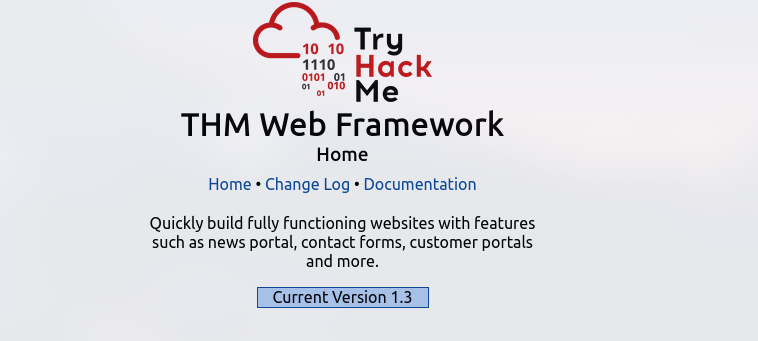
the latest version’s changelogs says something
1
2
3
Version 1.3

We've had an issue where our backup process was creating a file in the web directory called /tmp.zip which potentially could of been read by website visitors. This file is now stored in an area that is unreadable by the public.
visiting /tmp.zip on the server gives us a zip with the flag
1
2
3
4
5
❯ unzip tmp.zip
Archive:  tmp.zip
 extracting: flag.txt
❯ cat flag.txt
THM{KEEP_YOUR_SOFTWARE_UPDATED}
Task 4 - Developer Tools - Debugger
visiting /contact we observe a file named flash.min.js , since the code is obfuscated it is hard to understand on the first look but if we carefully check the last part of the code
1
2
3
setTimeout(function () {
  flash['remove']();
}, 5);
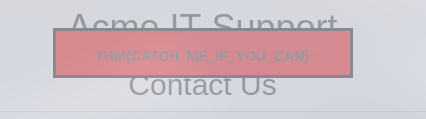
we observe the function is executed with a timeout of 5ms, therefore we couldnt see anything as it was too fast, now using breakpoints we can check what was going in the function setting a breakpoint at line 110 gives us ability to stop executing the js file at that point
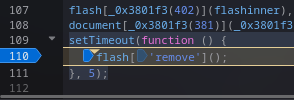
now if we reload the website we can see the flag
Task 5 - Developer Tools - Network
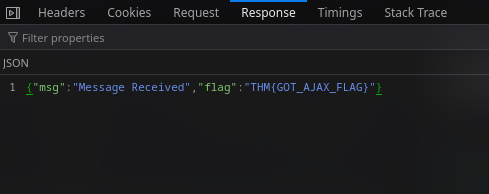
visiting /contact and sending a random message makes a post request to /contact-msg
What is the flag shown on the contact-msg network request?
checking the response of the request in the network tab, we get our last flag